Week 2- 2R Robotic Arm Challenge
introduction: program in MATLAB to simulate the forward kinematics of a 2R robotic arm.
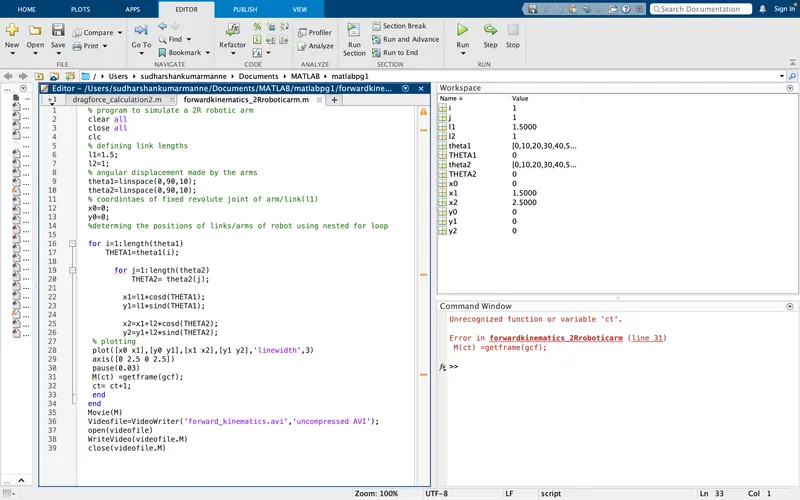
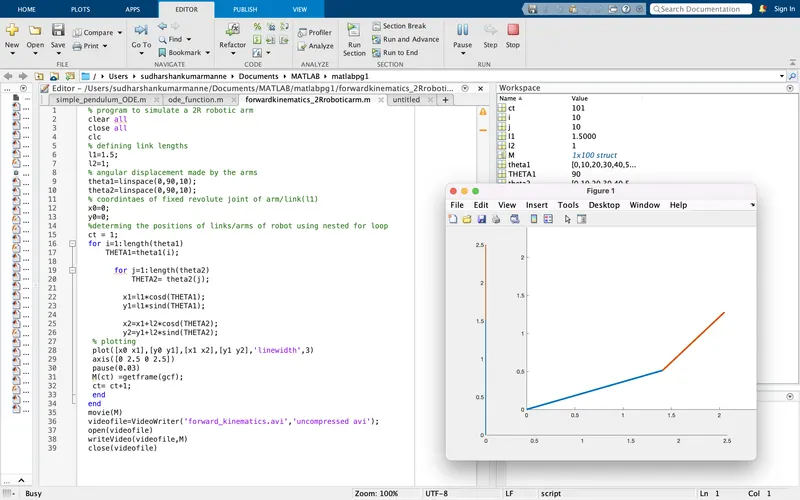
% program to simulate a 2R robotic arm
clear all
close all
clc
% defining link lengths
l1=1.5;
l2=1;
% angular displacement made by the arms
theta1=linspace(0,90,10);
theta2=linspace(0,90,10);
% coordintaes of fixed revolute joint of arm/link(l1)
x0=0;
y0=0;
%determing the positions of links/arms of robot using nested for loop
ct = 1;
for i=1:length(theta1)
    THETA1=theta1(i);

      for j=1:length(theta2)
          THETA2= theta2(j);

        x1=l1*cosd(THETA1);
        y1=l1*sind(THETA1);

        x2=x1+l2*cosd(THETA2);
        y2=y1+l2*sind(THETA2);
 % plotting
 plot([x0 x1],[y0 y1],[x1 x2],[y1 y2],'linewidth',3)
 axis([0 2.5 0 2.5])
 pause(0.03)
 M(ct) =getframe(gcf);
 ct= ct+1;
 end
end
movie(M)
videofile=VideoWriter('forward_kinematics.avi','uncompressed avi');
open(videofile)
writeVideo(videofile,M)
close(videofile)
explanation:
- firstly defined the lengths of links/arms (l1&l2) of a 2R robot & assigned the input variables such as angular displacements ('theta1' & 'theta2') will be made by the links respectively in an array using linspace command.
- in addition, defined the known joint parameters/positions of fixed revolute joint of a link as (x0=0, y0=0), as per the forward kinematics approach.
- further, used nested for loop control structure to execute the action of angular displacements made by the links repeatedly as follows a proper indexing w.r.t defined array of theta1& theta2 values respectively,
- such that the kinematic equations are used to compute/determine the positions will be achieved by the links such as (x1,y1 & x2,y2) respectively, w.r.t input variables(theta1 &theta2) as follows the nested for loop command.
- plot command is used inorder to generate a plotting of positions acheived by the links/endeffector on workspace w.r.t to coordinate axes.
- eventually an animation/vedio of kinematices of 2R robotic arm created by using the commands getframe(gcf),counter variable(ct) & as well as the video writing commands format such as movie(M),VideoWriter & writeVideo respectively.
errors: faced an error in the execution of coding, such as the counter variable(ct) is not assigned to the initial value before the for loop instruction/command, hence the error was rectified by assigning counter variable as (ct=1) initially.
inference:
- we have obtained the simulation of animated vedio by the MATLAB coding.
- as per the output results inorder to obtain mobility/motion of arm 2 (end effector) relative to the arm1 of a 2R robot on workspace, the variables theta1&theta2 shoud be followed by the nested for loop command. as well as the dermination of link lengths depends on the required working space.
output animation video:
https://drive.google.com/file/d/1rd5_yVtkQFllW8Pvsv_I07fq_JwAn_A3/view?usp=sharing