Week 2- 2R Robotic Arm Challenge
REPORT ON FORWARD KINEMATICS OF 2R-ROBOTIC ARM
Aim: Writing a program in Matlab to simulate the forward kinematics of a 2R Robotic Arm.
Theory
Kinematics:
Kinematics is the study of the motion of bodies without consideration of the forces or moments that cause the motion.
Robot kinematics: It refers the analytical study of the motion of a robot manipulator. Formulating the suitable kinematics models for a robot mechanism is very crucial for analyzing the behavior of industrial manipulators.
Forward Kinematics:
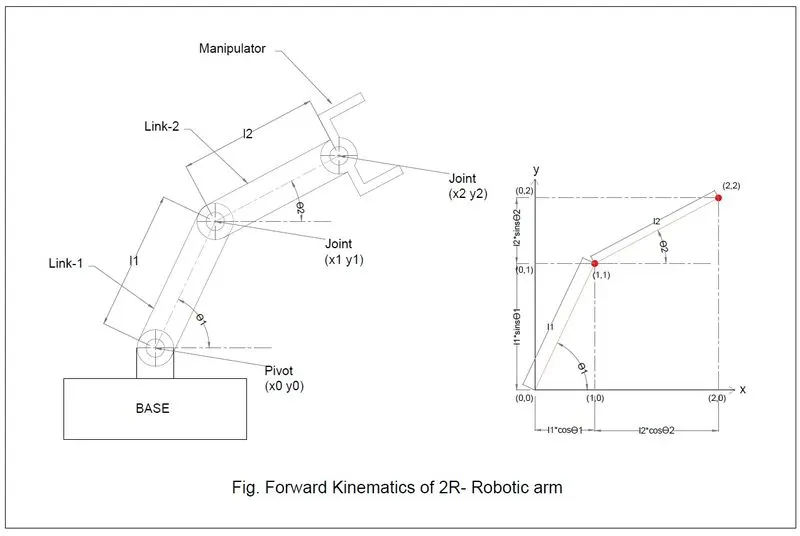
It refers to process of obtaining position and velocity of end effector of robotic arm, given the known joint angles and angular velocities. For example, if shoulder and elbow joint angles are given for arm, the goal is to find Cartesian coordinates of wrist/fist.
The position of the arm can be obtained by the following equations
For base: x0 = y0 = 0
For joint-1 of link-1 & link-2:
x1 = l1*cosθ1;
y1 = l1*sinθ1;
For joint-2 of link-2 & end effector/manipulator:
X2 =x1+ l2*cosθ2;
Y2 = y1+l2*sinθ2;
Program for forward kinematics of 2R-Robotic arm:
%Program for forward kinematics of 2r robotic arm
clear all
close all
clc
 %considering inputs for arm length and angles
 l1 = 1.5; % lenght of arm-1
 l2 = 1; % linght of arm-2
 theta1 = linspace(0,90,15);
 theta2 = linspace(0,90,15);
 ct = 1;

 for i = 1:length(theta1)
     THETA1 = theta1(i);
     for j=1:length(theta2)
         THETA2 = theta2(j);
         x0 = 0;
         y0 = 0;
         x1 = l1*cosd(THETA1);
         y1 = l1*sind(THETA1);

         x2 = x1+l2*cosd(THETA2);
         y2 = y1+l2*sind(THETA2);
         % plotting the graph
         plot([x0 x1],[y0 y1],[x1 x2],[y1 y2],'linewidth',3)
         axis([-0 2.5 0 2.5])
         pause(0.02)
         M(ct)=getframe(gcf);
         ct=ct+1;
     end
 end
 movie(M)
 videofile=VideoWriter('Robotic_arm.avi','uncompressed AVI');
 open(videofile)
 writeVideo(videofile,M)
 close(videofile)
Explanation of Code:
- Starting with comment for which we are writing a program for forward kinematic of 2r-robotic arm. The comment is written by using % at start.
- Before writing a new program, it is necessary to clear all previous data from code editor and close and clear all commands from command window by using clear all, close all and clc commands as shown.
- Assuming the length of link-1 as l1 = 1.5 and length of link-2 as l2=1, as shown in above.
- Considering the angle between link-1 and horizontal line as theta1 and angle between link-2 and horizontal line as theta2 as shown in figure. We assumed that the link-1 and link-2 are moving from 0 degree to 90 degree hence the value for theta1 and theta2 are also changing. We assumed the angles are changing by 15 degree hence we used linspace command as theta1 = linspace(0, 90 ,15); and theta2 = (0, 90, 15); as shown .
- Semicolons are used to terminate the unnecessary outputs.
- For loop is used for getting the x and y co-ordinates for both link-1 and link-2. As link-2 is connected to link-1 at joint-1, hence one more for loop is used to get x and y co-ordinates for link-2.
- For first loop ‘I’ is taken as incremental variable which increases by 1 until the value of interval of changing the angle theta1 satisfy and the condition inside the loop is executed. One more variable THETA1 is taken to store the value of theta(i) which is the value of interval of changing the angle theta1.
- As the link-2 is connected to link-1, its angle theta2 also changes with respect to horizontal with the same interval of time but the multiple of interval of change of angle theta1, hence second for loop is taken inside the first loop, similarly here ‘j’ is taken as incremental variable and THETA2 variable is taken to store the value of theta(j). The required conditions for getting the x and y coordinates for each joint are written inside the second loop as
- X0 = 0; y0=0;
- x1=l1*cosd(theta1); y1=l1*sind(theat1)
- x2=x1 + l2*cosd(theta2); y2=y1 + l2*sind(theat2)
- Plot command is used to plot the graph of x and y coordinates of joints of link-1 and link-2, linewidth is taken 3.
- coordinates for x and y axis are taken as axis ([0, 0.25,0,2.5]).
- Pause command is used to pause the plots for 0.02 second.
- getframe(gcf) command is used to convert the plots frames into a movie which is stored in a variable ‘M’
- A counter variable ‘ct’ is used to count the number of loops executed which is increasing by 1 as ct=ct+1.
- end command is used to exit both the loop.
- Movies(M) command is used to play the movie frame in array M once.
- VideoWriter('Robotic_arm.avi','uncompressed AVI') Command is used to create a uncompressed video file in .avi format. And stored in array variable ‘videofile’.
- Open(videofile) command is used to open the file for writing.
- writeVideo(videofile,M) command is used to write the image data in M to the video file.
- close(videofile) command is used to closed the file.
Error Faced while programming:
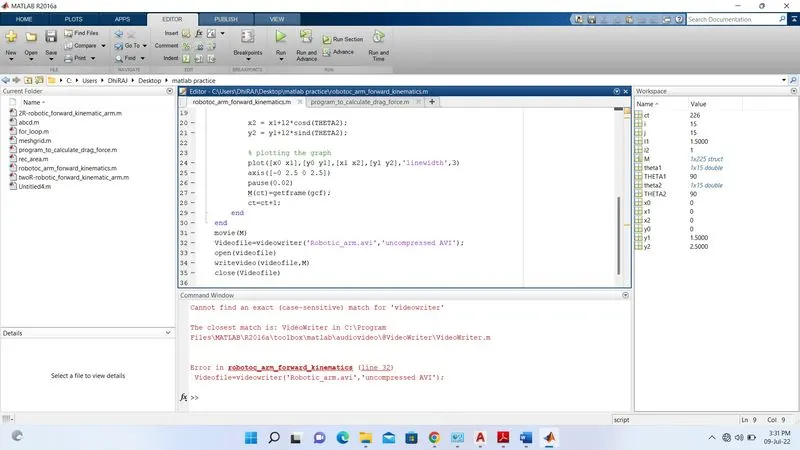
While executing the program an error is found in command 'videowriter' which is not exist as matlab is case-sensitive hence error was occured.
Step taken to overcome the error:
The error is overcomed by changing the small case letter 'v' to capital 'V'.
Result:
The result of the program can be seen in the link given below.
https://youtu.be/owttD-42Dls