Week 2- 2R Robotic Arm Challenge
program in Matlab to simulate the forward kinematics of a 2R Robotic Arm
clear all
close all
clc

%PROGRAM FOR KINEMATICS OF A ROBATIC ARMS

%length of the two arms

l1=1;
l2=0.5;

%angle of the two arms

theta1 = linspace(0,90,10);
theta2 = linspace(0,90,20);

ct=1;

for i=1:length(theta1)
    THETA1=theta1(i);
    for j=1:length(theta2)
        THETA2=theta2(j);

 %coordinates
        x0=0;
        y0=0;

        x1=l1*cosd(THETA1);
        y1=l1*sind(THETA1);

        x2=x1+l2*cosd(THETA2);
        y2=y1+l2*sind(THETA2);

 %PLOTTINGS

        plot([x0 x1],[y0 y1],[x1 x2],[y1 y2],'linewidth',3)
        title('forward kinematics of robotic arm');
        axis([-0.1 1.5 0 1.5])
        pause(0.005)
        M(ct)=getframe(gcf);
        ct=ct+1;

    end
end


%plot to video conversion

movie(M)
videofile = VideoWriter('forward_kinematics.avi','Uncompressed AVI');
open(videofile)
writeVideo(videofile,M)
close(videofile)
Code explanation;
Length of the arms
Length of the 1st arm
l1=1;
Length of the 2nd arm
l2=0.5;
Angle of the two arms
theta1 = linspace(0,90,10);-angle of the first arm with respective to the x-axis.
theta2 = linspace(0,90,20);-angle of the second arm with respective to the x-axis.
linspace command is because the the two angles are must executed in array.
LOOPS
- To change the theta value by matlab programing for loop is used.
- The variable i is used to change the iterations of the theta 1.
- The variable j is used to change the iterations of the theta 2.
- To increament the iteration counter comand is used.
Coordinates of the two arms
starting point of the 1st arm is fixed at base so
x0=0;
y0=0;
COORDINATE OF THE 1ST LINK END POINT
x1=l1*cosd(THETA1);
y1=l1*sind(THETA1);
COORDINATE OF THE 2ND LINK END POINT
x2=x1+l2*cosd(THETA2);
y2=y1+l2*sind(THETA2);
PLOTTINGS AND ANIMATION OF THE TWO LINKS
To specify the title of the animation and movie title command is used title('forward kinematics of robotic arm');
To fix&specify the axis ,axis command is used axis([-0.1 1.5 0 1.5])
pause command is used to break the code of the program
To create a movie
M(ct)=getframe(gcf);
- M array is used to save the individual frame & figure window.
- ct is a variable that simply increments or decrements by a specific 'step' value in every iteration of a loop.
- get frame command is used get current frame window (gcf)
To video conversion
- movie(M) is used to generate the movie with all of its saved frames.
- To extract out all these frames avi file format is used.
- To open the file open(videofile) command is used.
- To write the file writeVideo(videofile,M) command is used.
- To close or finish the generated movie close(videofile).
ERRORS
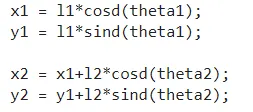
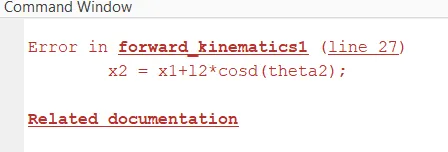
- Wrongly mentioned the theta to store the value
- After entering the capitalised THETA to assingn the angle value the animation and the movie is created.
LINK TO FORWARD KINEMATICS OF THE ROBOTIC ARMS--https://youtu.be/64pNd_kLPmw