Week 2- 2R Robotic Arm Challenge
Objective:
To create a program in Matlab to simulate the forward kinematics of a 2R Robotic Arm.
Procedure:
- We provide l1 = 1 and l2 = 0.5.
- l1 is the length of the first link.
- l2 is the length of the second link.
- theta 1 is the rotational angle of the first link.
- theta 2 is the rotational angle of the second link.
- theta 1 = linspace(0,90,10)
- theta 2 = linspace(0,90,10)
- Now we can create loops.
- Using the in-built command, we have created an animation.
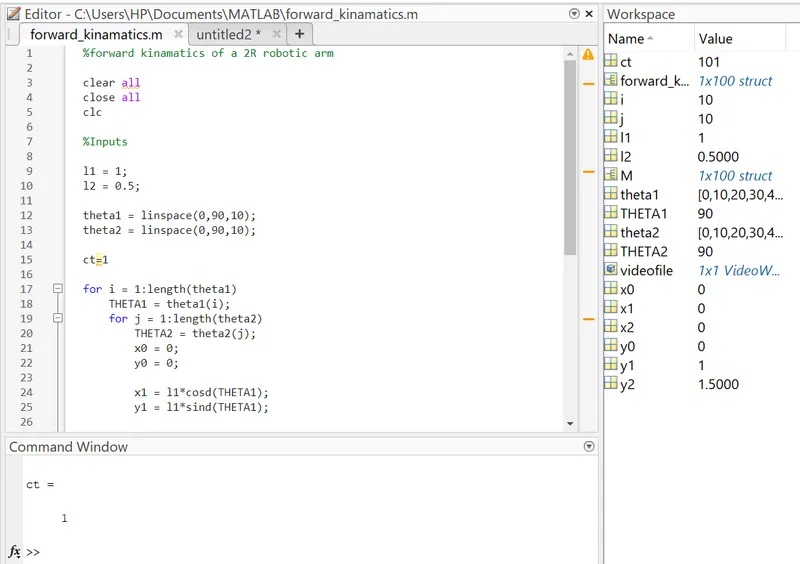
Code:
%forward kinamatics of a 2R robotic arm

clear all
close all
clc

%Inputs

l1 = 1;
l2 = 0.5;

theta1 = linspace(0,90,10);
theta2 = linspace(0,90,10);

ct=1

for i = 1:length(theta1)
    THETA1 = theta1(i);
    for j = 1:length(theta2)
        THETA2 = theta2(j);
        x0 = 0;
        y0 = 0;

        x1 = l1*cosd(THETA1);
        y1 = l1*sind(THETA1);

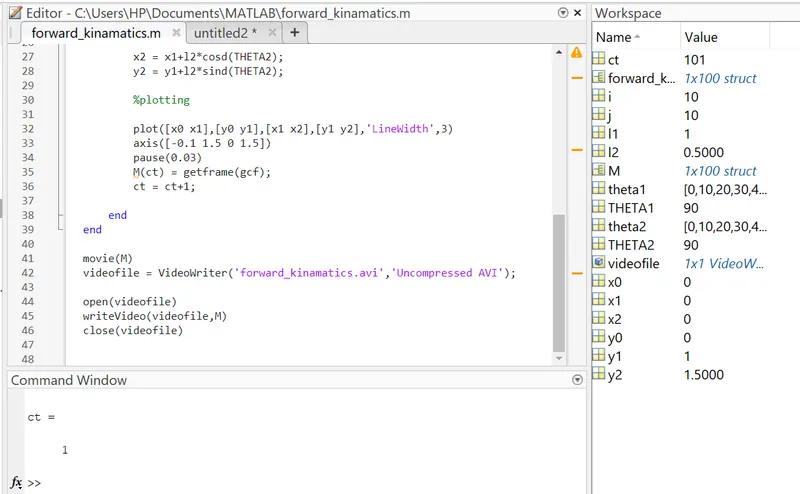
        x2 = x1+l2*cosd(THETA2);
        y2 = y1+l2*sind(THETA2);

        %plotting

        plot([x0 x1],[y0 y1],[x1 x2],[y1 y2],'LineWidth',3)
        axis([-0.1 1.5 0 1.5])
        pause(0.03)
        M(ct) = getframe(gcf);
        ct = ct+1;

    end
end

movie(M)
videofile = VideoWriter('forward_kinamatics.avi','Uncompressed AVI');

open(videofile)
writeVideo(videofile,M)
close(videofile)
Forward kinematics of 2R Robotic Arm animation:
https://drive.google.com/file/d/1FfXbSvoEf3fctVA3oNVcwsnjrj8lRUOH/view?usp=sharing
Conclusion:
We have created a program in Matlab to simulate the forward kinematics of a 2R Robotic Arm. Using the MATLAB in-built commands, we have created an animation.