Week 2- 2R Robotic Arm Challenge
Aim :To simulate the forward kinematics of a 2R Robotic Arm using MATLAB.
Create an animation file of the plot.
- Upload an animation on You tube and provide the You tube link for an animation in your report.
- You can also provide the google drive link.Note: Make sure that you provide the access to the video, while pasting the google drive link.
THEORY: A manipulation/end effector movement determines the workspace where the robotic arm can be applicable. Our motive is to animate the movement of robotic arm with the subsequent relative motion between the two coprising link.
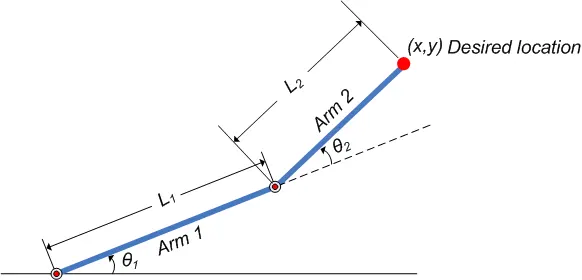
Inputs:
(x0,y0) = Starting point of link 1
(x1,y1) = End point of link 1 and starting point of link 2
(x2,y2) = End point of link 2
l1 = length of the first base link
l2 = length of the second link attach between the first link and end effector
#Code
%  2R Robotic Arm
close all
clear all
clc
% Inputs
% Length of robotic arm
l1 = 1;
l2 = 0.5;
% set of Angle for the movement of robotic arm
theta1 = linspace(0,90,10);
theta2 = linspace(0,90,10);
ct = 1;
for i = 1:length(theta1)
    THETA1 = theta1(i);
    for j = 1: length(theta2)
        THETA2 = theta2(j);
%coordinates for starting point of the first arm
   x0 = 0;
   y0 = 0;
%coordinates for end point of the first arm
   x1 = l1*cosd(THETA1);
   y1 = l1*sind(THETA1);
%coordinates for end point of the second arm
   x2 = x1+l2*cosd(THETA2);
   y2 = y1+l2*sind(THETA2);

   %plotting
   % the coordinated of the arm assigned over a set of theta1 and theta2
plot([x0 x1],[y0 y1],[x1 x2],[y1 y2],'linewidth',3);
%The limit of the x-axis and y-axis
axis([-0.1 1.5 0 1.5]);
%getting the subsequent fram of the animation
pause(0.03)
% collecting the fram of the figure to create the movie/animation
M(ct) = getframe(gcf);
ct = ct+1;

    end
end
% To make the movie o the collected frame
movie(M)
% saving the movie in '.avi' formate
videofile = VideoWriter('forward_kinematics.avi','uncompressed AVI');
open(videofile)
%writing the movie in the video file
writeVideo(videofile,M)
close(videofile)
Animation:
Error facing during program:
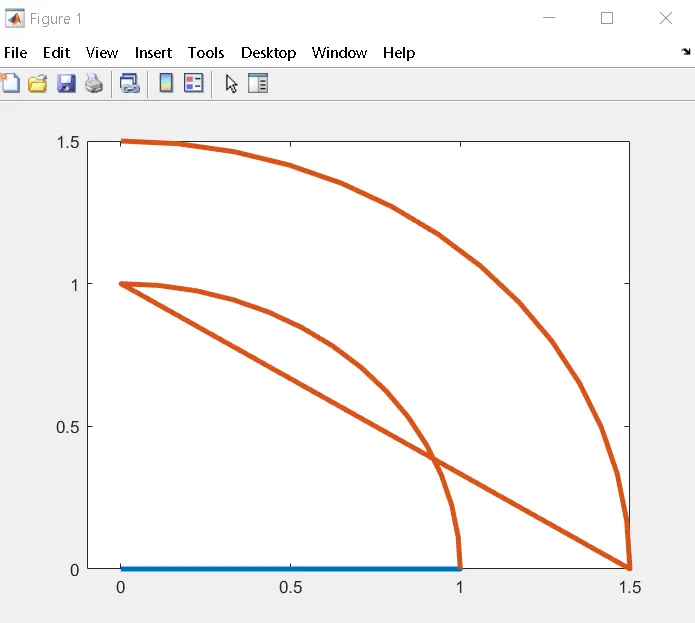
It is dur to putting theta value instead of THETA value in x2 and y2 coordinates.
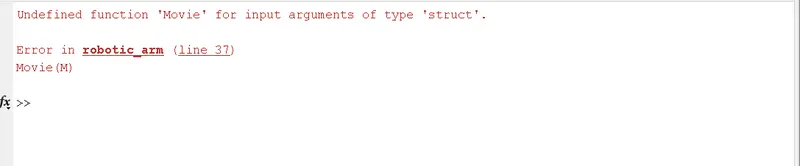
It is because of capital 'M' instead of small 'm'
- We will get '.asv' file instead of '.avi' file because of capital 'V' in videofile, small 'w' in VideoWriter and 'Video' missing in 'writeVideo'
Explaination:
- Initially we define the length of the robotic arm i.e. l1 and l2.
- set of the value of theta1 and theta2 are assigned in and array with 'linspace command'.
- Used of 'for coomand ' to iterating the value of desired variable.
- Again using 'for command ' for providing movement to the second robotic arm.
- Define the coordinates of both the robotic arm.
- Plotting all the coordinates value and writing command for changing the appearance of te contours.
- All the figure are assignes to the variable 'M', one at a time using 'ct' followed by termination of the 'for loop'.
- Lastly 'Movie command' is used to combine all the figure saved in the 'M' file make an animation/ movie and therafter saving it in .avi format.
Conclusion :
A practical scenario regarding the fuctioning the robotic arm and its workspace has been experienced by simukating the forward kinematics with a prgram in matlab.