Week 2- 2R Robotic Arm Challenge
Problem Statement:
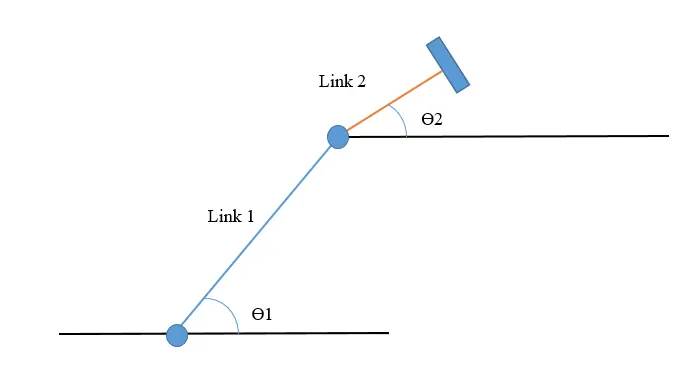
Write a program in Matlab to simulate the forward kinematics of a 2R Robotic Arm, as shown in the video.
Code:
% To write a program for Forward Kinematics of a Robotic arm
l1 = 1;
l2 = 0.5;
theta1 = linspace(0,90,10);
theta2 = linspace(0,90,10);
x0 = 0;
y0 = 0;
ct = 1;
for i = 1:length(theta1)
    THAETA1 = theta1(i);
    for j = 1:length(theta2)
        THAETA2 = theta2(j);
%         Link 1 coordinates
        x1 = l1*cosd(THAETA1);
        y1 = l1*sind(THAETA1);
%         Link 2 coordinates
        x2 = x1 + l2*cosd(THAETA2);
        y2 = y1 + l2*sind(THAETA2);

        % Plotting
        plot([x0 x1],[y0 y1],[x1 x2],[y1 y2],'linewidth',3)
        axis([-0.1 1.5 0 1.5])
        pause(0.03)
        M(ct) = getframe(gcf); % This is to create a movie
        ct = ct+1;
    end
end
movie(M)
videofile = VideoWriter('forward_kinematics.avi','Uncompressed AVI');
open(videofile)
writeVideo(videofile,M)
close(videofile)
Code Explanation:
- There are two kinematic links.
- Each has two ends and is defined by coordinates in the code.
- One end of the link 1 is fixed and the other end is variable with respect to `theta_1`.
- The ends of the other link are dependent on the location of non-fixed end of the link 1 and `theta_2`.
- Link 1 coordinates:
--> x0 = 0, y0 = 0 and x1 = L1 cos`theta_1`, y1 = L1 sin`theta_1`
- Link 2 coordinates:
--> x2 = x1 + L2 cos`theta_2`, y2 = y1 + L2 sin`theta_2`
- In MATLAB, just using sin and cos will result in values used in radians, to show the values in degrees, sind and cosd is used.
- Inorder to move the links, it has to travel and this is achieved with varying the angles of the corresponding links.
- Therefore 'linspace' command is used to create an array of angles for both the links.
- These values of angles are stored in variables 'THETA1' and 'THETA2' to plot and create a movie out of it.
- FOR LOOP must be incorporated to access each and every angle of array of both links.
- Plot the graph for each angle of the links.
- 'axis' command limits the the extreme ends of x and y axis for better accomodation of the plot.
- A counter variable is created to store each frame and this is done by using getframe(gcf) command.
- To create a movie and store it on the hard drive, following commands are used:
movie(M)
videofile = VideoWriter('forward_kinematics.avi','Uncompressed AVI');
open(videofile)
writeVideo(videofile,M)
close(videofile)
- And finally an animation is obtained:
Errors:
- Error 1:

Rectification: MATLAB is case sensitive, so instead of 'Movie', 'movie' is the correct syntax.
- Error 2:

Rectification: The syntax used is wrong. It should be 'writeVideo'.