Week 2- 2R Robotic Arm Challenge
AIM:To write a program in Matlab to simulate the forward kinematics of a 2R Robotic Arm.
Objective:- 1)To write a program for the forward kinematics of a 2R robotic arm.
2)To create a movie/Animation from the plots.
Basic Theory:-
A robotic arm is a type of mechanical arm usually programmable, with similar functions to a human arm;the arm may be the sum total of the mechanism or maybe part of a more complex robot.The links of such a manipulator are connected by joints allowing either rotational motion (such as in an articulated robot) or translational (linear) displacement. The links of the manipulator can be considered to form a kinematic chain.The terminals of the kinematic chain of the manipulator is called the end effect and it is analogous to the human hand.
-In this project,we consider or 2R robotic arm represents a robotic arm with two rotations,i.e.It has two links which rotate or work over a two-dimensional plane with each of links having a single degree of freedom. Also both the links are restricted to on 90 degree rotation with respect to axes.Fig below shows the 2R robotic arm having many parts as described.
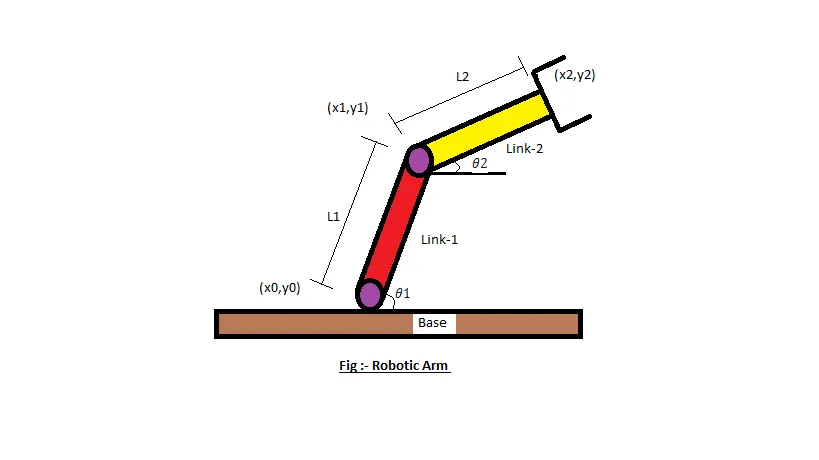
- Let,L1 and L2 be the lengths of the link-1 and link-2 respectively.
- Let,θ1">be the angle formed by link-1 with horizontal.
- Let,θ2">be the angle formed by link-2 with horizontal.
- Let, the starting and end coordinates of link-1 to be (x0,y0) and (x1,y2)
- Let, the starting and end coordinates of link-2 to be (x1,y1) and (x2,y2)
Code:-
clear all
close all
clc

%Inputs
l1 = 1; % length of link 1
l2 = 0.5; % length of link 2

theta1 = linspace(0,90,20);% Angle of first link
theta2 = linspace(0,90,20);% Angle of second link

% use for loop

ct = 1;
for i = 1:length(theta1)
    THETA1 = theta1(i);
    for j = 1:length(theta2)
        THETA2 = theta2(j);
        x0 = 0;% x coordinate of the start point of link 1
        y0 = 0;% y coordinate of the start point of link 1

        x1 = l1*cosd(THETA1);% x coordinate of the end point of link 1
        y1 = l1*sind(THETA1);% y coordinate of the end point of link 1

        x2 = x1 + l2*cosd(THETA2);% x coordinate of the end point of link 2
        y2 = y1 + l2*sind(THETA2);% y coordinate of the end point of link 2

        %Plotting

        plot([x0 x1],[y0 y1],[x1 x2],[y1 y2],'linewidth',3)% plotting the x and y axis coordinates
        axis([0 1.5 0 1.5])% plotting the x and y axis coordinates
        pause(0.03)% pause time for each frame
        M(ct) = getframe(gcf);% for creating the animation
        ct = ct+1;% frame of increment 1

    end
end

movie(M)
videofile = VideoWriter('forward_kinematics.avi','Uncompressed AVI');
open(videofile)
writeVideo(videofile,M)
close(videofile)
Explanation of code:-
clear all- clearing all variable in workspace
close all- for closing all figure windows
clc- for clearing command window
1) Take inputs when theta1 and theta2 are known with length of links we can calculate the position of robotic arm using matlab.
so lets take theta1 and theta2 are starts from 0 degree to 90 degree with 20 interval values.
2) lets assume we have 1m long link1 and 0.5m long link2.
3) Set up a counter.A counter is a variable that counts an event in a loop.
4) Take a coordinates we know links1 starts at fixed base so here coordinates are (x0=0, y0=0) now to calculate next coordinates which are (x1,x2,y1,y2) we need to use for loop to take geometry calculations,by applying simple geometry we can calculate a remaining coordinates using theta.we get
x1 = l1*cosd(THETA1)
y1 = l1*sind(THETA1)
x2 = x1 + l2*cosd(THETA2)
y2 = y1 + l2*sind(THETA2)
5) To plot a graph use plot command and fill cordinates, linewidth and color for better visualization.Give axis and grids to plot.
6) A pause command was used for pausing the command for a certain time,for this project a pause of 0.03s was used.
7) The M command was used to capture the current frame every time the for loop runs.
8) ct= ct+1 ,this will increment the frame every time the for loop run.
9) End command was used for the plot & for the for loop to stop both from running.
10) To generate animated movie use movie(m) code.
11) Now generete video file using videofile =(videowriter) give specific name and make it uncompress for clear visualization
12) Now write video file in hard disk and close video file to back to codes.
done....
Result:-
The final Animation can be seen in the given link below,
https://youtu.be/IUFJgdEfDkc