Week 2- 2R Robotic Arm Challenge
Forward KInematcs of a Robotic arm:
Forward kinematics refers to the use of the kinematic equations of a robot to compute the position of the end effector from specified values for the joint parameters.
the forward kinematics is compsosed of a series of links whisch are fixed to each other and are moved in realtion with one another at desired degeress of freedom at each link. it involves usage of tirgnometric and kinematic equations derived to calucalte the position of the end affector in trems of the kown values of the links and their degress of freedom
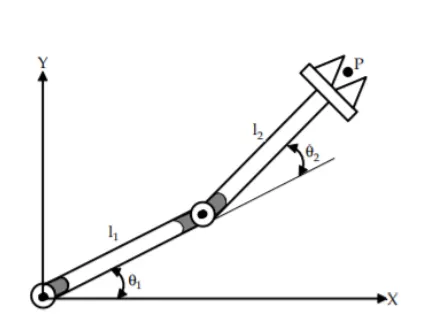
the aove picture demonstrates a simple 2 arm robot, which haas two links l1 and l2 connected to each other , and are moving at angles of `theta`1 and `theta`2 in xy plane
The postion of the end actuatuor p in the xy palne is derived as follows
intially the link 1 `s starting postion is fixed to the base and can be considered as x0 and y0.
the end coordinates of the link 1 can be computed by using trignomrtic rules as
x1 = l1*cos(`theta`1)
y1 = l2*sin(`theta`1).
this end cordinates of the firat ink are the starting cordiantes if the second link
so agin using trinometic rules we can compute the end cordiantes of link 2 as
x2=x1+l2*cos(`theta`2)
y2=y1+l2*sin(`theta`2)
these cordinates (x2 ,y2 ) gives the end position of the actutor in the xy plane. traing the entire possible positions of the end actuator will give us the work spcae for the robotic arm.
Matlab Program:
here given below is the code to caluclate the postion of the end effecote at known angles of link 1 and link 2
close all
clear all
clc
%% forward kinmatics of a two arm robot%%

l1= 50; %lentgh of the first arm
l2=20 ; %lenght of the second arm

theta1 = 45 % Angel of the first arm
theta2 = 30 % Angel of the second arm

x0 = 0; % intial x cordinate of the first arm
y0 = 0; % intial y cordinate of the first arm

x1 = l1*cosd(theta1) % final x cordinate of the first arm (becomes defalut first x cordinate of second arm)
y1 = l1*sind(theta1) % final y cordinate of the first arm (becomes defalut first y cordinate of second arm)

x2 = x1+l2*cosd(theta2) % final x cordinate of the second arm
y2 = y1+l2*sind(theta2) % final y cordinate of the second arm

%plotiing the arms
line([x0 x1],[y0 y1],'linewidth',3,'color','b')
line([x1 x2],[y1 y2],'linewidth',3,'color','r')
conclusion :
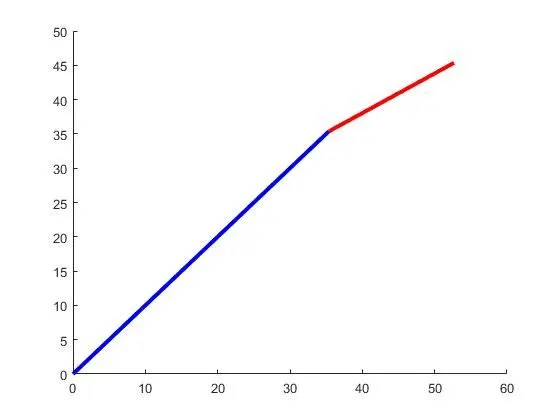
the below figire shows the postion of the arms at the below given values of the arms
l1= 50
l2 = 20
`theta`1 =45
`theta`2 = 30
Matlab program to animate the workspace of the robotic arm:
close all
clear all
clc

l1= 1 % lenght of the first arm
l2= 0.5 %lenght of the second arm
theta1= linspace(0,90,10)   %Array specifying Angular range of the firs link
theta2= linspace(0,90,10)   %Array specifiying Angular range of the second link
ct=1;   %  seting  counter  variable ct to 1
for i=1:length(theta1)  % usign for loop to run the code i time,where in  variable i is count from  1 to the length of the array theta1
    Theta1= theta1(i)   % sets teta1 value for each i value to Theta1
    for j=1:length(theta2)  % for every value of I, the code runs j time where jcount from 1 to  is lentght of theta2
        Theta2= theta2(j)   % sets the theta2 value for each j value to Theta2
        x0 = 0; % intial x cordinate of the first arm
        y0 = 0; % intial y cordinate of the first arm

        x1 = l1*cosd(Theta1) % final x cordinate of the first arm (becomes defalut first x cordinate of second arm)
        y1 = l1*sind(Theta1) % final y cordinate of the first arm (becomes defalut first y cordinate of second arm)

        x2 = x1+l2*cosd(Theta2) % final x cordinate of the second arm
        y2 = y1+l2*sind(Theta2) % final y cordinate of the second arm

        %plotiing the arms

        plot([x0 x1],[y0 y1],[x1 x2],[y1 y2],'linewidth',3);%plots both the links
        axis([-0.1 2 0 2]); %sets the axis limits
        pause (0.03)
        M(ct)= getframe(gcf); %get the individual frames from each current plot on every counter
        ct=ct+1; % incrementing the counter by one every time the loop runs
    end
end
movie(M);
S= VideoWriter('forward_kinematics.avi','uncompressed AVI'); % created move of variable 'S' of uncompresseed avi type
open(S); % open the movie file S
writeVideo(S,M); % Combines all the frames from the variable M and  creates the video files
close(S);% closes the movie files
Conclusion:
The above code demosntates the postion of the end actuator over a range of the angel for link 1 and link 2. the codes uses loops to get the postion of the arms at each of the agnels possible and plots them. The code is used in a way to get each of these individaul figures for the plot ans join them to animate the total work space of the robot. The work spcae animation is linked below.
https://drive.google.com/file/d/1KWbV14jve9tIHCKXgD4CTGrafRWRD7-C/view?usp=sharing