Week 2- 2R Robotic Arm Challenge
Aim:- Write a program in Matlab to simulate the forward kinematics of a 2R Robotic Arm
% ploting using line plot
% code for forward kinematics
% inputs as link lengths link 1 as l1 and link 2 as l2
l1 = 1;
l2 = .5;
% inputs as angle made by links, angle made by link 1 as theta1 and angle made by link 2 as theta2
theta1 = 60;
theta2 = 45;
% cordinates
% origine cordinates
x0=0;
y0= 0;
% link 1 end cordinates
x1 = l1 * cosd(theta1);
y1 = l1 * sind(theta1);
% link 2 end cordinates
x2 = x1 + l2 * cosd(theta2);
y2 = y1 + l2 * sind(theta2);
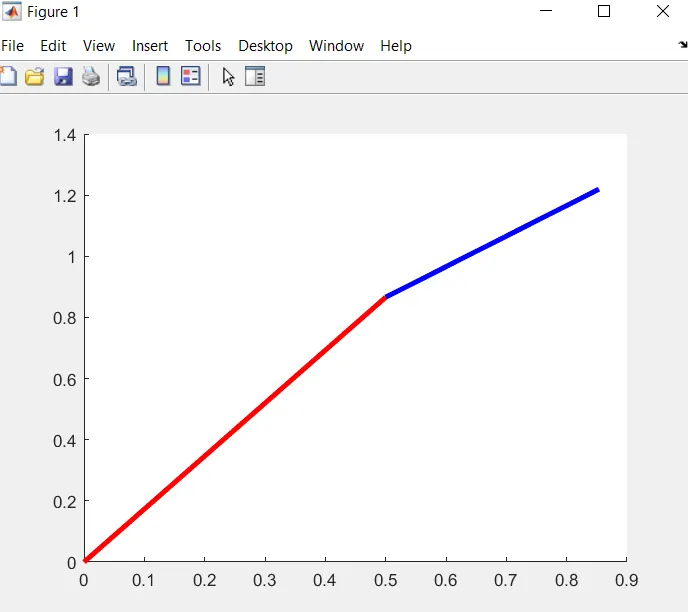
%ploting using line ploting
line([x0 x1], [y0 y1], 'linewidth',3, 'color' , 'r')
line([x1 x2], [y1 y2], 'linewidth',3, 'color' , 'b')plot result:
% % code to create animation that simulate the forward kinematics of a 2R Robotic Arm
close all
clear all
clc
% code to create animation that simulate the forward kinematics of a 2R Robotic Arm
% inputs as link lengths link 1 as l1 and link 2 as l2
l1 = 1;
l2 = .5;
% inputs as angle made by links, angle made by link 1 as theta1 and angle made by link 2 as theta2
theta1 = linspace(0,90,10);
theta2 = linspace(0,90,10);
ct=1;
% using for loop to get difrent values of new theta1 as THETA1 and new theta2 as THETHA2 angle made by links
for i = 1:length(theta1)
    THETA1 = theta1(i);
    for j = 1:length(theta2)
        THETA2 = theta2(j);
% cordinates values
        x0=0;
        y0= 0;
        x1 = l1 * cosd(THETA1);
        y1 = l1 * sind(THETA1);
        x2 = x1 + l2 * cosd(THETA2);
        y2 = y1 + l2 * sind(THETA2);
% ploting of links by using plot command and using pause command to create animation
        plot([x0 x1], [y0 y1], [x1 x2], [y1 y2],'linewidth',3)
        axis([-0.1 1.5 0 1.5])
        pause(.03)
% to create animation movie collecting frames using gcf getting current frame command
        M(ct) = getframe(gcf);
        ct = ct+1;

    end

end
% to create animation movie using videowriter command in uncompressed form as avi
movie(M)
videofile = VideoWriter('forward_kinematics.avi','Uncompressed AVI');
open(videofile)
writeVideo(videofile,M)
close(videofile)
% code explanation:
% code to create animation that simulate the forward kinematics of a 2R Robotic Arm
% inputs as link lengths link 1 as l1 and link 2 as l2
l1 = 1;
l2 = .5;
% inputs as angle made by links, angle made by link 1 as theta1 and angle made by link 2 as theta2
% linspace command is used to generate range of 10 theta values ranging from 0 to 90.
theta1 = linspace(0,90,10);
theta2 = linspace(0,90,10);
% ct is use to count the frames starting from 1
ct=1;
% using for loop to get difrent values of new theta1 as THETA1 and new theta2 as THETHA2 angle made by links
for i = 1:length(theta1)
THETA1 = theta1(i);
for j = 1:length(theta2)
THETA2 = theta2(j);
% cordinates values for origin
x0=0;
y0= 0;
% cordinates values for end of first link
x1 = l1 * cosd(THETA1);
y1 = l1 * sind(THETA1);
% cordinates values for end of second link
x2 = x1 + l2 * cosd(THETA2);
y2 = y1 + l2 * sind(THETA2);
% ploting of links by using plot command and using pause command to create animation
plot([x0 x1], [y0 y1], [x1 x2], [y1 y2],'linewidth',3)
axis([-0.1 1.5 0 1.5])
pause(.03)
% to create animation movie collecting frames using gcf getting current frame command
M(ct) = getframe(gcf);
ct = ct+1;
end
end
% to create animation movie using videowriter command in uncompressed form as avi
movie(M)
videofile = VideoWriter('forward_kinematics.avi','Uncompressed AVI');
open(videofile)
writeVideo(videofile,M)
close(videofile)
% animation file of the plot
#youtube link for animation of forward kinematics
#google drive link for animation of forward kinematics
https://drive.google.com/file/d/1WBmZu8NP3jE9AGfuyMt3fU4PVo0xZkjl/view?usp=sharing
%% errors faced while programming.
% undefined function name
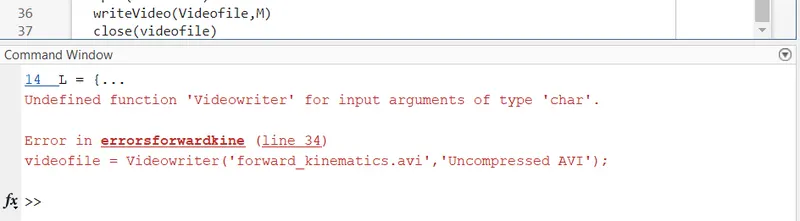
overcome error: function names are case sensetive so be carefully while calling the function names.
% plot :
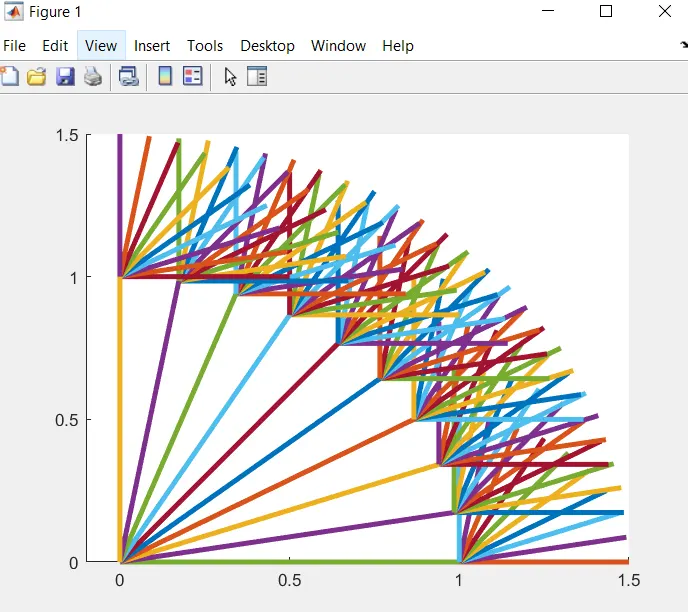
PLOT Explaination:
Forward kinematics of two links as shown in the above plot. first link is link1 is ploted for ten difrent angles from 0 to 90 having some difrence. and link2 is ploted again for ten difrent angles from each of the first link as shown in the above plot. the hold comand is used to hold the all the plots of each value.