Week 2- 2R Robotic Arm Challenge
AIM;
Towrite a program in matlab to simulate the forward kinematics of a 2R robotic Arm.
OBJECTIVE:
- Write a program to simulate forward kinematic of a 2R robotic Arm.
- To create a movie/animation from the plot obtained from the program.
THEORY:
A robotic arm is a type of mechanical arm, usually programmable, with similar functions to a human arm; the arm may be the sum total of the mechanism or may be part of a more complex robot. The links of such a manipulator are connected by joints allowing either rotational motion (such as in an articulated robot) or translational (linear) displacement.[1][2] The links of the manipulator can be considered to form a kinematic chain. The terminus of the kinematic chain of the manipulator is called the end effector and it is analogous to the human hand. However, the term "robotic hand" as a synonym of the robotic arm is often proscribed.
Also both the links are restricted to a 90 degree rotation with respect to the axes.
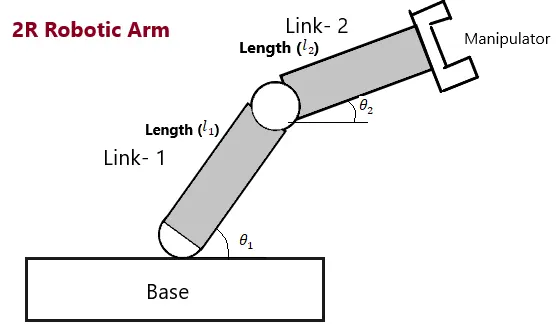
- let,L1&L2 be the length of the link 1 and link 2 respectively.
- let,θ1 be the angle formed by link 1 with horizontal.
- let,θ2 be the angle formed by link 2 with horizontal.
- let,the starting and end co-ordinates of link-1 to be (X0,Y0) and (X1,Y1).
- let,the starting and end co-ordinates of link-2 to be (X1,Y1) and (X2,Y2).
CODE EXPENATION:-
- programing language used matlab online'
- starting the program by using comments'
- providing the program by using comments'
- predefining the length/value of the robotic arm'
- providing the cr (compression ratio) value as a specific digit.
- plotting all the coordinate value and providing the axis no.
- ending the 'for' loop twice .
- At end saving the movie in .avi format.
MATLAB CADE:
%input
l1 = 1.5;
l2 = 0.5;

theta1 = linspace(0,90,14);
theta2 = linspace(0,90,14);

ct=1;
for i=1:length(theta1)
    THETA1=theta1(i);

    for j=1:length(theta2)
        THETA2=theta2(j);
x0 = 0;
y0 = 0;
x1 = l1*cosd(THETA1);
y1 = l1*sind(THETA1);

x2 = x1+l2*cosd(THETA2);
y2 = y1+l2*sind(THETA2);

%plotting
plot([x0,x1],[y0,y1],[x1,x2],[y1,y2],'LineWidth',3)
axis([-0.3 2 0 2])
pause(0.03)
M(ct)=getframe(gcf);
ct=ct+1;
    end
end
movie(M)
videofile = VideoWriter('Robotic_arm.avi','Uncompressed AVI');
open(videofile)
writeVideo(videofile,M)
close(videofile)
RESULT/CONCLUSION:
Thus we have simulated 2R robotic arm by using the matlab programming and also created a movie/Animation from the plots obtained from the program
below is the link given for the program output for movie/animation of a 2R robotic arm.
https://youtu.be/ccdg1YT6r0E