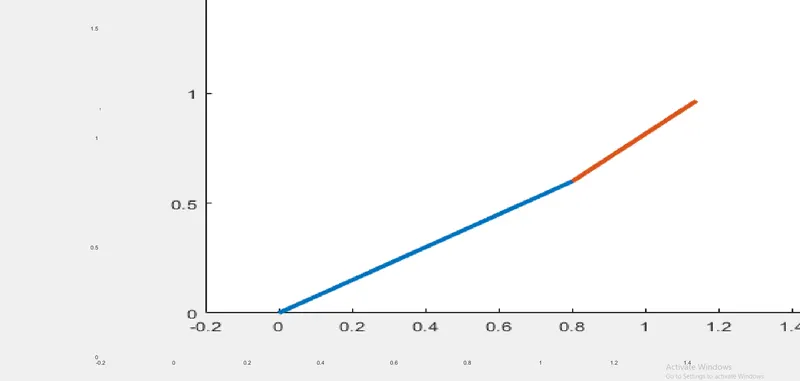
Week 2- 2R Robotic Arm Challenge
AIM:
A program in Matlab to simulate the forward kinematics of a 2R robotic arm
EXPLANATION:
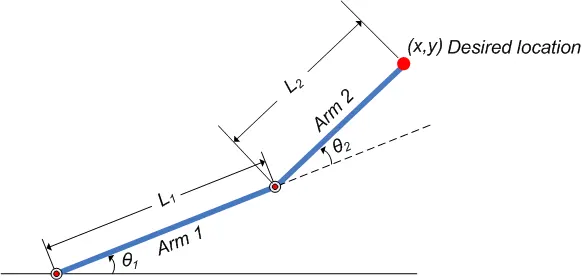
length of the first arm is =L1
length of the second arm is=L2
the angle of position of the first arm=theta 1
the angle of position of the second arm =theta 2
the link of the first arm starts from the base x=0,y=0
the first arm ends at endpoint x1=l1*cosd(THETA1),y1=l1*sind(THETA2)
the second arm starts from the end of the first arm x2=x1+l2*cosd(THETA2),y2=y2+l2*sind(THETA2)
SOLUTIONS SET ARE DEFINED AS
[x0,y0] [x1,y1] [x2,y2]
IN EDITOR WINDOW
%A program to simulate  the forward kinematics of a robotic arm

%inputs

theta1=linspace(0,100,20);
theta2=linspace(0,100,20);

l1=1;
l2=0.5;
mx=1;
for m=1:length(theta1)
    THETA1=theta1(m);
    for n=1:length(theta2)
        THETA2=theta2(n);

        x0=0;
        y0=0;


        x1=l1*cosd(THETA1);
        y1=l1*sind(THETA1);


        x2=x1+l2*cosd(THETA2);
        y2=y1+l2*sind(THETA2);

        %PLOTTING

        plot([x0 x1],[y0 y1],[x1 x2],[y1 y2],'linewidth',3)
        axis([-0.2 1.5 0 1.5])
        pause(0.03)
        M(mx)= getframe(gcf);
        mx=(mx+1);

    end
end
movie(M)
videofile=VideoWriter('kinematics_of_robotic_arm.avi','uncompressed AVI');
open(videofile)
writeVideo(videofile,M)
close(videofile)
Here the linspace commands are used to fix the number of elements.
THETA is used to store elements theta in for loop.
for loop is used repeat a set of actions again and again .
videofile=videowriter ('kinematics_of_robotic_arm.avi','uncompressed AVI') is used to save the file to desktop .
output:
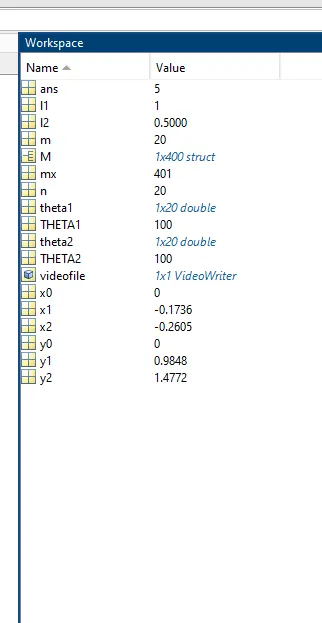
in workspace
animation on youtube link
Kinematics of robotic arm - video