Week 2- 2R Robotic Arm Challenge
Aim: To write a program in MATLAB to simulate the forward kinematics of a 2R Robotic Arm.
Objective: 1. To write the program to simulate the forward kinematics of a 2R Robotic arm.
2. To create a video/animation from the plot points obtained from the program.
Theory: A robotic arm is a type of mechanical arm, usually programmable, with similar functions to a human arm.
A 2R robotic arm represents a robotic arm with two rotations ie. it has two links which rotate or work over a two dimensional plane with each link having a single degree of freedom.
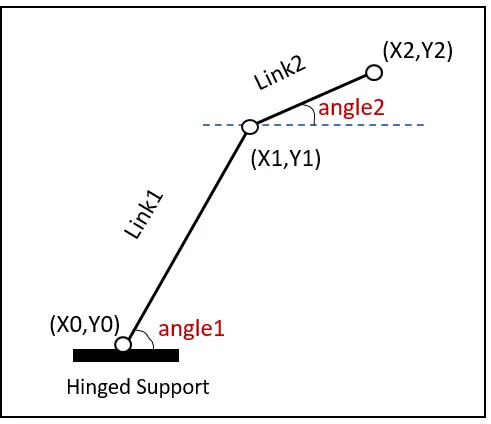
Let l1 and l2 be the lengths of link1 and link2.
Let `theta1` be the angle formed by link1 with the horizontal (represented by 'angle1' in the above image).
Let `theta2` be the angle formed by link2 with the horizontal (represented by 'angle2' in the above image).
Let the starting and ending points of link1 be (x0,y0) and (x1,y1).
Let the starting and ending points of link2 be (x1,y1) and (x2,y2).
Program:
clear all
close all
clc
%inputs
%lengths - 1
l1=2;
l2=1;
%angles - 2
theta1=linspace(0,180,10);
theta2=linspace(0,180,10);
%for end loop - 3
ct=1;
for i=1:length(theta1)
    THETA1=theta1(i);
    for j=1:length(theta2)
        THETA2=theta2(j);
        x0=0;
        y0=0;
        x1=l1*cosd(THETA1);
        y1=l1*sind(THETA1);
        x2=x1+l2*cosd(THETA2);
        y2=y1+l2*sind(THETA2);
        %plotting - 4
        plot([x0,x1],[y0,y1],[x1,x2],[y1,y2],'linewidth',3)
        axis([-3 3 -3 3])
        pause(0.01)
        M(ct)=getframe(gcf);
        ct=ct+1;
    end
end
%plot to video - 5
movie(M)
videofile=VideoWriter('robotic_arm.avi','Uncompressed AVI');
open(videofile)
writeVideo(videofile,M)
close(videofile)
Explaination:
1. Inputs - Lengths - The lengths of link1 and link2 are provided.
2. Inputs - Angles - linspace command is used the provide 10 equally spaced values between 0 and 180 deg
3. For End Command - For i= 10 values of `theta1` and j= 10 values of `theta2` when ct=1, the co-ordinates are defines
4. Plot command is used to plot the various values of x1,y1,x2,y2, after which the counter (ct) in incrimented.
5. Video file is created.
Result:
1. Program is written error free
2. Video is created and uploaded in Youtube in the below link:
https://www.youtube.com/watch?v=cshpBWWiEK4