Week 2- 2R Robotic Arm Challenge
Aim:- To write a program that simulate the forward kinematics of 2R robotis arms
Introduction :- Kinematics is the relationships between the position all velocity and all acceleration of the link of a manupulator.
The forward kinematics is the kinematical data are knows for the variables the end- affector in a given certesian space are to be computed.
In our Project, we are going to use the basic arms of the robot to do that we are dealing with the linkage known as Forward kinematics of a 2R Robotic arm (where 2R means 2-rotating Link i.e 2 is a number of link and R is rotation). we are taking two links as a representative of the Robotic arm in which Link-1 is Hinged at (X0, Y0) and making an angle1, while Link-2 is hinged at the end of the Link-1 and making angle2 with respect to Datum.
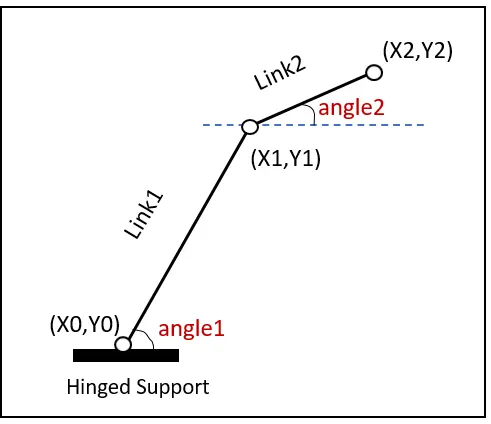
step wise perfroming this program
step1 :- calculate link 1
x0 = 0
y0 = 0
x1 = L1*cosd(THETA1)
y1 = L1*sind(THETA1)
step2 :-
x2 = x1+L2*cosd(THETA2)
y2 = y1+L2*sind(THETA2)
video file create by the help of getframe command
movie(m)
videofile = videoWriter('forward_kinematics.avi', 'uncompressed AVI');
open(videofile)writeVideo(videofile,m)
close(videofile)
main program of 2R robotics arm
% moving kinematics robotics arm
clear all
close all
clc
% inputs
l1 = 1;
l2 = 0.5;
theta1 = linspace(0,90,10);
theta2 = linspace(0,90,10);
ct = 1;
for i = 1:length(theta1)
THETA1 = theta1(i);
for j = 1:length(theta2)
THETA2 = theta2(j);
x0 = 0;
y0 = 0;
x1 = l1*cosd(THETA1);
y1 = l1*sind(THETA1);
x2 = x1 + l2*cosd(THETA2);
y2 = y1 + l2*sind(THETA2);
% ploting
plot([x0 x1],[y0 y1],[x1 x2],[y1 y2], 'linewidth', 3)
axis([-0.1 1.5 0 1.5])
grid on
pause(0.03)
m(ct) = getframe(gcf);
ct=ct+1;
end
end
movie(m)
videofile = videoWriter('forward_kinematics.avi', 'uncompressed AVI');
open(videofile)
writeVideo(videofile,m)
close(videofile)
the output of the program is a simple plots
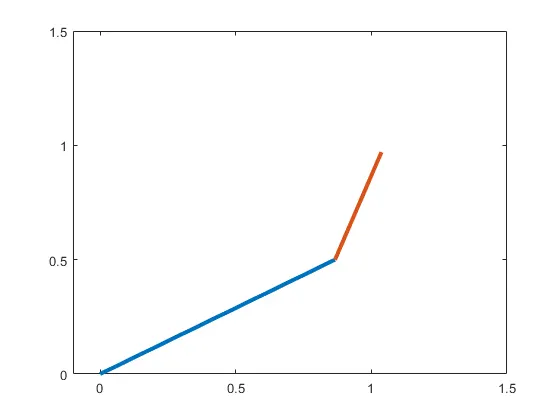
forword kinematics 2R robotic arm manupulator
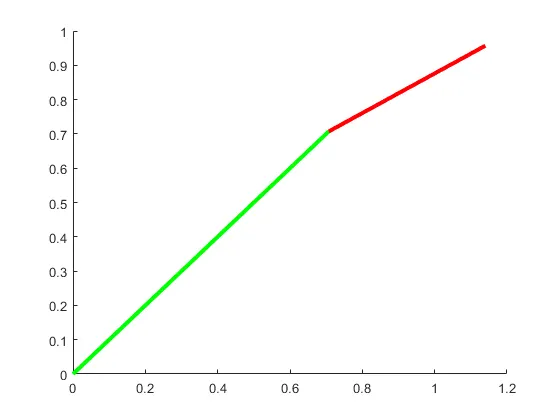
Conclusion :- Forward kinematics 2R robotics arm links how will be chenges in using various angles to be completed th help of MATLAB softwere
Youtube video link below
https://www.youtube.com/watch?v=EV1XN2EVfRQ