Week 2- 2R Robotic Arm Challenge
AIM:- TO Write a program in Matlab to simulate the forward kinematics of a 2R Robotic Arm
THEORY:- forward kinematics refers to apply the kinematic equation for a robot to compute the position of end-effector. A kinematic chain composed of links and joints with multiple degree of freedom, finding the position and orientation of the end-effector in the operational workspace when all the joint parameters are known. called as Forward kinematics.
Kinematics can yield very accurate calculation in many problems,such as positioning a gripper(end-effector) at a place in space, designing a mechanism that can move a tool from point A to point B, or predicting whether a robot's motion would collide with obstacles. kinematics is concerned with only the instantaneous value of the robot's coordinates, and ignores their movement under forces and torques. the kinematics problem may be trivial for certain robot's, like mobile robots that are essentially rigid bodies, but requires involved study for other robot with many joints, such as humanoid robots and parallel mechanisms.
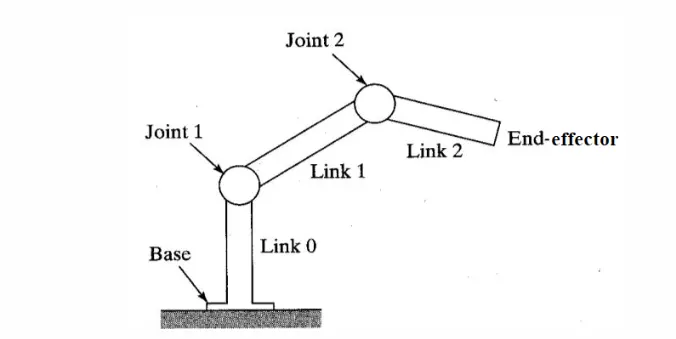
Turm used in robotics
Links:- links are rigid bodies which possesses at least two nodes which are points for attachments to other links.OR A link is a resistant body (or assembly of resistant bodies) constituting a part(or parts) of the machine, connecting other parts, which have motion, relative to it. here it also gives structure to the robot.
Joints:- joints are the movable parts (actuators) of the robot that connect the links of the robot. joints cause relative motion between adjacent links.
types of Joints:
- Revolute- when one link has a turning or revolving motion relative to the other, they constitute a turning or revolving pair( Revolute joints ). EX- DC servo motor
- Prismatic- if two links have a sliding motion relative to each other, they form a sliding pair( prismatic joints). EX- slider joint
- Continuous- when the link of a pair have a rolling motion relative to each other, they form a rolling pair( continuous joints). EX- Ball and roller bearings.
Kinematics chains:- A kinematic chain may be defined as an assembly of links in which the relative motion of the links is possible and the motion of each link relative to the others is definite. the last link of the kinematic chain is attached to the first link.Human arm is an example of a kinematic chain. Human body is a group of kinematic chains connected in series.
Degree of Freedom ( DOF ):- The number of inputs which need to be provided in order to create a predictable output. in robotic is simply the total number of independent joints which can change the pose of the robot. Human arm from shoulder to palm(fingers not included) has 7 DOF.
End-effector:- End-effector is the last link of the robot arm or manipulator that interacts with the environment. the last link can be gripper tool to do pick and place action or a welding gun.
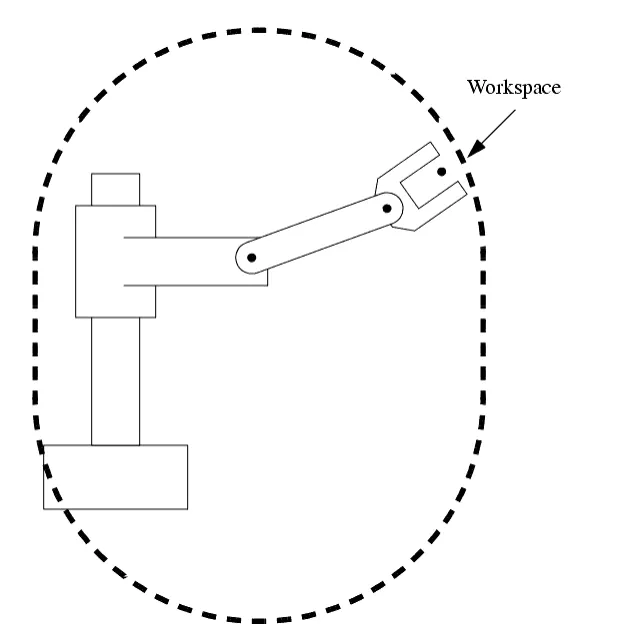
Workspace:- workspace is the space in which your robot can work that is all reachable points by the robot's end-effector constitutes to workspace.
Formula used:-
MATLAB PROGRAM:-
% Forward kinematics with for loop

clear all

close all

clc

%inputs

l1 = 1;
l2 = 0.5;
theta1 = linspace(0,90,10);
theta2 = linspace(0,90,10);

ct=1;

for i= 1:length(theta1)
    THETA1= theta1(i);
    for j= 1:length(theta2);
        THETA2= theta2(j);

        x0= 0;
        y0= 0;

        x1 = l1*cosd(THETA1);

        y1= l1*sind(THETA1);

        x2= x1 + l2*cosd(THETA2);

        y2= y1 + l2*sind(THETA2);

        %ploting
         plot([x0 x1],[y0 y1],[x1 x2],[y1 y2],'linewidth',3)

         axis([-0.1 1.5 0 1.5])
          pause(0.03)
          M(ct) = getframe(gcf);
            ct = ct+1;

    end
end

movie(M)

videofile = VideoWriter('forward_kinematics.avi','Uncompressed AVI');

open(videofile)

writeVideo(videofile,M)

close(videofile)
EXPLANATION:-
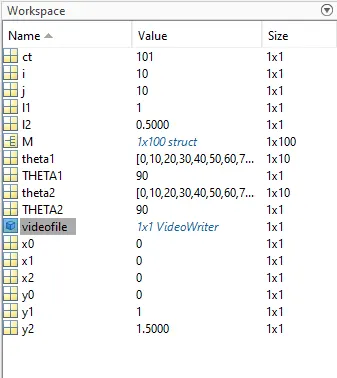
1.0) start with command clear all (removes data from workspace), close all (close all plots and graph) and clc ( clear all inputs and outputs in command window).
2.0) define the inputs length of arm 1, arm 2 and theta1, and theta2.
3.0) we use linspace command to generate eually spaced vectors here we able to generate 10 value of theta1 between 0 to 90 degree and similarly (linspace(0,90,10)) for theta2.
4.0) set up a counter ( a counter is a variable that counts an event in a loop) a for loop was (for loop is a repetition control structure that allow us efficiently write a loop that needs to execute a specific number of times) used.
5.0) theta1 and theta2 will contain multiple values of angles.
6.0) a new variable is needed inside the loop for both x and y coordinates. THETA1 and THETA2 are assign as a new variable inside the loop (program) here in THETA2 the variable j is coded in place of i.
6.0) plot the graph for all the x and y coordinates. a pause command is used for pausing the command for acertain time here we use pause for 0.03sec.
7.0) 'M' command used to capture the current frame and every time we change the frame by (add a+1 into the ct variable this will increment the frame every time) and run the loop at the end of the loop we are able to capture many frames.
8.0) movie command is used for animation, the VideoWriter command is used to assign the video format (.avi), open command is used to open the video file, writevideo command is used to write the video with plot frames and finally close command is used to close the video file.
ERRORS:-
1.0) here we take ct(counter variable) = 0
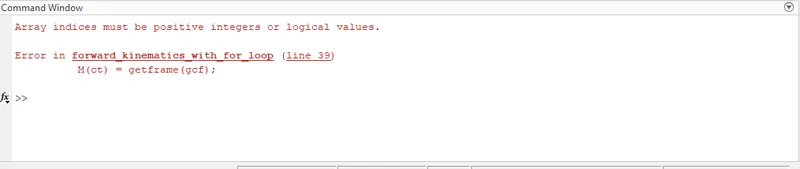
Solution:- we fix this error by taking ct=1.
2.0) here we write videowriter
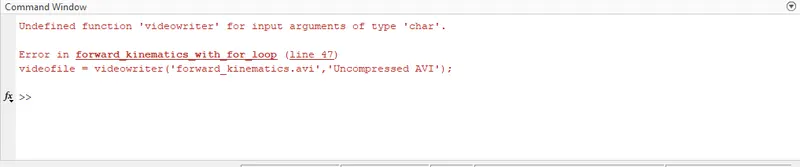
Solution:- we fix this error by writing VideoWriter ( here V- cap and W-cap )
VIDEO LINK:- https://youtu.be/3JSPoAfTWrM