Week 2- 2R Robotic Arm Challenge
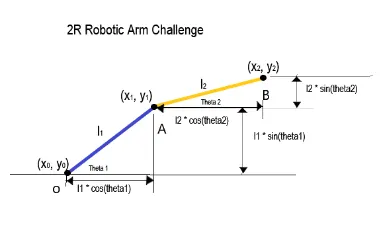
`l_1`=length of link 1
`l_2`=length of link 2
`theta_1`=Angle made by link 1 with horizontal
`theta_2`=Angle made by link 2 with horizontal
`x_1=l_1costheta_1`,`y_1=l_1sintheta_1`
`x_2=x_1+l_2costheta_2, y_2=y_1+l_2sintheta_2`
MATLAB Code
%% Programming of 2R Robotic Arm
clear all
close all
clc

%% Inputs
% length of first and second link (m)
l1=1; l2=0.5;

% Angle made by links with horizontal (degrees)
theta1=linspace(0,90,10); theta2=linspace(0,90,10);

%% for loop
ct=1;
for i=1:length(theta1)
    THETA1=theta1(i);
    for j=1:length(theta2)
        THETA2=theta2(j);

        x0=0; y0=0;
        x1=l1*cosd(THETA1); y1=l1*sind(THETA1);
        x2=x1+l2*cosd(THETA2); y2=y1+l2*sind(THETA2);

        plot([x0 x1],[y0 y1],[x1 x2],[y1 y2],'linewidth',3)
        axis([-0.1 1.5 0 1.5])
        pause(0.03)
        M(ct)=getframe(gcf);        % use the getframe funcion in loop to record frames. then play the movie frames once.
        ct=ct+1;
    end
end

%% Animation
movie(M)             % movie(M) play the movie frames in array M once
videofile=VideoWriter('Robotic_Arm_animation.avi','Uncompressed AVI');      % VideoWriter object is used to create videofile.
open(videofile)     % open file for writting video data
writeVideo(videofile,M)     % write video data to a file
close(videofile)        % close file after writting video data
Google drive link of animation:
https://drive.google.com/file/d/1P8nvMq1T33io9P_h3uSY8Ouq7a0bU5Sh/view?usp=sharing