Week 2- 2R Robotic Arm Challenge
ROBOTIC ARM CHALLENGE
Aim of the challenge:-
The main aim of the challenge is to calculate the forward kinematic of a 2R robotic arm manipulator
and to create the animation file of the plot of 2R Robotic arm movement so we know the workspace
Explanation:-
In robotic arm forward kinematic place an important role as forward kinematic refer to use of kinematic equation of robot to compute the position of the manipulator and to know the workspace of the robotic arm by knowing the specified values of the joints parameters x0,y0,x1,y1,x2,y2(cordinates) and theta values(angle of movement of the links of the robotic arm.
a robotic arm is a mechanical arm design by the movement through programs with the help of values of the cordinates and theta values.robotic arm are connected through joints we called number of links which forms the kinematic chain upto the manipulator and these joints allows rotational and translational displacement.
so i am plotting a 2d graph and animate of the robotic arm with the help of the cordinates in the links of the arm and calculate the forward kinematic of the 2R robotic arm.
working principle and condition of the 2R Robotic arm
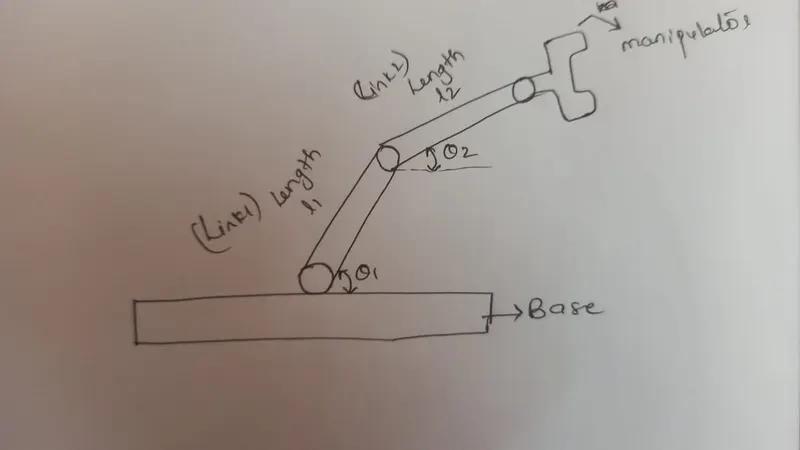
- robotic arm base is fixed and its consist of 2 links (link 1 & 2) and manipulator
- one end of the link is fixed to base and the other to the link 2 at an angle theta1 and link 2 is connected to manipulator at an angle theta 2
the image is shown below.
procedure:
initially we are assigning length of both the links, theta values.
%Inputs%
%length of the link-1%
l1 = 1;
%length of the link-2%
l2 = 0.5;
%the angle for the link 1%
theta1 = linspace(0, 90, 10);
%the angle of the link 2%
theta2 = linspac(0, 90, 10);
intially, the value of x and y are set to zero and
x1 and y1 values changes with the theta1
x2 and y2 values changes wih the theta 2
for loop command is used the value of i going to change from 1 to 10, each and every time
it is going to store only one variable which is not going to have array but its value going to change from
1 to 10 and each time its value changes its going to execute the set of commands that are present inside
formula.
%count for the iteration%
ct = 1;
for i = 1: length(theta1)
THETA1 = theta1(i)
for j = 1: length(theta2)
THETA2 = theta2(j)
here THETA1 and THETA2 acts as a variable
we are assigning the values for cordinates of robotic arm
x0 = 0;
y0 = 0;
x1 = l1*cosd(THETA1);
y1 = l1*sind(THETA1);
x2 = x1 + l2*cosd(THETA2);
y2 = y1 + l2*sind(THETA2);
Then we are plotting the graph and creating the axis and based on that creating the movie and the video file are saved
%plotting%
plot([x0 x1], [y0 y1], [x1 x2], [y1 y2],'linewidth',3)
axis([-0.1 2 0 1.5)]
pause(0.03)
M(ct) = getframe(gcf);
ct = ct+1;
end
end
then the movie is created by using the videowriter command and is as follows
movie(M)
videofile =VideoWriter('forward_kinematics.avi','uncompressed AVI');
open(videofile)
writevideo(videofile,M)
close(videofile)
code:
The complete code is written below
clear all
close all
clc

clear all
close all
clc

% forward kinematics of a 2R robotic arm manipulator

%inputs

%length of the first arm
l1 = 1;

%length of the second arm
l2 = 0.5;

% angle of the first arm
theta1 = linspace(0,90,10);

%angle of the second arm
theta2 = linspace(0,90,10);

%initiate the counter value
ct = 1;

for i = 1:length(theta1)
    THETA1 = theta1(i);
    for j = 1:length(theta2)
        THETA2 = theta2(j);

        %cordinates inputs
        x0 = 0;
        y0 = 0;

        x1 = l1*cosd(THETA1);
        y1 = l1*sind(THETA1);

        x2 = x1 + l1*cosd(THETA2);
        y2 = y1 + l2*sind(THETA2);

        %plotting
        plot([x0 x1],[y0 y1],[x1 x2],[y1 y2],'linewidth',3);
        axis([-0.1 2 0 1.5])
        pause(0.03)
        M(ct) = getframe(gcf);
        ct = ct+1;


    end

end

movie(M)
videofile = VideoWriter('forward_kinematics.avi','uncompressed AVI');
open(videofile)
writeVideo(videofile,M)
close(videofile)
Animation video:-
Here is the link for the video of the animation that i got for this project.
error faced while programming :-
The error i found was the videowriter, it should be the
Unrecognized function or variable 'videowriter'.
Error in challenge_robotic_ARM (line 57)
videofile = videowriter('forward_kinematics.avi','uncompressed AVI');Unrecognized function or variable 'm'.
Error in challenge_robotic_ARM (line 56)
Movie(m)
Unrecognized function or variable 'm'.
Error in challenge_robotic_ARM (line 56)
movie(m)i solve it by replacing the words for 'Movie' to 'movie' and
(m) to (M)
and i run the code its found ok.