Week 2- 2R Robotic Arm Challenge
Aim- To write a program that simulates the forward kinematics of a 2R Robotic arm.
Theory -
A 2R robotic arm consists of a base, 2 arms, and 2 rotational joints, these arms are programmed to have motion in them.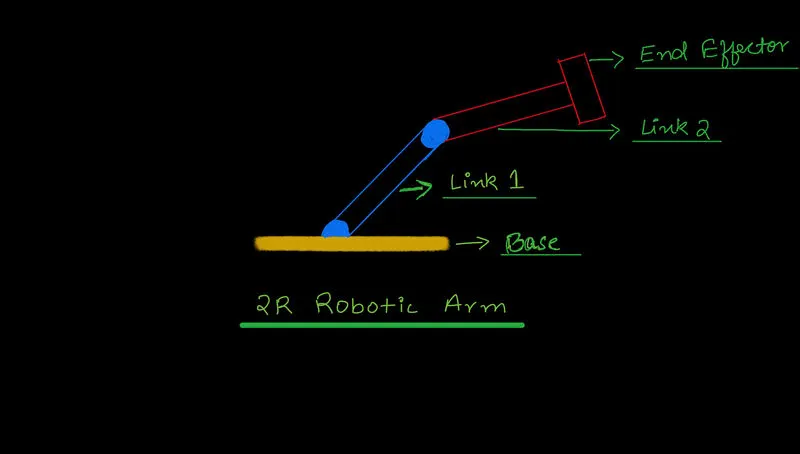
To know the end effectors position we use the following calculations :
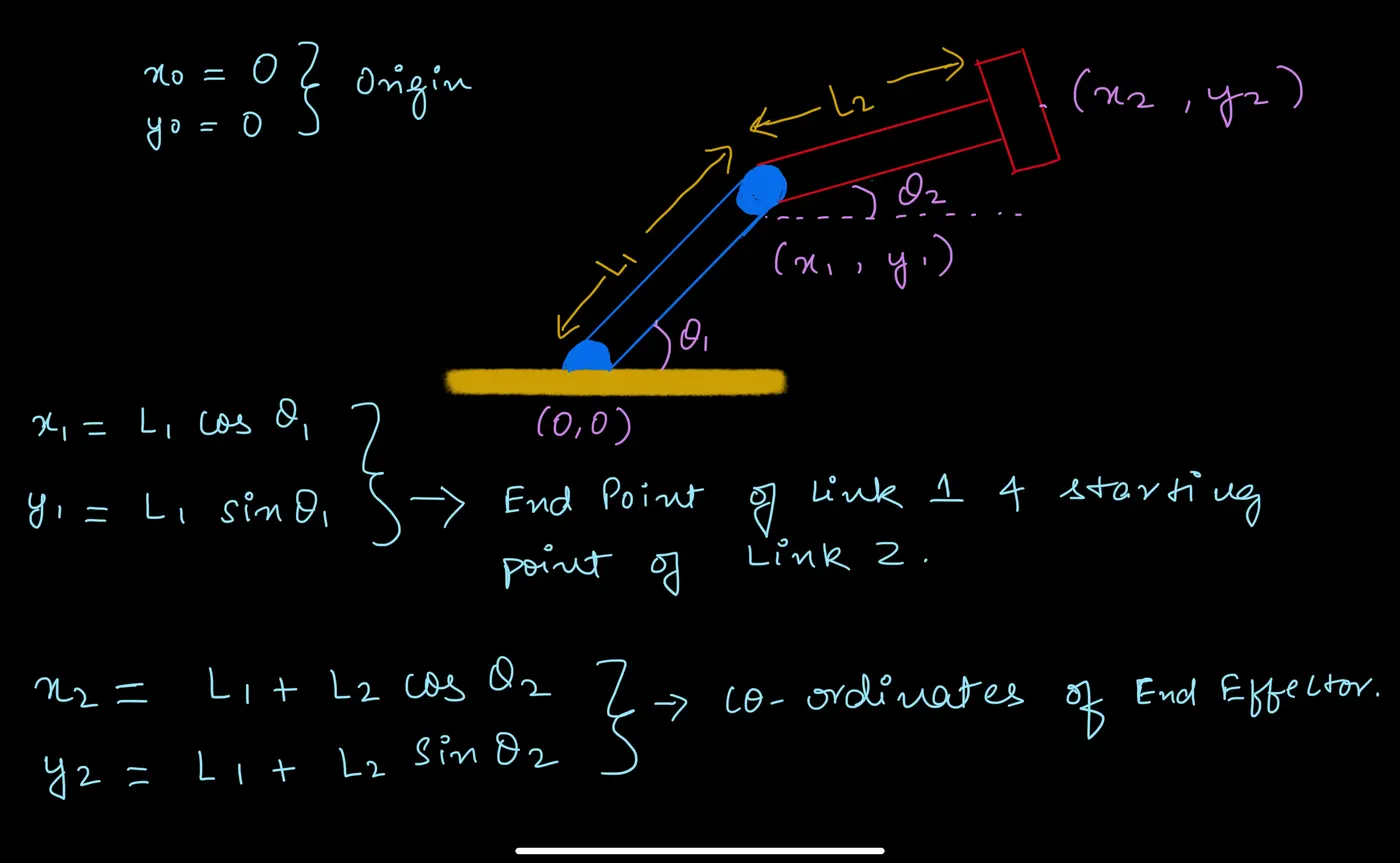
Once we know how to calculate the end effectors' position, theta 1 and theta 2 can be varied according to the need to know the workspace of the robotic arm :
Code with an explaination of the syntax used -
close all
clc
clear all

% Program for Forward Kinematics of a robotic arm

% Inputs
L1= 1; %length of base arm.
L2= 0.5; % length of connected arm.


theta1 = linspace (0,90,20); %angle which the base arm makes with global axis.
theta2 = linspace (0,180,20);%angle which connected arm makes with local axis.

ct=1; %frame counter which has been set to 1
for i= 1:length(theta1) % calling variables from 1 to no. of values in the array of theta1.
    THETA1= theta1(i); % THETA1 is the variable which for loop takes for i (loop counter).
    for j= 1:length(theta2) % calling variables from 1 to no. of values in the array of theta2.
    THETA2= theta2(j); % THETA2 is the variable which for loop takes for i (loop counter).

    X0=0; % X cordinate of base.
    Y0=0; % Y cordinate of base.

    X1= L1*cosd(THETA1); % X cordinate of Connected arm.
    Y1= L1*sind(THETA1); % Y cordinate of Connected arm.

    X2= X1 + L2*cosd(THETA2); % X cordinate of end effector.
    Y2= Y1 + L2*sind(THETA2); % Y cordinate of end effector.

    %plotting the graph and animating the arm :

 plot ([X0 X1],[Y0 Y1],[X1 X2],[Y1 Y2],'LineWidth',3) %combines and plots the graphs.
 axis ([0 2 0 2]) %sets the limits of x & y axis on the graph.
 pause(0.03) %used to combine all the graphs and animate.
 N(ct)= getframe(gcf); %gets the frames from the current graphs.
 ct=ct+1; %counter set to increase as the loop runs several times.
    end
end

movie(N) %shows a movie of the frames captured before.
videofile = VideoWriter ('forward_kinematics.avi',"Uncompressed AVI") %creates a video in .avi format and specifies file type.
open (videofile) %opens the video created.

writeVideo(videofile,N) %writes the video in the videofile created above.
close(videofile) % closes the video.
The movie created in the code can be played by clicking on the link below:
Result :
The animation of a 2R robotic arm has been successfully created and the workspace of the arm can be determined by it.