Week 2- 2R Robotic Arm Challenge
AIM : To write a program to simulate the forward kinematics of 2R robotics arm
OBJECTIVE :
- To Write program to understand forward kinematics of 2R robotics arm
- To create an animation of working robotics arm
INTRODUCTION :
A robotic arm is a robot manipulator, usually programable with similar function to a human arm. The links of such a manipulator are connected by allowing either rotational motion or translation (linear) displacement. The links of robotic arm can be consider to form a kinematic chain.
The use of industrial robot are increasing in areas such as food, consumer goods, wood , plastic and electronics but it still mostly concentrated in automotive industry .
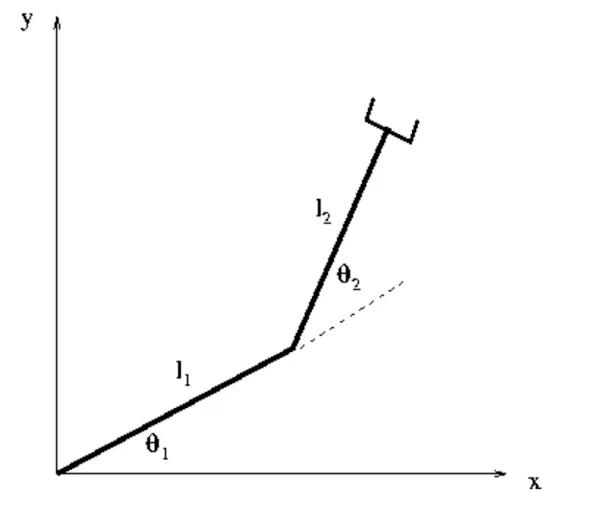
- As belove fig. shows robotics arm having two links , Link1 (L1) and Link2 (L2) with respective angles
INPUTS :
1) For the links of robotics arm assuming the length of Link 1 is 1 meter, for Link 2 it is 0.5 meter
2) Then to simulate the robotic arm we need to vary the angles of links that is `theta`1 and `theta` 2, but it not possible to vary it manually every time so, we created a row vector for the angles.We are varying this angles from 0 to 90 with 10 evenly spaced points between them.
3)Then we assign the coordinated to base i.e. starting point of link 1 as (0,0)
4) For middle that is the joining point of link 1 and link 2 coordinates are
x1 = l1`*``cos``theta`
And y1 = l1`*``sin``theta`
Similarly the coordinates for the end of link 2 are
x2 = x1 + l2`*``cos``theta`
And y2 = y1 + l2`*``sin``theta`
MATLAB PROGRAM :
close all
clear all
clc
% Forword kinamatics of 2R robotic arm

% Inputs
l1 = 1;                              % Length of link 1
l2 = 0.5;                            % Length of link 2
theta1 = linspace(0,90,10);
theta2 = linspace(0,90,10);          % Values for theta1 and theta2

% For loop
ct = 1;
for i = 1:length(theta1);
    THETA1 = theta1(i);
    for j = 1:length(theta2)
    THETA2 = theta2(j);

    % Coordinates
    x0 = 0;
    y0 = 0;
    x1 = l1*cosd(THETA1);
    y1 = l1*sind(THETA1);
    x2 = x1+l2*cosd(THETA2);
    y2 = y1+l2*sind(THETA2);

    % Plotting program
    plot([x0 x1],[y0 y1],[x1 x2],[y1 y2]);
    axis([-0.1 1.5 0 1.5]);
    grid on
    title('Forword Kinamatics of 2R Robotic Arm');
    pause(0.3);
    M(ct) = getframe(gcf);              % getting curent frmaes
    ct = ct+1;
    end
end

% making movie
movie(M)
videofile = VideoWriter('Robotic_arm.avi','Uncompressed AVI');
open(videofile)
writeVideo(videofile,M)
close(videofile)
RESULT :
The following plot is the output for the simulation
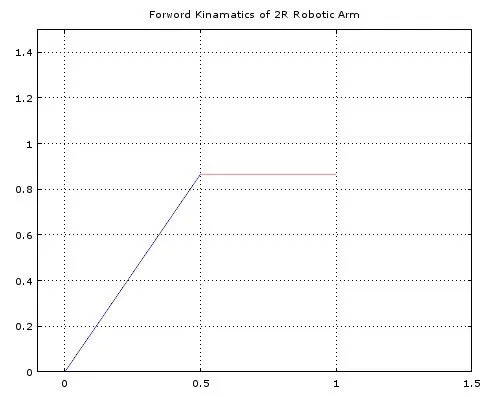
Then we obtained animation of simulation for the forward kinematics of 2R robotics arm
Link : https://youtu.be/kp6yfNmeD64