Week 2- 2R Robotic Arm Challenge
Aim of the Project- Write a Program in Matlab to simulate the forward kinematics of a 2R Robotic Arm
Objectives of the Project-
- To simulate the forward Kinematics of 2R Robotic Arm
- Create an animation file of the working of 2R Robotic Arm
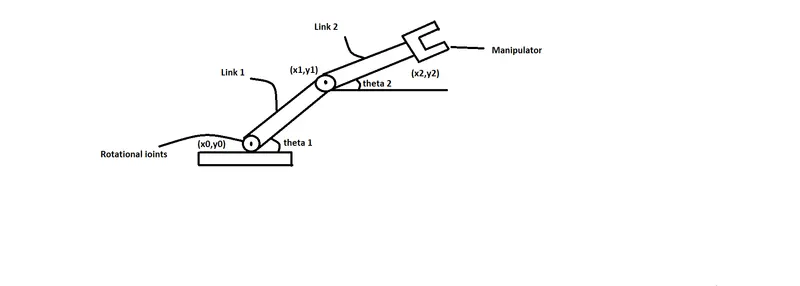
Governing Equations -
Length of Link1 = l1
Length of Link2 = l2
if `theta`1 & `theta`2 are given,
so the coordinates at the different points of Robotic arm are-
at the starting point - (X0,Y0)
at the end of link 1 - (l1*cos`theta`, l1*sin`theta`)
at the end of link 2 - (x1+l2*cos`theta`,y1+l2*sin`theta`)
Body of the Content-
Programming language used in this project is ''Matlab''
close all
clear all
clc

%inputs
l1=1;
l2=0.5;

theta1=linspace(0,90,10);
theta2=linspace(0,90,10);

ct=1;
for i=1:length(theta1)
    THETA1=theta1(i);

    for j=1:length(theta2)
        THETA2=theta2(j);

        x0=0;
        y0=0;

        x1=l1*cosd(THETA1);
        y1=l1*sind(THETA1);

        x2=x1+l2*cosd(THETA2);
        y2=y1+l2*sind(THETA2);

        %plotting

        plot([x0 x1],[y0 y1],[x1 x2],[y1 y2],'LineWidth',3);
        axis([-0.1 1.5 0 1.5])

        % collecting frames of figure
        M(ct)=getframe(gcf);
        ct=ct+1;
        pause(0.03)
    end
end
movie(M)
Videofile = VideoWriter('Forward_kinematics.avi','Uncompressed AVI');
open(Videofile)
writeVideo(Videofile,M)
close(Videofile)
Code Explanation-
clear all- this command clear all the data stored in the workspace previously.
close all - this command closes all the opened figures and plots
clc - this command clears the command window
for loop- for loop is used for the iteration of the `theta`values from 0 to 90 Degrees.
Pause - by using this process can be visualized more clearly.
ct(counter) - it used for saving the frames
getframe - to capture the frame , it can convert frames into movie
VideoWriter- To create a Videofile of the movie
Videofile- To name the movie used to create animation
Result-
After programing in Matlab we got an animated videofile of 2R Robotic Arm