Challenge

Week 2- 2R Robotic Arm Challenge

Assumptions & calculations for programming :-

Considering l1( length of link 1 ) = 2mtr & l2( length of link 2 ) = 1mtr , assuming that robotic arm consisting of two links with specified lengths .

ALPHA1 & ALPHA2 are the respective angles of link1 & link2 with the base.

Also considering the initial coordinates of link 1 to be (0,0) denoted by (x0,y0) and final coordinates to be (x1 , y1 )

Similarly the initial coordinates for link 2 will ( x1,y1 ) and final coordinates to be ( x2 , y2)

Note:- final coordinates of link 1 will be the initial coordinates of link 2 and also explaination of the codes are written in red colour

Now specifically calculating the values of ( x1,y1) & ( x2,y2) :-

x1 = l1cos(ALPHA1) , y1=l1sin(ALPHA1) , x2= x1 + l2cos(ALPHA2) , y2=y1 + l2cos(ALPHA2)

Moving forward now we have the required values of the links ie (x0,y0) , ( x1,y1) & ( x2,y2) , so we can write the programm by using these values.

Program to simulate the forward kinematics of a 2R Robotic Arm:-

% Simulating the forward kinematics of a 2R Robotic Arm

close all 
clear all
clc 

% input values 
l1=2;
l2=1;

alpha1 = linspace(0,90,10);
alpha2 = linspace(0,90,10);
 ct=1;
for i = 1:length(alpha1)
   ALPHA1 = alpha1(i);
  for j = 1:length(alpha2)
  ALPHA2 = alpha2(j);

  x0=0;

  y0=0;

x1 = l1*cosd(ALPHA1);
y1 = l1*sind(ALPHA1);

x2 = x1 + l2*cosd(ALPHA2);
y2 = y1 + l2*sind(ALPHA2);

% Plotting

plot([x0 x1],[y0 y1],[x1 x2],[y1 y2],'linewidth',3);
xlabel('x-axis');
ylabel('y-axis');
axis([-0.5 4 0 5]);
pause(0.1);
M(ct)=getframe(gcf);
 ct = ct + 1;
  end  
end

%commands for generating an animation video 
movie(M)
videofile = VideoWriter('forward_kinematics_animation.avi','uncompressed AVI');
open(videofile)
writeVideo(videofile,M)
close(videofile)

Explaination of the programm :-

1.% Simulating the forward kinematics of a 2R Robotic Arm
% is usedc to add the comment as mentioned above in words.
2.close all ( it is used to close all the figures that are handling the varibales )
3.clear all ( it used to clear all the variables in workspace )
4.clc ( it is used toi clear all the commands in the command window )
5.% input values ( % is used to add the comment as mentioned in words )
6.l1=2; ( l1 ( length of link 1 ) is variable and 2 ( in mtrs ) is its value & (;) is used to terminate the output in command window )
7.l2=1; ( l2 ( length of link 2 ) is variable and 1 ( in mtrs ) is its value & (;) is used to terminate the output in command window )
8.alpha1 = linspace(0,90,10); ( alpha1 is an array of 10 values from 0 to 90 created using linspace, values in degrees & (;) is used to terminate the result in command window )
9.alpha2 = linspace(0,90,10);( alpha2 is an array of 10 values from 0 to 90 created using linspace, values in degrees & (;) is used to terminate the result in command window )
10.ct=1; ( counter that starts from 1 )
11.for i = 1:length(alpha1)
ALPHA1 = alpha1(i);
for j = 1:length(alpha2)
ALPHA2 = alpha2(j);
x0=0;
y0=0;
x1 = l1*cosd(ALPHA1);
y1 = l1*sind(ALPHA1);
x2 = x1 + l2*cosd(ALPHA2);
y2 = y1 + l2*sind(ALPHA2);
% Plotting ( % is used to add the comment as mentioned in words )
plot([x0 x1],[y0 y1],[x1 x2],[y1 y2],'linewidth',3); ( graph will be plotted between the 3 respective coordinates )
xlabel('x-axis'); ( to set the axis labels )
ylabel('y-axis');( to set the axis labels )
axis([-0.5 4 0 5]); ( to set the axis limits )
pause(0.1); ( to pause the code )
M(ct)=getframe(gcf); ( getting all the frames in an array M )
ct = ct + 1; ( for the loop the counter is increnented by 1 for every iteration )
end( to end the loop )
( in the above code For loop is used and we have multiple values of Alpha2 for Alpha1 thats why another For loop is used for ALPHA2 )
length(alpha2) denotes the no.of values in alpha2
The algorithm for the green colour highlighted code has been already explained in assumptions and calculation part above .
12.%commands for generating an animation video ( % is used to add the comment as mentioned in words )
13.movie(M) ( to generate the movie )
14.videofile = VideoWriter('forward_kinematics_animation.avi','uncompressed AVI'); ( to generate the video file with AVI format with the name " forward kinematics animation video )
15.open(videofile) ( to open the video file )
16.writeVideo(videofile,M) ( to write all the frames in video file )
17.close(videofile) ( to close the video file )

Output :- A animated plot will be there and also the video of that animated plot will be saved with the video file name forward_kinematics_animation.avi .

Errors faced while programming :-

1. While using the axis command to set the limits of the axis
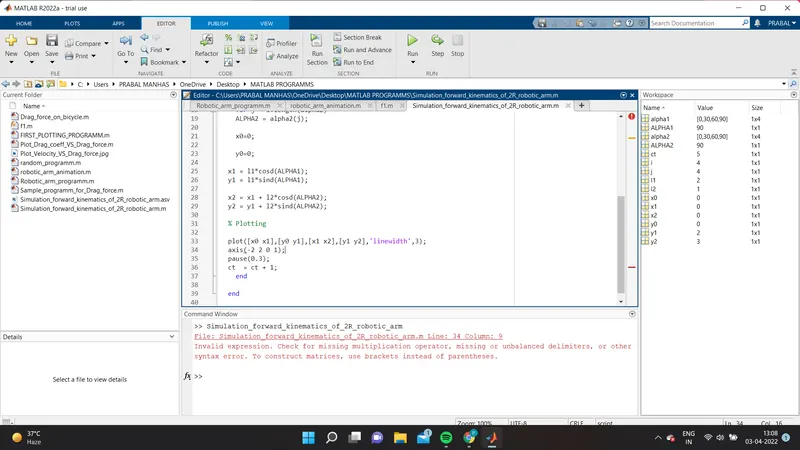
To counter this error I also used [ ] these brackets in addition to the parenthesis () to overcome this error .

2. While runing the programm i got an error mentioning " unrecognized function or variable 'Movie' " :-
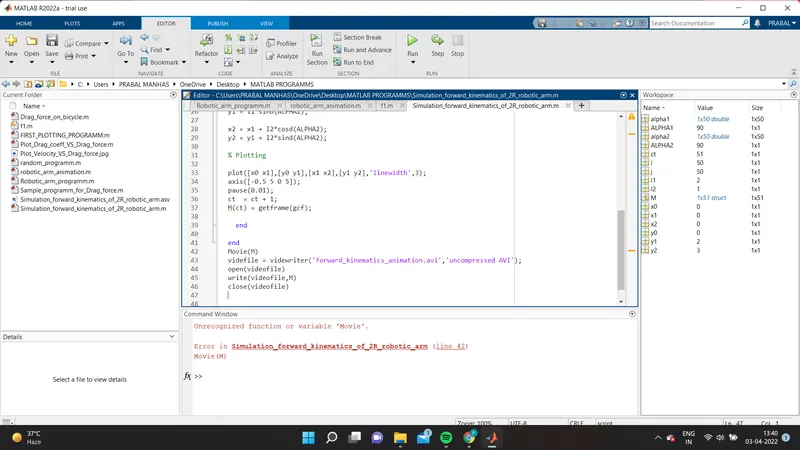
To overcome this error I changed the upper case 'M' (in line 42) in movie with the lower case 'm'.

3.While runing the programm again encountered with the similar type of error :-
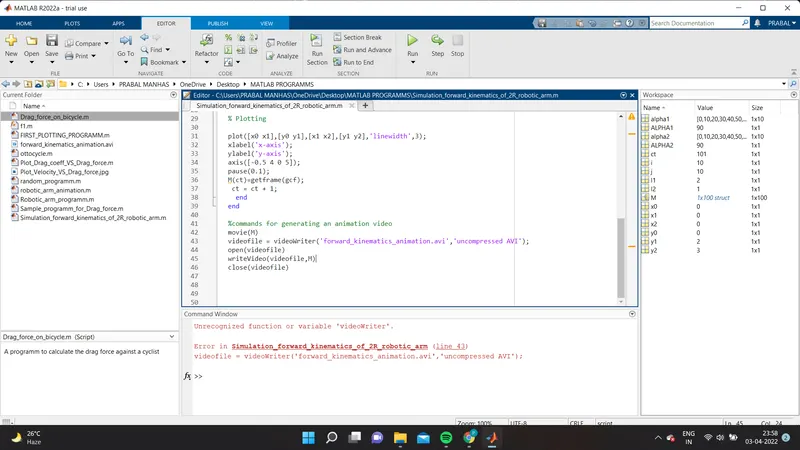
To overcome this error I changed the lower case 'v' in videowriter ( in line 43 ) with the upper case 'V'.

Youtube link for animation

https://youtu.be/fsDFhgNbzro

Your portfolio, next

Ship work like this
in your own course.

Talk to a career counsellor

Free 20-minute call. We'll map the right course to where you want to work.

By submitting you agree to our Terms and Privacy Policy.

Talk to a career counsellor

Free 20-minute call. We'll map the right course to where you want to work.

By submitting you agree to our Terms and Privacy Policy.