Week 2- 2R Robotic Arm Challenge
AIM: Write a program in Matlab to simulate the forward kinematics of a 2R Robotic Arm.
THEORY:
A robotic arm is a type of mechanical arm, usually programmable, with similar functions to a human arm; the arm may be the sum total of the mechanism or may be part of a more complex robot. The links of such a manipulator are connected by joints allowing either rotational motion (such as in an articulated robot) or translational (linear) displacement. The links of the manipulator can be considered to form a kinematic chain. The terminus of the kinematic chain of the manipulator is called the end effector and it is analogous to the human hand.
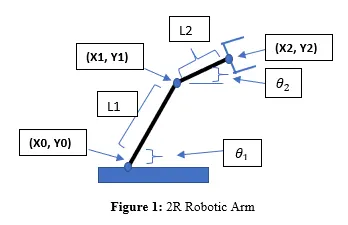
OBJECTIVE: To simulate the forward kinematics of 2R Robotic Arm.
PROCEDURE:
- As MATLAB is a case sensitive software, make sure of that during the programming. And clear and close all the previous data before starting.
close all (closes all the previous plots )
clear all (clears all the variable data )
clc (clears the command window)
- Let’s say l1 is the length of link1 (l1=2) & l2 is the length of link2 (l2= 1) and angle formed by these links are (theta1) & (theta2).
- Then calculate the position of link1 & link2
- Postion of link1:
- Starting point - ( ) = (0,0)
- End point - ( ) = (l1cos , l1sin )
- Position of link2:
- Starting point - ( ) = (l1cos , l1sin )
- End point - ( ) = (+ l2cos ,+ l2sin )
- The value of theta1 and theta2 lies between 0 to , and we take 20 random values between them for that we use linspace command
theta1 = linspace(0,90,20)
theta2 = linspace(0,90,20)
- Now “for” loop is used for calculating the x and y coordinates of link1 and link2. As theta1 and theta2 are array and contains multiple values of angle, therefore we need another variable which stores only one value at a time and the variables are difined for theta1 and theta2 are THETA1 and THETA2.
- Now for plotting the values of x and y we use plot command. The command used for differentiating the two links is ‘legend’ which helps us to determine the lincks with color. The label the axis with command ‘xlabel’ & ‘ylabel’. A pause command is used for pausing the program for a certain time before processing a new set of values.
- Now for creating a video or a animation of the result a counter variable is defined before the first for loop command as ‘ct’ and then a variable ‘M’ for capturing the current frame every time ‘for’ command runs. For every increment of the frame ‘1’ is added to the variable ‘ct’. now close the loop command with ‘end’.
- Now for creating a movie command is used “movie(M) and for assigning the path and name of file ‘VideoWriter’ is used and is saved in ‘.avi’ format. For opening and closing the video “open” & “close” command is used. For writing the video with plot frames ‘writeVideo’ command is used.
- Run or complile the program with ‘F5’. The video will saved where the code is being saved.
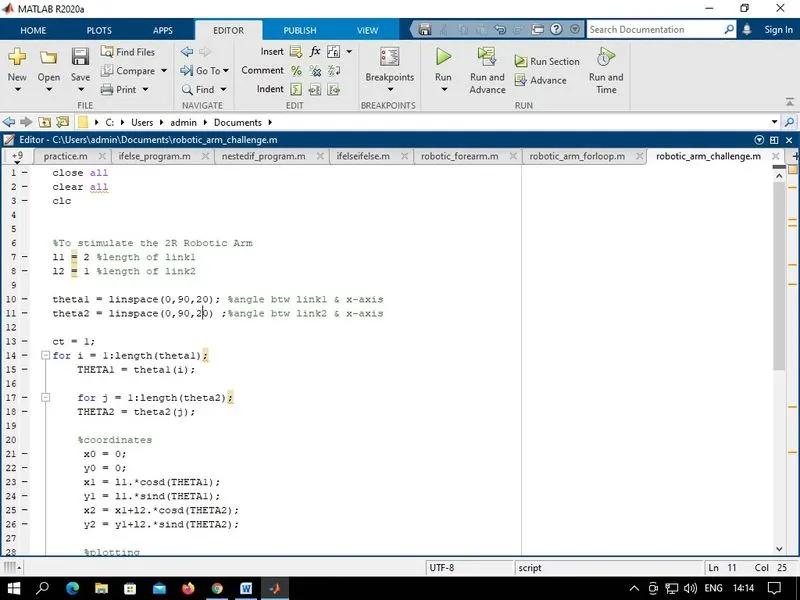
CODE:
close all
clear all
clc


%To stimulate the 2R Robotic Arm
l1 = 2 %length of link1
l2 = 1 %length of link2

theta1 = linspace(0,90,20); %angle btw link1 & x-axis
theta2 = linspace(0,90,20) ;%angle btw link2 & x-axis

ct = 1;
for i = 1:length(theta1);
    THETA1 = theta1(i);

    for j = 1:length(theta2);
    THETA2 = theta2(j);

    %coordinates
     x0 = 0;
     y0 = 0;
     x1 = l1.*cosd(THETA1);
     y1 = l1.*sind(THETA1);
     x2 = x1+l2.*cosd(THETA2);
     y2 = y1+l2.*sind(THETA2);

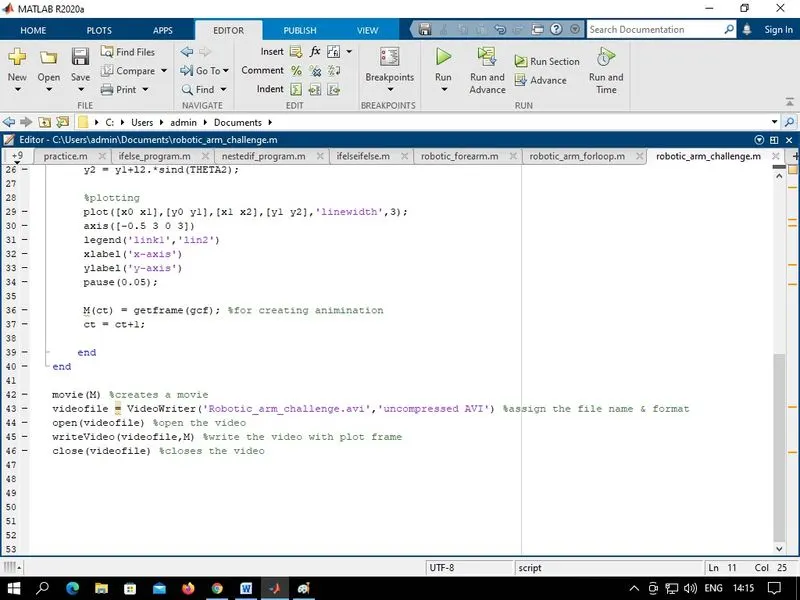
     %plotting
     plot([x0 x1],[y0 y1],[x1 x2],[y1 y2],'linewidth',3);
     axis([-0.5 3 0 3])
     legend('link1','lin2')
     xlabel('x-axis')
     ylabel('y-axis')
     pause(0.05);

     M(ct) = getframe(gcf); %for creating animination
     ct = ct+1;

    end
end

movie(M) %creates a movie
videofile = VideoWriter('Robotic_arm_challenge.avi','uncompressed AVI') %assign the file name & format
open(videofile) %open the video
writeVideo(videofile,M) %write the video with plot frame
close(videofile) %closes the video
ERRORS DURING PROGRAMMING:
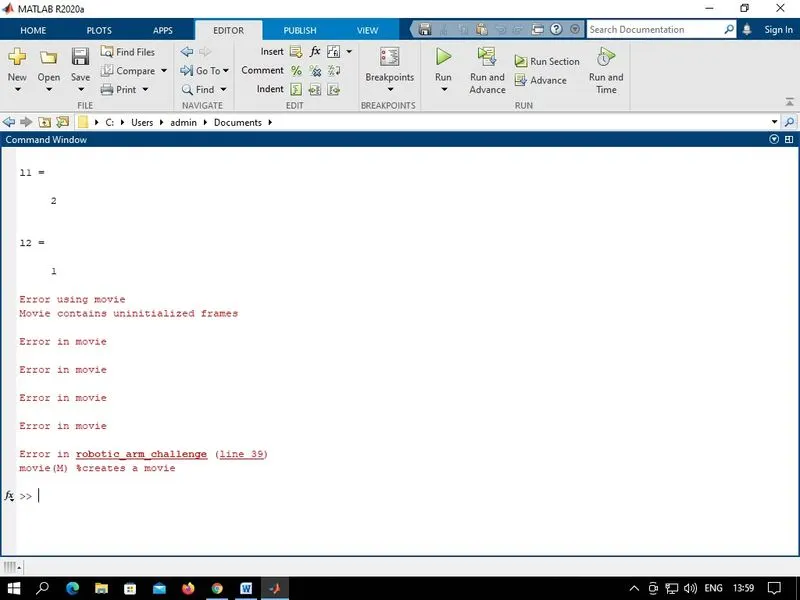
- Issue was I’m giving the frame increment value before the command ‘M(ct)= getframe(gcf)’ which is used for capturing the frame.
RESULT:
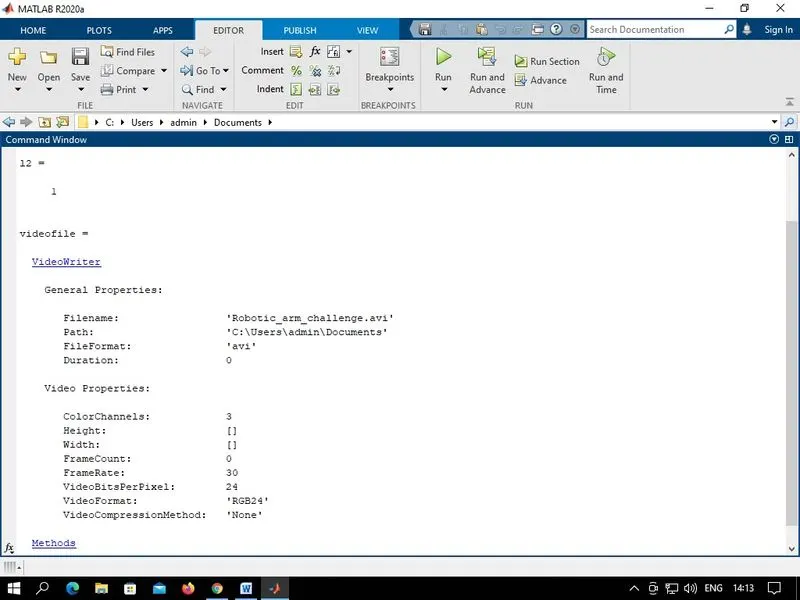
ANIMINATION: Animation of 2R Robotic Arm is formed showing variation with the change of angle.
CONCLUSION:
Thus to stimulate and animate of forward kinematics of 2R Robotic Arm using MATLAB has been done.