Week 2- 2R Robotic Arm Challenge
FORWARD KINEMATICS OF A 2R ROBOTIC ARM
AIM:
Write a program in Matlab to simulate the forward kinematics of a 2R Robotic Arm.
THEORY:
The links are the smallest unit of the Machine. By a combination of the link, pair is formed and pair together forms a chain and which further causes linkage formation, and at last, the combination of Linkage (also known as Mechanism) forms Machine. The Machine is the basis of the Robotics.
2R robotic arm consist of two rotating links (l1 & l2) and rotating angles for these links are `theta1`&`theta2` as shown in the figure . by changing `theta1`and `theta2`we can manipulate the arm .
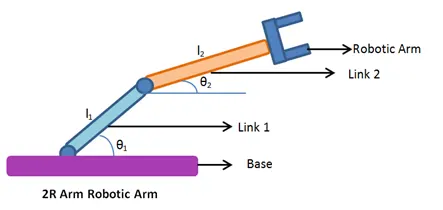
these types of robotic arm is used for pick up actiivity , welding etc.. . the workspace of robotic arm is the possible location the arm can reach .
Forward kinematics refers to the use of the kinematic equations of a robot to compute the position of the end-effector from specified values for the joint parameters.
GOVERNING EQUATIONS:
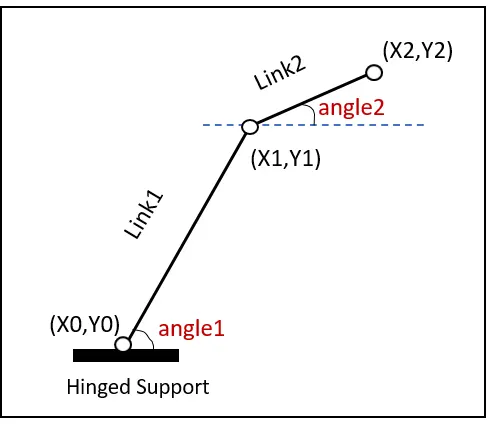
angle 1 = `theta1`
angle 2 = `theta2`
position of link 1 :-
initial position of link 1 is (X0,Y0) and final position of link 1 is (X1,Y1)
X0 = 0
Y0 = 0
X1 = l1*cosd(`theta1`)
Y1 = l1*sind(`theta1`)
position of link 2 :-
initial position of link 2 is (X1,Y1) and final position of link2 is (X2,Y2)
X1 = l1*cosd(`theta1`)
Y1 = l1*sind(`theta`)
X2 = X1 + l2*cosd(`theta2`)
Y2 = Y1 + l2*sind(`theta2`)
CODE:-
% Program to calculate and simulate forward kinematics of a 2R robotic arm

clear all
close all
clc

%input data
l1=1; % in meter
l2=0.5; % in meter
theta1 = linspace(0,90,10);
theta2 = linspace(0,90,10);

ct=1;
for i = 1:length(theta1)
    THETA1 = theta1(i);
    for j = 1:length(theta2)
        THETA2 = theta2(j);
        X0 = 0;
        Y0 = 0;

        X1 = l1*cosd(THETA1);
        Y1 = l1*sind(THETA1);

        X2 = X1+l2*cosd(THETA2);
        Y2 = Y1+l2*sind(THETA2);

        %plotting

        plot([X0,X1],[Y0,Y1],[X1,X2],[Y1,Y2],'linewidth',3)
        axis([-0.2 2 0 2])
        xlabel('x axis (m)')
        ylabel('y axis (m)')
        title('Forward kinematics of 2R robotic arm ')
        pause(0.1)
        M(ct)=getframe(gcf);
        ct=ct+1;


    end
end

%creating video file
movie(M)
videofile= VideoWriter('2R_forward_kinematics.avi','Uncompressed AVI');
open(videofile)
writeVideo(videofile,M)
close(videofile)
STEPS:
1. length was given directly as input .
2. using linspace command we created multiple values for `theta1` and `theta 2` . so that simulation with multipe angles on the plot is possible .
3. the initial position of link 1 was set to (0,0) as (X0,Y0)
3. final position of link 1 was (X1 , Y1) and calculated by the given formula
X1 = l1*cosd(`theta1`)
Y1 = l1*sind(`theta`)
4. initial and final position of link 2 was (X1,Y1) and (X2,Y2) , where
X2 = X1 + l2*cosd(`theta2`)
Y2 = Y1 + l2*sind(`theta2`)
5. with the help of for loop . we calculate initial and final positions for link 1 and 2 for different angles
6. we then save every frame in a array called 'M' . with the help of getframe()
7. then a video file is created .
8. writevideo() helps to write data from array to video file .
9. video file is saved in the same folder where the matlab program is saved.
RESULT:-
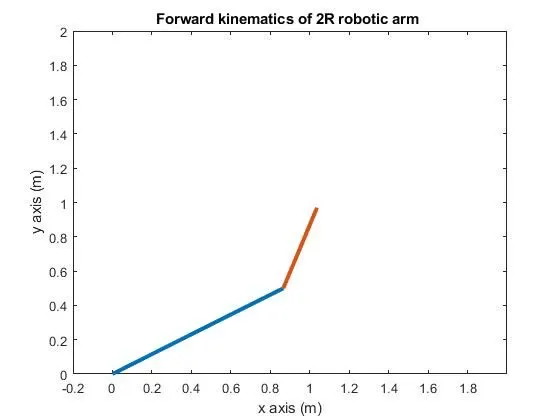
simulation video :
https://youtu.be/ikwt1HcKTEY
CONCLUSION:-
a program for simulating the forward kinematics of 2R robotic arm was coded successfully.