Week 2- 2R Robotic Arm Challenge
Report of forward kinematics of 2R robotic arm
*challenge_skill lync-ganesh katkar
*Matlab Basic forward kinematics of linkages & robotic arms
Aim :
Forward kinematics of linkages and robotic arm manupulater.
Objectives of robotic arm :
Use two linkagees of robotic arm in kinematic linkages matlab and create animation, animate basic two link system to understand forward kinematics.
Problem statements:
How will the robotic arm move and what is the final position of the manupulater in the robotic arm.
Body of the content:
Solution:
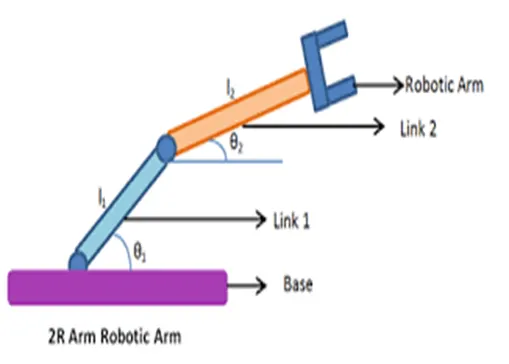
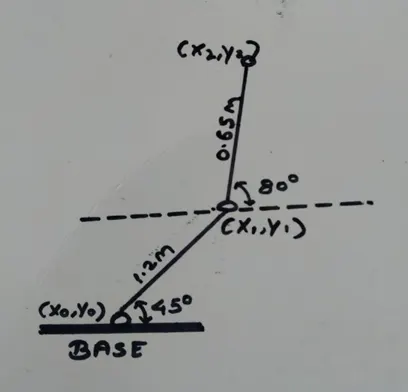
The 2R robotic arm consists of 2 links and 2 rotational joint
Link 1 will make theta 1 angle on the x axis and link 2 will make theta 2 angle. The length of link 1 is L1 and the length of link 2 is L2.
A step-by-step explanation of my code as follows :-
The first step is to calculate the position of LINK 1
(Link 1 has points in which the starting point is fixed to the base of the robot and the end point is connected to LINK 2)
The 1st link has 2 coordinates for the 1st link :-
Sarting points coordinate = (0,0) = (x0,y0)
Ending points coordinate = (LcosΘ,LsinΘ) = (x1,y1)
The second step is to calculate the position of LINK 2
(Link 2 has points in which the first point is the ending point of link 1 i.e. the starting point of link 2 and the ending point of link 2 is the manupulater end point.)
The 2nd link has 2 coordinates for the 2nd link :-
Sarting points coordinate = (LcosΘ,LsinΘ) = (x1,y1)
Ending points coordinate = (x1+L2cosΘ2,y1+L2sinΘ2) = (x2,y2)
There are coordinates of three points= [origin point] [Last point of the 1st link/1st point of the 2nd link] [Last point of 2nd link]
=[x0,y0][x1,y1][x2,y2]
Create 2 plots from coordinate and animation can be created when write porgram in matlab
Started the matlab program
First of all type the variable to save and run the program.
% Forward kinematics of a 2R robotic arm manipulator
clear all
close all
clc
Then defined the input
% Inputs
l1 = 1.2; …(L1 is the length of the 1st link)
l2 = 0.65; …(L2 is the length of the 2nd link)
[ The length of L1 & L2 is in meters]
Then took Θ 1 and Θ 2
theta1 = 45;
theta2 = 80;
Now take three coordinate
%coordinates
x0 = 0;
y0 = 0;
…[x0,y0 are the starting points of the 1st link & they are fixed]
y1 = l1*sind(theta1);
…[x1,y1 are the last point of the 1st link & the starting point of the 2nd link]
x2 = x1+l2*cosd(theta2);
y2 = y1+l2*sind(theta2);
…[x2,y2 are the last point of 2nd link]
Now executed, the value of x0,y0,x1,y1,x2,y2 are displayed on the workspace.
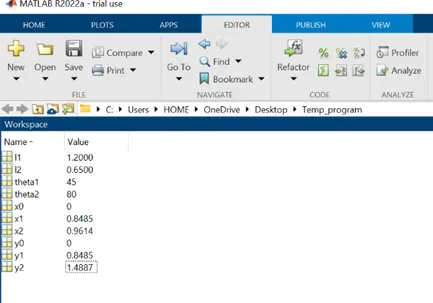
The line command is very simple to visualize the Robotic arm.
Let’s write line in this
First of all we have to provide x coordinate of 2 points which will make the line,1st point is origin i.e(x0,y0) and end point is(x1,y1)
Then we will use the linewidth parameter,which has a linewidth of 5
%plotting
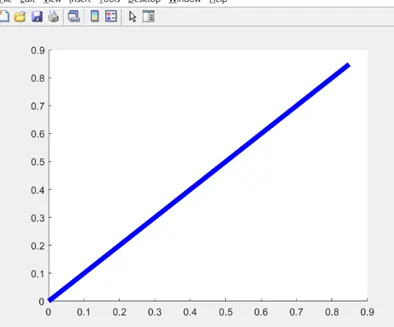
line([x0 x1],[y0 y1],'linewidth',5,'color','b')
It gets a blue line after being executed,it represents the first link
Let’s us take (x1,x2) for the 2nd link,x for coordinate and (y1,y2) for y coordinate and red for the line.
line([x1 x2],[y1 y2],'linewidth',5,'color','r')
It gets a red line after being executed,it represents the second link,now there are 2 link is smaller than the 1st link,because link 2 this is 0.65
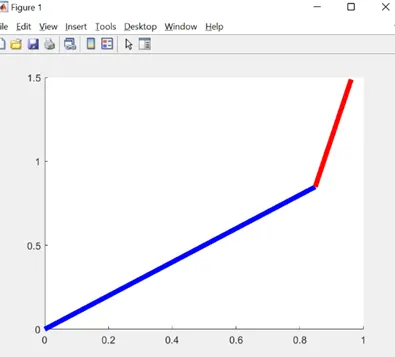
Link 1 is making angle on x axis is small and link 2 is making angle on x axis is big, because theta 1 is 45˹̊ and theta 2 is 80 ̊.
This is a simple forward kinematic plot,and then the animated by adding several plots of Θ1 & Θ2 for each value of Θ1 & Θ2, adding each plot.
First of all type the variable to save and run the program.
% Forward kinematics of a 2R robotic arm manipulator
clear all
close all
clc
%input
l1 = 1.2;
l2 = 0.65;
theta1 = linspace(0,80,20);
theta2 = linspace(0,80,20);
[ Θ1 & Θ2 are arrays,using linespace command, linespace command has 0 to 80 degrees,it has 20 values.
What is linspace is in the command window
For example:-
>> A = linspace(1,5,10)
A =
1.0000 1.4444 1.8889 2.3333 2.7778 3.2222 3.6667 4.1111 4.5556 5.0000
The multiple value 0f Θ is 40, each value has to be repeated for of Θ1 & Θ2.
When the program was typed, the values of Θ1 & Θ2 were changed manually,so the plot was changed, now let’s do it through programming,let’s use the for Loop concept.
for i = 1:length(theta1)
theta2(i)
end
Let’s save and run
After exexuting,Θ2 value is printed in the command window
Length(theta 1) has 20 values
i = 1:20
i =
1 2 3 4 5 6 7 8 9 10 11 12 13 14 15 16 17 18 19 20
size(i)
ans =
1 20 …[1 row & 20 colum]
Then value of the i will change from 1 to 20 when used in a for loop .and will store only one value each time,not an array,only a single value.but when the value changes from 1 to 20, it will execute the set of command which is in the for loop.
Same value for given problem.
l1 = 1.2;
l2 = 0.65;
theta1 = linspace(0,80,20);
theta2 = linspace(0,80,20);
for i = 1:length(theta1)
THETA1 = theta1(i);
THETA2 = THETA2(i);
end
…[when the ‘i’ change, we will take 01 & 02 with the original array ,and the sign the new variable,because it is in capital.]
01 is not an array but it has only 1 value.when ‘I’ is 1,the first value of 0 is taken,& the ‘I’ is 2,the second value of 0 is taken. Using the value of’I’.to take the specific value of 01 & 02.
Let’s perform forward kinematics solution.
01 can take link 2 multiple position for each value,link 1 for each position.
The position of 01 depends on 02.
Another for Loop has to be used for 02
After executing the program.
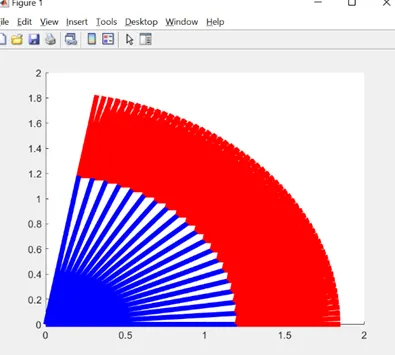
Will start with counter 1 and when the for loop is executed
hold on
plot([x0 x1],[y0 y1],'linewidth',5,'color','b')
plot([x1 x2],[y1 y2],'linewidth',5,'color','r')
pause(0.4)
ct = ct+1;
After executing the program.
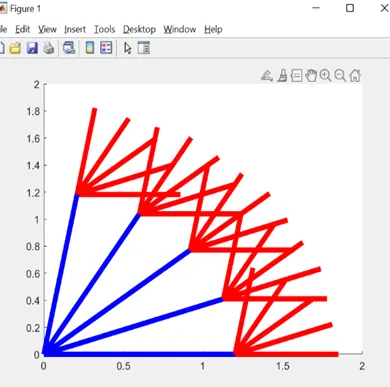
The plot has changed for each value in the plot.therefor’ the (x1 x2) & (y1 y2) are deleted from the second plot statement and added to the first plot statement.
axis([-0.2 1.6 0 1.7])
…(x & y limit’s have changed)
After executing the program.
Will show animation after saving the program.and the movie will play.
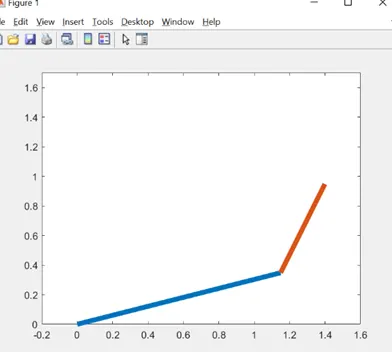
Movie(M)
Videofile = VideoWriter('Forward_kinematics_with_for_loop.avi','Uncompressed AVI');
open(Videofile)
writeVideo(Videofile,M)
close(Videofile)
The program will show animation after executed.and the movie will play.
The animated movie will play on the link given below.
https://drive.google.com/file/d/1_Hvyp3RS09RiJlEn_62OTmhTSLqLLe8H/view?usp=sharing
Results : with the help of matlab we understand how link 1 & link 2 move at different degrees and we are getting an animation movie for robotic arm for different angles.
% Forward kinematics of a 2R robotic arm manipulator