Week 2- 2R Robotic Arm Challenge
clear all
close all
clc
%inputs
l1= 1;
l2= 0.5;
theta1= linspace(0,90,10);
theta2= linspace(0,90,10);
ct=1;
for i= 1:length (theta1)
THETA1= theta1 (i);
for j= 1:length (theta2)
THETA2= theta2 (j);
x0=0;
y0=0;
x1= l1*cosd (THETA1);
y1= l1*sind (THETA1);
x2= x1+l2*cosd (THETA2);
y2= y1+l2*sind (THETA2);
%plotting
plot ([x0 x1], [y0 y1], [x1 x2], [y1 y2], 'linewidth',3)
axis([-0.1 1.5 0 1.5])
pause (0.05)
M(ct)= getframe(gcf);
ct= ct+1;
end
end
movie (M)
videofile= VideoWriter('forward_kinematics.avi', 'Uncompressed AVI');
open(videofile)
writeVideo(videofile,M)
close(videofile)

Explanation:

Consider two links l1 and l2,assume starting points of link l1 to be (0,0) i.e x0=0 & y0=0; ending points of link 1 x1= l1cos(THETA1) & x2= l1sin(THETA2)and ending points of link 2 as x2= x1+l2cos(THETA2) and y2=y1+l2sin(THETA2). Assuming the lengths of the links, l1= 1 & l2= 0.5. And the value of theta1 & theta2 has 10 values ranging from 0 to 90 at an equal interval of 10 values and since, we are in need of different values of angle theta for loop is used i.e THETA1 and THETA2 will be having 10 values. After calculation of x1,x2,y1 & y2 a graph is plotted for link 1 and link 2. Axis command is used for maintaing the intervals between the axis i.e [x-axis from -0.1 to 1.5 & y-axis from 0 to 1.5]; pause is used to make the subsequent actions to be made at given time interval [eg. 0.05 ms). Each time the for loop is executed, the value is incremented by 1. Getframe is used for capturing the plot as movie frame. Finally, in the filename forward_kinematics a video is saved in the resp location in the form of .avi.Now the
videofile is opened and can be displayed in the form of movie.

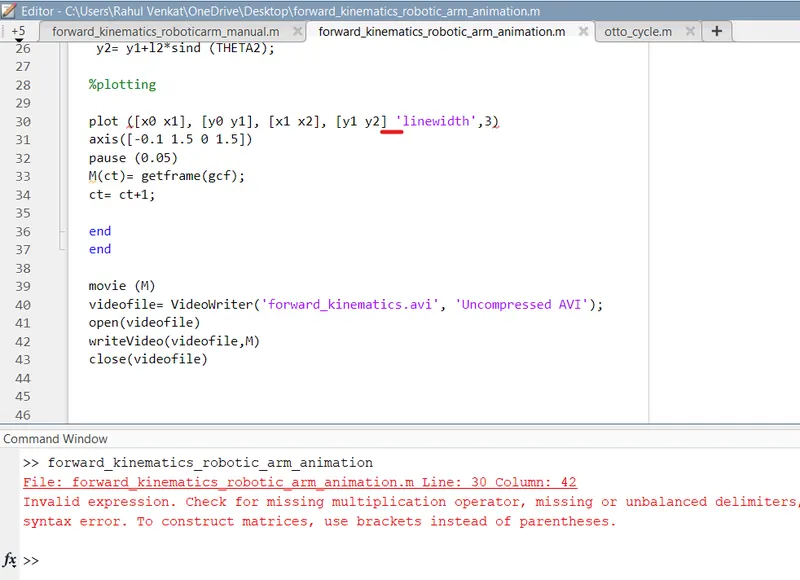
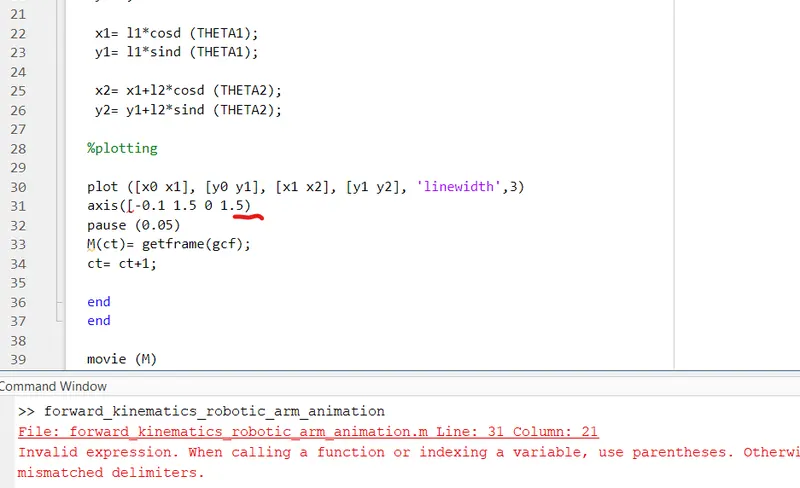
Errors while executing the program:

1. Missed to add square parensthesis, instead added curly parenthesis
2. Missed to add comma before linewidth in plot command

Steps to overcome:

Try to read the message carefully in command window and check once the places having many braces are correct or not
Error 1 screenshot:
Error 2 screenshot:
Animation link:
https://drive.google.com/file/d/1V-ND3n6Z1oI8mjV7GZptr7uZkd9WyWK8/view?usp=sharing