Week 2- 2R Robotic Arm Challenge
The program :
% forward kinematics of a 2R robotic arm
clear all
close all
clc

% Given values
l1 = 2;
l2 = 1;
theta1 = linspace(0,90,10);
theta2 = linspace(0,90,10);
ct = 1;
for a = 1:length(theta1);
    THETA1 = theta1(a);
for b = 1:length(theta2);
    THETA2 = theta2(b);

% defining the coordinates
x0 = 0;
y0 = 0;
x1 = l1*cosd(THETA1);
y1 = l1*sind(THETA1);
x2 = x1 + l2*cosd(THETA2);
y2 = y1 + l2*sind(THETA2);

% plotting the links
plot([x0,x1],[y0,y1],[x1,x2],[y1,y2],'linewidth',3)
axis([-1 4 0 4])
pause(0.05)
m(ct) = getframe(gcf);
ct = ct+1;
end
end

% creating the movie
movie(m)
videofile = VideoWriter('forward_kinematics_of_2r_arm.avi','Uncompressed AVI');
open(videofile)
writeVideo(videofile,m)
close(videofile)
Report :
- Strategy for the programming :
- With the help of a program we can simulate the motion of a robot.
- I am performing forward kinematics of a 2r robotic arm. with given data: length of the two links , the angle between base of the robo to the first link(theta 1) and the angle between first and second link(theta 2).
- First i need to define the co-ordinates of the following (1)starting point of the first link , (2)ending point of the first link/starting point of the second link , (3)ending point of the second link.
- With these three co-ordinates i can plot the two links. Which will show a stationary figure.
- But in here i need to perform an animation , and for that i need multiple values of theta 1 and theta 2.
- And for each value of theta 1 and theta 2 , i will create a plot.
- And to make an animation out of all the plots , i will stitch all the plots.
Explanation of the code :
Given values/inputs :
As no values are provided , i have taken a random value for the length of the two links. I need multiple values of theta 1 and theta 2 , for that i have used the syntax "linspace",with this i can decide how many values of theta i am providing to the program , because of the linspace syntax the values between consecutive angles are constant, resulting a smooth link movement.
i have used a counter here, because every plot has a count , the counter will help to create a video file at the end.
Explaining the for loop :
I have taken multiple values of theta 1 and theta 2 , and for each value of theta 1 and theta 2 i have to perform same set of command , when we have a perticular interval and we need to perform same task over and over for that interval , we use for loop.
Here the number of links are two, and for each position of the link one ,the link two should take multiple position. it fully denends on the value of the theta 1 and theta 2.
i.e : for each value of theta 1 , theta 2 should take multiple values.
And for that i have used another for loop inside the theta 1 for loop.
'a' and 'b' are the loop counters n a loop counter determines how many times a for loop will execute.
After the set of command is provided , the loop will follow the command again and again for each value of theta through out the interval provided.
The command :
co-ordinates:
to plot the links , co-ordinates are required. for two links , three co-ordinates are required( explained previously)
for the starting point of link one the co-ordinates will ne x0=0 , y0=0 , because the link is fixed to the base
for the end point of the link one/starting point of link two the co-ordinates will be x1 = l1*cosd(THETA1) ,y1 = l1*sind(THETA1)
for the end point of link two the co-ordinates will be x2 = x1 + l2*cosd(THETA2) , y2 = y1 + l2*sind(THETA2)
( basic trigonometry )
because theta is in degree i have used 'd' after 'cos' and 'sin' function.
Plotting :
I have used thge syntax plot to draw the two links , as i have the three required co-ordinates , i have used it inside the plot. and given a linewidth of 3 for a thicker plot.
then i have fixed the 'x' and 'y' axis by using the syntax "axis" and providing the limits for 'x' and 'y'.
then i have used a syntax 'pause' , the command will be executed ina interval provided with the 'pause' syntax.
Movie :
The animation is successfully created , but i need a video file out of it.
for that i have saved individual frames in a array 'm(ct)' , here 'ct' stands for individual frames.and used the syntax 'getframe(gcf)'. because each plot is a figure , the 'getframe' command collect all the figureas.
'ct = ct + 1' because the counter needs to increment each time the loop is executed.
after this i have ended both the for loops.
at the end i have used the syntax 'movie(m)' , this will generate a movie with the array 'm'( which contains all the frames )
to save the frames in a filr , i have created a video file with the command 'videowriter' . and provided the file name and profile.
and then i have opened the videofile that i just created and with the command 'writevideo' i write all the frames/ 'm' array in the video file.
and then closed the video file.
Link of the animation :
Error faced while programming :
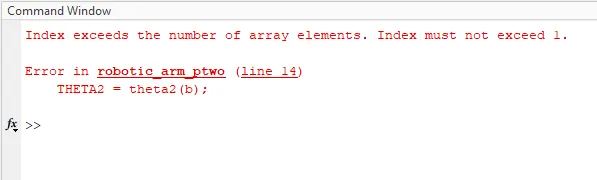
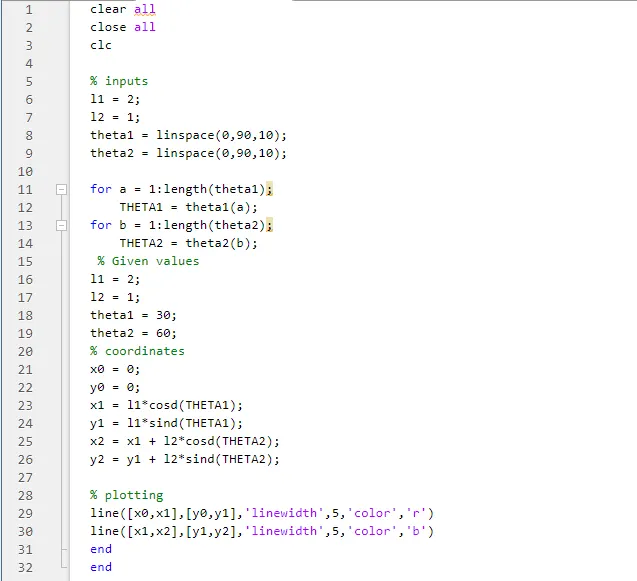
this is the only error i came across while writing the code , this was happening because by mistake took two values for theta 1 & 2 , i deleted the unnecessary values inside the for loop . and this fixed the error.