Week 2- 2R Robotic Arm Challenge
1 ) AIM : simulating the forward kinematics of a 2R Robotic Arm using matlab program .
2 ) OBJECTIVE :
Here our objective is to create simulation of forward kinematics of a 2R robotic arm.
here we are giving various angle to link 1 and link 2 of robotic arm . By doing so , we are able to find area robot can cover.
3 ) BODY :
we are using matlab program to create simulation of forward kinematics of a 2R robotic arm.
Here we have given various angle to link 1 and link 2 of robot.
"For loop " is used in this program.
we have used movie command to create movie with the pause of 0.001 sec .
clear all
close all
clc


%inputs
l1 = 2.5;
l2 = 1;
theta1 = linspace(0,90,10);
theta2 = linspace(0,90,10);


ct=1;
for i = 1:length(theta1)
   THETA1= theta1(i);
   for j  = 1:length(theta2)
       THETA2 = theta2(j);

x0 = 0;
y0 = 0;


x1 = l1*cosd(THETA1);
y1 = l1*sind(THETA1);

x2 = x1 + l2*cosd( THETA2);
y2 = y1 + l2*sind( THETA2);


% plotting

plot([x0 x1],[y0 y1],[x1 x2], [y1 y2] , 'linewidth',5)
axis([ -0.1 5 0 5])
pause(0.001)
M(ct) = getframe(gcf);
ct = ct+1;
   end
end
movie(M)
videofile = VideoWriter('forward_kinematicss_for_loop.avi','Uncompressed AVI')
open(videofile)
writeVideo(videofile,M)
close(videofile)
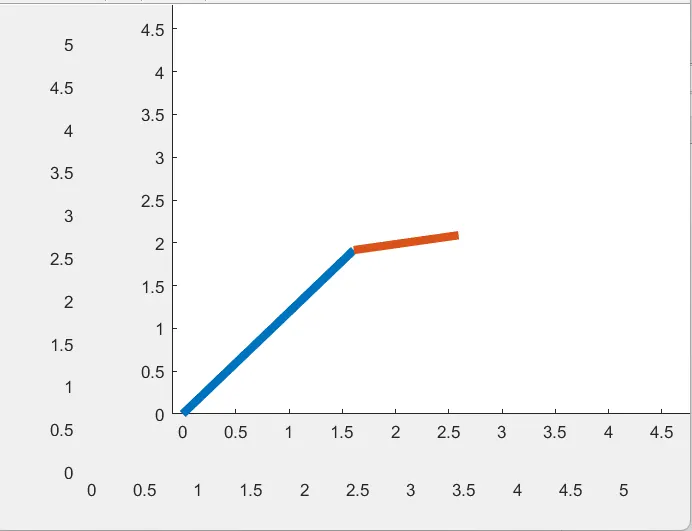
Above figure shows the position of arms of robort at different angle.
Here is the linkl from which you can open simution of robotic arms .
https://drive.google.com/file/d/1MMcTiXoCbJE9XXmgWM7wGPOsxJ5P36Mv/view?usp=sharing
4 ) CONCLUSION :
we can conclude that the area covered by robotic arm is the working space of robort.
That much area can be used for working.