Week 2- 2R Robotic Arm Challenge
simulate the forward kinematics of a 2R Robotic Arm
clear all
close all
clc

%inputs
l1 = 1
l2 = 0.5

%angle 1 and angle 2
a1=linspace(0,90,10);
a2=linspace(0,90,10);

%for loop for generating sucessive lines
ct=1;
for i = 1:length(a1)
    A1 = a1(i);
    for j = 1:length(a2)
        A2 = a2(j);

        %coordinates

%hinged coordinates
x0 = 0;
y0 = 0;

%first link coordinates
x1 = l1*cosd(A1);
y1 = l1*sind(A1);

%coordinates in 2 links
x2 = x1 + l2*cosd(A2);
y2 = y1 + l2*sind(A2);

%plotting

plot([x0 x1],[y0 y1],[x1 x2],[y1 y2],'linewidth',3)

%fixed axis to fix the grid
axis([-0.1 1.5 0 1.5])
pause(0.03)


%storing frame in array by getframe code
M(ct) = getframe(gcf);

ct=ct+1

    end

end


%accessing and saving video file
movie(M)
videofile = VideoWriter('roboticarm.avi','Uncompressed AVI');
open(videofile)
writeVideo(videofile,M)
close(videofile)- the first step of the code is to clear the screen and close all previous programs
- Then providing input values for both links (length and angles in this case)
- now to get successive output values to generate the plot we start for loop
- in which 2 variables were assigned for different links (for loop length(angle) shows the number of values specified earlier in inputs)
- after for loop is generated We add coordinates (calculated using the geometry of line figure of robotic arm)
- After all 3 points coordinated have been assigned we plot the graph using plot command giving the line some width
- axis is been fixed
- after frames have been saved by frame code and Variable M is assigned for frames which are saved
- for accessing and saving video file M the Videowriter command is used and name of file is assigned which is then opened
errors faced
- As matlab commands are case sensitive many times after run it failed to execute, for eg I wrote videowriter command which is wrong later came to know with the help that it was VideoWriter
- syntax errors as due to typing mistakes, non assigned variables were also there
- underdefined variables
Screen shot of output at time of executing
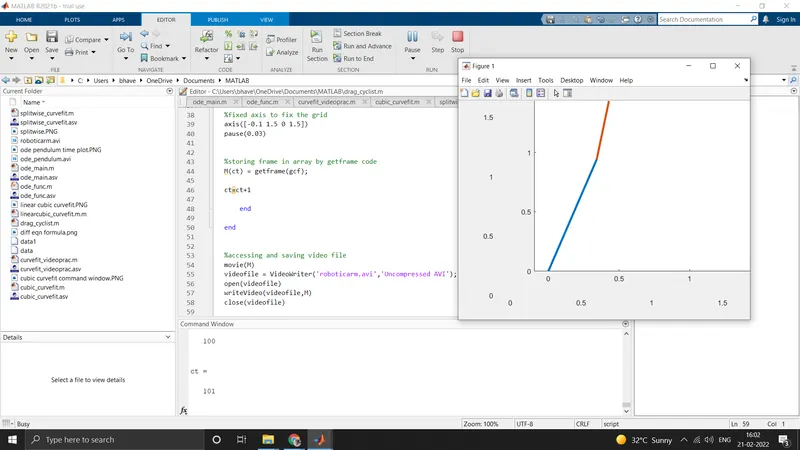
Animation video of Robotic arm