Week 2- 2R Robotic Arm Challenge
Program
% Program to simulate a forward kinematics of a 2R robotic arm

clear all
close all
clc

%Inputs

%length of the robotic arm
l1=1;
l2=0.5;

%Angle between the base and robotic arm
theta1=linspace(0,90,10);
theta2=linspace(0,90,10);

ct=1;
for i=1:length(theta1)
    THETA1=theta1(i);
    for j=1:length(theta2)
        THETA2=theta2(j);

        %coordinates
        x0=0;
        y0=0;
        x1=l1*cosd(THETA1);
        y1=l1*sind(THETA1);
        x2=x1+l2*cosd(THETA2);
        y2=y1+l2*sind(THETA2);

        %plotting
        plot([x0 x1],[y0 y1],[x1 x2],[y1 y2],'LineWidth',3)
        axis([-0.1 2 0 2])
        pause(0.1)
        M(ct)=getframe(gcf);
        ct=ct+1;
    end
end

movie(M)
vidoefile=VideoWriter('foraward_kinematics.avi','Uncompressed AVI');
open(vidoefile)
writeVideo(vidoefile,M)
close(vidoefile)
Result
Video link
https://youtu.be/0Q4NAqWYe9g
Explaination
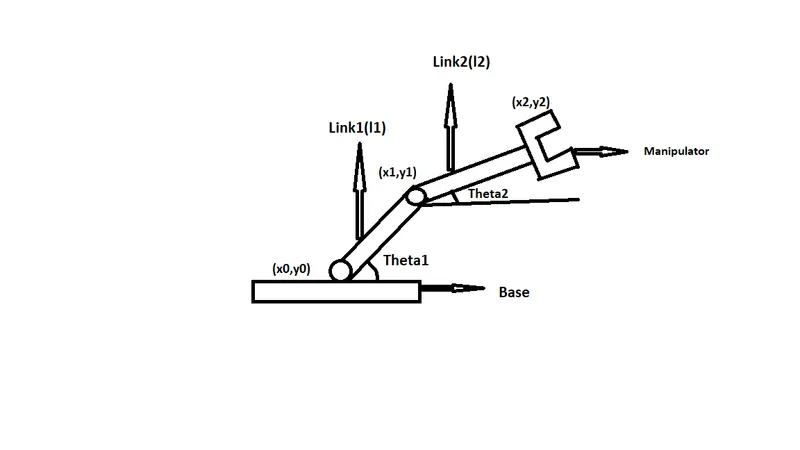
In this fig. it consist of a base,manipulator,two arms or links and two rotational points.
The link one make an angle theta1 with respect to base and similarly link2 make an angle theta2.
In this we have to create plot at different angular positions so that the arm can move. So we have to find out the coordinates at joints.
The coordinates will be (x0,y0) at the base, at the end of the first link and staring of the second link are(x1,y1) and finally at the manipulator will be(x2,y2)