Week 2- 2R Robotic Arm Challenge
Video file link - https://drive.google.com/file/d/139WF6JiyMaEMa-6E4gth3vTVchQrETvF/view?usp=sharing.
% forward kinematics of 2R robotic arm

clear all
close all
clc

% input
l1=1;
l2=0.5;

theta1= linspace (0,90,10);
theta2= linspace (0,90,10);

ct=1;

for i = 1:length(theta1)
    THETA1=theta1(i);
    for j = 1:length(theta2)
        THETA2=theta2(j);

        x0=0;
        y0=0;

        x1=l1*cosd(THETA1);
        y1=l1*sind(THETA1);

        x2=x1+l2*cosd(THETA2);
        y2=y1+l2*sind(THETA2);

        %plotting

        plot([x0 x1], [y0 y1], [x1 x2], [y1 y2], 'LineWidth',3);
        axis([-0.1 1.5 0 1.5])
        pause(0.03);
        M(ct)=getframe(gcf);
        ct=ct+1;
    end

end

movie(M)
videofile = VideoWriter("kinematics_two_R.m","Uncompressed AVI");
open(videofile)
writeVideo(videofile,M)
close(videofile)
Step wise Explanation:
% input
-considering l1 and l2 be the length of robort arms
-theta 1 & theta 2 are given using linspace command (the value of theta seperated as 10 values for 0 to 90 degrees)
-ct is a counter variable is assumed as 1
-then the varaible i value is given from 1 to the length of theta 1 and considering theta i with respective to i as THETA 1 (for loop starts)
- then the variable j is given with referance to theta 2
-here the x0 and y0 are 0, because it is starting point
-x1 and y1 is considering with respective to angles with cos and sin by muliplying its length.
-and x2 and y2 is considering by adding the previous value x1 and x2.
% plotting
- here the plots are assumed with respective to x and y axis
-and the axis values are consider as (-0.1 to 1.5) in x axis and (0 to 1.5) in y axis
-pause command is use to visualize the movement.
-and the counter variable is given as ct+1 (which incerases from 1 to 101)
-before that M (ct) is used to capture frames in movie as a video file
-and the for loop gets END
% to save the frames as movie
-movie command is use and the video gets write using a name as avi video file.
Error faced while programming:
I have faced lot of error while running this program, after sereval time it was completed.
here i will mention some few error that was faced,
1. i forget to close the for loop using two end command. (very basic i missed)

2. while giving x2 and y2 values, i forget to add X1
so the l2 link moves below like l1. (moved in downwards direction)
3. missed to use this command M(ct)=getframe(gcf)
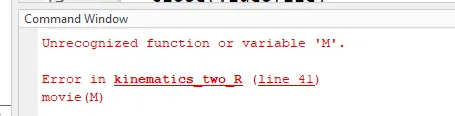
Steps to overcome those error:
i have checked each lines again and again until i get clartiy to run.