Week 2- 2R Robotic Arm Challenge
Objective: To simulate the forward kinematics of a 2R Robotic Arm using MATLAB.
Robotic Arm:
A robotic arm is a type of mechanical arm, usually programmable, with similar functions to a human arm. The arm may be sum total of the mechanism or may be part of a more complex robot. The links of such a manipulator are connected by joints allowing either rotational motion(such as in an atriculated robot) or translational(linear) displacement. The links of the manipulator can be considered to form a kinematic chain. The terminus of a kinematic chain of the manipulator is called the end effector and it is analogous to the human hand.
Application:
The robotic arm are used in various applications such as
1.Welding
2.Painting
3.Automotive Robot Solution
4.Food,Beverage,Sanitation
5.Package Industry
Matlab Code
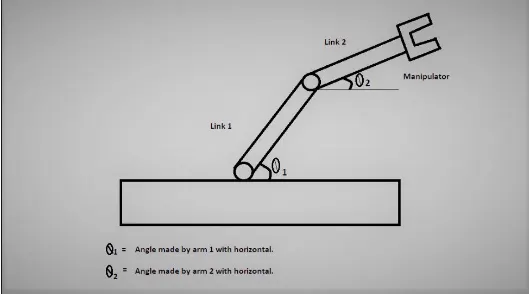
Schematic Diagram
% Forward kinematics of a 2R robotic arm manipulator
clear all
close all
clc

%inputs
L1=1;
L2=0.5;

theta1=linspace(0,90,10);
theta2=linspace(0,90,10);
ct=1;
for i=1:length(theta1)
    THETA1=theta1(i);
    for j=1:length(theta2)
    THETA2=theta2(j);
    x0=0;
    y0=0;

    x1=L1*cosd(THETA1);
    y1=L1*sind(THETA1);

    x2=x1+L2*cosd(THETA2);
    y2=y1+L2*sind(THETA2);

    % Plotting


    plot([x0 x1],[y0 y1],[x1 x2],[y1 y2],'linewidth',2)
    axis([-0.1 1.5 0 1.5])
    pause(0.03)
    M(ct)=getframe(gcf);
    ct=ct+1;
    end

end
movie(M)
videofile=VideoWriter('forward_kinematics.avi','uncompressed AVI');
open(videofile)
writeVideo(videofile,M)
close(videofile)
Explanation:
Inputs
L1 & L2 are the length of our robotic arm of link1 & link2 respectively.
theta1 is the angle made by link1.
theta2 is the angle made by link2.
programming
theta1 and theta2 arrays are initialized.A variable for frame counting 'ct' is initialized the value 1. Two for loops are defined for controlling values of theta1 and theta2. For each value of theta1, the positions of the two links are found out using each value of theta2. The values from theta1 and theta2 array are stored into variables THETA1 and THETA2 for each iteration of the loops.
The position of the end points for each of the links are calculated using the equations given below:-
Link 1
Start Point
x0=0,y0=0
End Points
x1=L1cos(θ1)
y1=L1sin(θ1)
Link 2
End Point
x2=x1+L2cos(θ2)
y2=y1+L2sin(θ2)
Graph
The graph is plotted using the plot command.The 'getframe(gcf)' command is used inside the second loop(controlling second link position) to get the current frame and store it as an image into the array 'M'.
Video
The videowriter command creates an empty video file by the name 'forward kinematics' in .avi format and it is stored in the variable videofile.
The writevideo command inserts the frames stored in the array 'M' into the videofile.
The video file was made and published. The link to the video is given below.