Week 2- 2R Robotic Arm Challenge
Aim: Write a program in MATLAB to simulate the forward kinematics of a 2R Robotic Arm
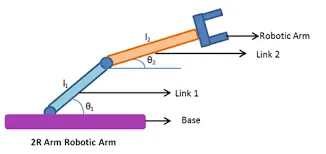
Governing Equation:
Consider a simple robotic arm with two links.
Let l1 be the length of the first arm link, making an angle θ1 with the base (horizontal axis).
Let l2 be the length of the second arm link, making an angle θ2 with the horizontal axis.
Co-ordinates
To find the position of end effectors (robotic arm) is as follows.
Co-ordinates of link 1
Starting point - (X0 ,Y0) = (0,0)
Ending Point - (X1 ,Y1 ) = (l1cosdθ1 , l1sin dθ1 )
Co-ordinates of link 2
Starting point - (X1 ,Y1) = (l1cosdθ1 , l1sindθ1 )
Ending Point - (X2 ,Y2 ) = (X1 + l2cosdθ2 , Y1 + l2sindθ2)
Objective: To write a program in MATLAB to create an animation of the position of the robotic arm or the end effector by taking multiple values of θ1 and θ2.
Procedure / Steps:
- Assigning the inputs given i.e, l1 and l2 and considering the theta values within a range( here we have considered 10 values from 0 to 90 degrees).
- Writing the logic of the program to create the animation. (important part of the program).
- Create a for loop to generate frames and declare a varaible named counter (ct).
- For one count of loop i, loop j will compute the complete range of values,this hapens till complete range of loop i values is computed.
- Each computed frames is stored in incremental counter variable.
- The frames which are captured are stored in an movie array M.
- we need a video file to read the frames captured in the movie array M, this can be done by using a command VideoWriter in MATLAB.
- Once we have created the videofile, the videofile is opened in MATLAB.
- With the help of write command the frames are stitched together.
- Finally we have an animation created of a Forward kinematic 2R Robotic Arm.
MATLAB PROGRAM:
% Forward Kinematics of a 2R Robotic arm manupulator

clear all
close all
clc

% Inputs in meters
l1 = 1;
l2 = 0.5 ;
theta1 = linspace(0,90,10);
theta2 = linspace(0,90,10);
ct=1;

% logic
for i= 1:length(theta1)
    THETA1 = theta1(i);
    for j=1:length(theta2)
        THETA2 = theta2(j);
        x0=0;
        y0=0;

        x1=l1*cosd(THETA1);
        y1=l1*sind(THETA1);

        x2=x1+l2*cosd(THETA2);
        y2=y1+l2*sind(THETA2);

        % Assigning parameters
        txt1 = ['θ1 = ', num2str(THETA1), 'deg'];
        txt2 = ['θ2 = ' ,num2str(THETA2), 'deg'];

        % plotting
        plot([x0 x1],[y0 y1],[x1 x2],[y1 y2],'linewidth',3)
        axis([-1 2 -1 2])
        xlabel('x-axis (M)');
        ylabel('y-axis (M)');
        title('Forward Kinematics of a 2R Robotic arm manupulator')
        text(x0,y0,txt1,'VerticalAlignment', 'top')
        text(x1,y1,txt2,'VerticalAlignment', 'top')
        text(0.5*(x0+x1),0.5*(y0+y1),'Link 1')
        text(0.5*(x1+x2),0.5*(y1+y2),'Link 2')
        grid on
        pause(0.1)
        M(ct) = getframe(gcf);
        ct=ct+1;
    end
end
movie(M)
videofile = VideoWriter('forward-kinematic.avi', 'Uncompressed AVI');
videofile.FrameRate = 10;
open(videofile)
writeVideo(videofile, M)
close(videofile)
ERRORS OCCURED:
ERROR 1
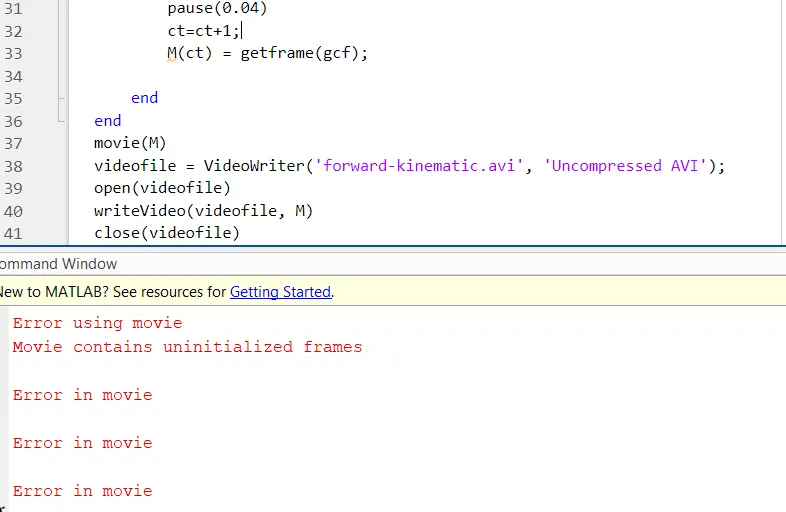
SOLUTION: Counter was written after capturing the frames i.e M(ct)=getframe(gcf) was written then ct=ct+1 was executed.
ERROR 2: ERROR IN WRITING THE FUNCTION VIDEOWRITER.
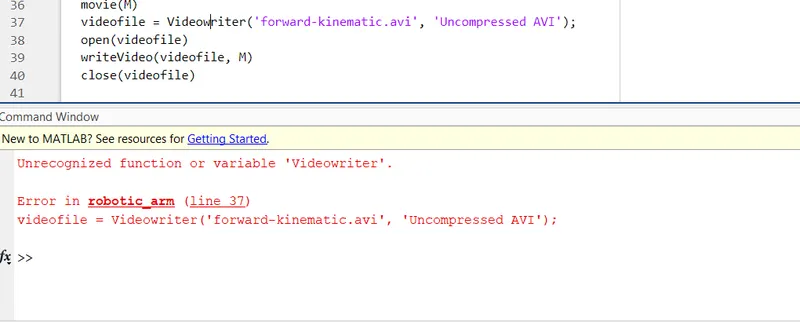
SOLUTION: correcting the spelling Videowriter to VideoWriter.
Conclusion: An animation is created for forward Kinematics of a 2R Robotic arm manupulator.
Video of Animation: