Week 2- 2R Robotic Arm Challenge
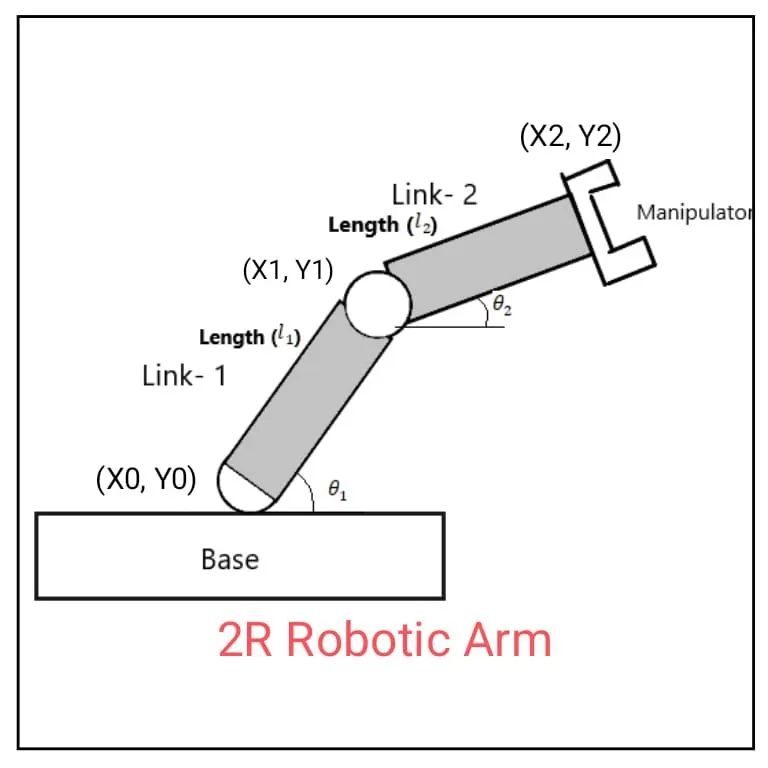
AIM :- TO SIMULATE THE 'FORWARD KINEMATICS' OF 2R ROBOTIC ARM USING MATLAB.
OBJECTIVES :-
- Write a program to simulate forward kinematics of 2R robotic arm.
- Animating and creating a movie from the plots obtained from the program.
INPUT's :-
- (x0, y0) = Starting point of link 1.
- (x1, y1) = Ending point of link 1 & Starting point of link 2.
- (x2, y2) = Ending point of link 2.
- l1 = Lentgh of link 1.
- l2 = Lentgh of link 2.
- theta1 = Angle made by link 1 with X-axia
- theta1 = Angle made by link 2 with X-axis
PROGRAM :-
% program for 2R Robotic Arm using MATLAB.
clear all
close all
clc
% Input
% length of robotic arm
l1 = 0.5
l2 = 0.8
% Angle with X-axis
theta1 = linspace(0,90,10);
theta2 = linspace(0,90,10);
ct =1;
for i = 1:length(theta1)
Theta1 = theta1(i);
for j = 1:length(theta2)
Theta2 = theta2(j);
x0 = 0;
yo = 0;
x1 = l1*cosd(Theta1)
y1 = l1*sind(Theta1)
x2 = x1 + l1*cosd(Theta2);
y2 = y1 + l1*sind(Theta2);
% plotting
plot([x0 x1],[yo y1],[x1 x2],[y1 y2],'linewidth',3)
axis ([-1 1 0 1])
pause(0.002)
M(ct)= getframe(gcf);
ct=ct+1;
end
end
movie(M)
videoFile = VideoWriter('forward_of_kinematics.AVI','uncompressed AVI')
open(videoFile)
writeVideo(videoFile,M)
close(videoFile)
EXPLAINATION OF PROGRAM :-
- first of all we have to define link 1 length of robotic arm
- x1=l1cosd(theta1) , y1=l1sind(theta1) similarly for link 2, [ here sintheta1 in radian so, we want degree we write d after function]
- x2=x1+l2cosd(theta2)
- y2=y1+l2sind(theta2)
- linspace command use setting value of array of theta 1 & theta2
- for & end command used for obtain multiple values of desired variable.
- for second line again used for command for providing moment.
- plotting all the co-ordinate values and writing commands for. changing the apprerance of the countours.
- All figure assigned to a variable M, one at a time using ct followed by termination of for loop.
- Lastly, movie cammand is used to combine all the figures saved in the M file to make an animation or movie and thereafter saving it in .avi format.
Probles during the program :
- It's difficult to create AVI file first, there is lots of time consumed.
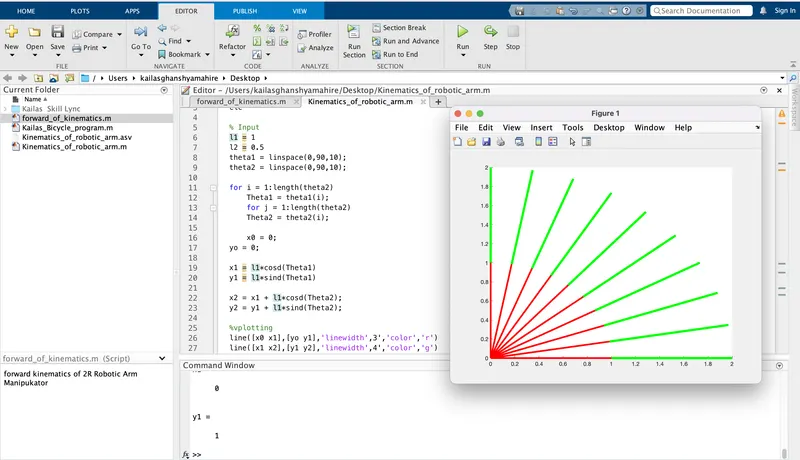
- there is error come in For-end loop (image attached).
CONCLUSION :-
After this program run, I able to create animation/movie of different relative motion objects. Also learn about simulation of the 2R Robotic arm with the help of MATLAB
Google Drive Link :- https://drive.google.com/file/d/1W8btNgdPdap9SMFSnGm7EtcO-LurJI_n/view