Week 2- 2R Robotic Arm Challenge
Forward Kinematics
- Kinematics is the study of motion without considering the cause of the motion, such as forces and torques.
- We use kinematics to trace the path of the robotic arm.
- In Forward kinematics, we use joint angles and length of arms to get the endpoints of the robotic arm.
- As seen in the following figure we know the angle position of link 1 and link 2 also their lengths so by using the Pythagorean theorem you will get endpoints.
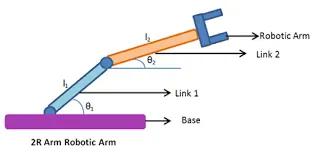
fig 1. 2R Robotic Arm
- In this program, we are going to simulate a Robotic Arm by using 'forward Kinematics'
Procedure: 1. Write down Input Data
2. Use Nested For Loop included formulas and plot data
3. Crate Animation file
Program
clear all
close all
clc
%Input Data
L1=1; % Length of Robotic arm 1 im m
L2=0.5; % Length of Robotic arm 2 in m
x0=0;
y0=0;
a1=linspace(0,90,10); % Angle of Robotic arm 1
a2=linspace(0,90,10); % Angle of Robotic arm 2
ct=1; % we use ct variable to count
For Loop
for i=1:length(a1) % from single iteration of angle of link 1 we get one position
for j=1:length(a2) % In this loop after completing all iteration, it will move to first for loop to get acces for next iteration and it will repeat.
x1=L1*cosd(a1(i));
y1=L1*sind(a1(i));
x2=x1+L2*cosd(a2(j));
y2=y1+L2*sind(a2(j));
% Plot
plot([x0 x1],[y0 y1],[x1 x2],[y1 y2],'Marker','o','MarkerSize',10,'lineWidth',3)
X=[x2 , x2 , x2+1 , x2+1 ,x2+0.5,x2+0.5, x2+1 ,x2+1, x2, x2];
Y=[y2 , y2+1 , y2+1 , y2+0.25, y2+0.25 ,y2-0.25,y2-0.25,y2-1,y2-1,y2];
patch(X,Y,'r')
Y=[y2 , y2+1 , y2+1 , y2+0.25, y2+0.25 ,y2-0.25,y2-0.25,y2-1,y2-1,y2];
patch(X,Y,'r')
title('Workspace of Robotic Arm')
axis([-0.1 1.8 0 1.8]); % to set the limit of axis
pause(0.03) % To pause the code
M(ct)=getframe(gcf); % To get the current figure window
ct=ct+1;
end
end
%% Now We have to create animation Video
movie(M) % movie(M) plays the movie frames in array 'M' once.
V_filename=VideoWriter('Forward_Kinematics.avi','uncompressed AVI'); % Creates a 'VideoWriter' object to write video data to an AVI file.
open(V_filename) % It's time to open that file by using 'open' command to write video data in the file
writeVideo(V_filename,M) % The command 'writeVideo' will combine all frames which are stored in 'M' Variable and send it to 'V_filename' variable
close(V_filename) % To close the file use comand 'close'
You Can See the Image of Output below :
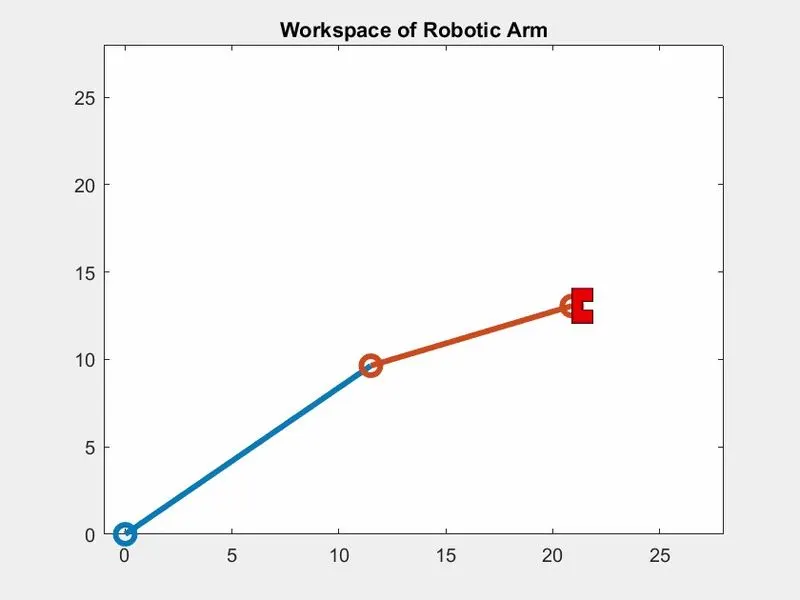
fig 2. Workspace of 2R Robotic Arm
To watch my video:
https://drive.google.com/file/d/1c639yCcl5oaBne2oHZfYeXrf3q4DACIe/view?usp=sharing