Week 2- 2R Robotic Arm Challenge
ANSWER
A program in Matlab to simulate the forward kinematics of a 2R Robotic Arm
PROCEDURE:
- Start the matlab programming with these commands , as all previous calculations are erased
- clear all
- close all
- clc
- now, give the inputs of link1 ,link2 , theta 1 and theta 2 as a range from o to 90 degrees
- linespace is used providing the equal gap points witin the range
- now, for loop is used to calculate the x, y coordinates of link 1 and link 2
- As theta 1 and theta 2 contain many values of angles with the x- axis , so we another variable which store one value at one time so we can set the x and y cooordinates they are different that is why values are not defined for the theta 1 and theta 2 that are THETA 1 AND THETA2
- Now the cocordinates for the starting point of link 1 is defined
- the coordinates of te end point of the link 1 are the coordinates of the starting poinof the link 2 are defined , Here the cosd and the sind values are provided so tat the values stored in degrees
- now the coordinates of the end points of the link 2 is defined in which there is a use of coordinates of endpoints of link 1
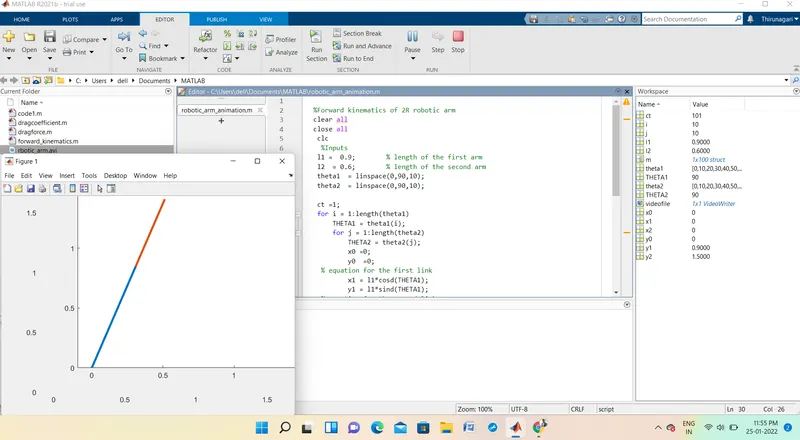
- now plotting all the points by using the plot command having a linewidth of 3 , this command is used for differentiting the two links by ist two different colors
- A pause command is used foe pausing the program for certain time before the new set of values assign
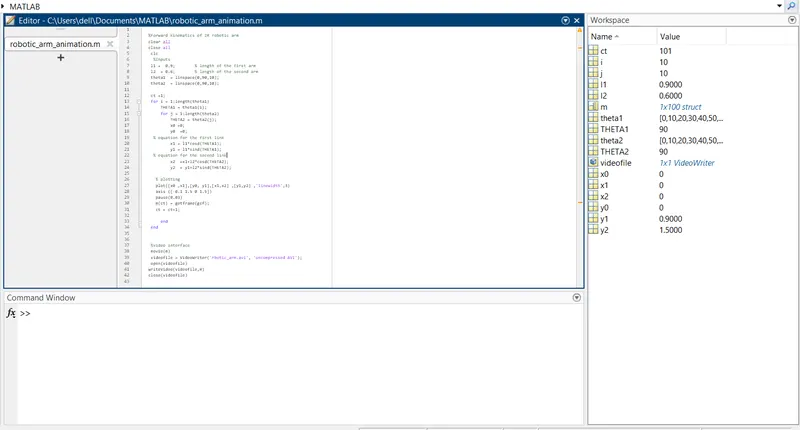
- now, creating a movie animation of the result a counter variable is defined before 1st for loop command as 'ct' and then varable 'm' for capuring the current frame every time for the command runs
- now creating the complete movie command named 'movie' is used and then assigning the file name and file format command is used 'avi' then for opening and closing of video 'file open ' and 'file close' command is used
- save the program and and press f5 to run the progarm and then the animation of a 2r robotic arm is visible.
%Forward kinematics of 2R robotic arm
clear all
close all
 clc
  %Inputs
 l1 =  0.9;        % length of the first arm
 l2  = 0.6;        % length of the second arm
 theta1  = linspace(0,90,10);
 theta2  = linspace(0,90,10);

 ct =1;
 for i = 1:length(theta1)
     THETA1 = theta1(i);
     for j = 1:length(theta2)
         THETA2 = theta2(j);
         x0 =0;
         y0  =0;
  % equation for the first link
         x1 = l1*cosd(THETA1);
         y1 = l1*sind(THETA1);
  % equation for the second link
         x2  =x1+l2*cosd(THETA2);
         y2  = y1+l2*sind(THETA2);

   % plotting
   plot([x0 ,x1],[y0, y1],[x1,x2] ,[y1,y2] ,'linewidth',3)
   axis ([-0.1 1.5 0 1.5])
   pause(0.03)
   m(ct) = getframe(gcf);
   ct = ct+1;

     end
 end


 %video interface
 movie(m)
 videofile = VideoWriter('rbotic_arm.avi', 'uncompressed AVI');
 open(videofile)
writeVideo(videofile,m)
close(videofile)
ANIMATION LINK:
CONCLUSION
The simulation of the above program is given in a url link .