Week 2- 2R Robotic Arm Challenge
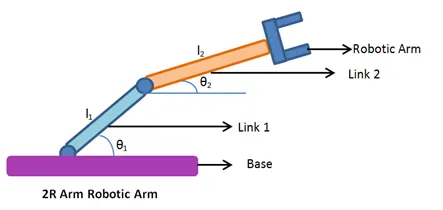
Aim : Simulate the forward kinematics of 2R robotic arm
Objective:
Robotics is used in many industries for performming various oprations eg. material handling ,welding
Here we will create 2R robotic arm which means it has 2 links and then genrate the simulation of robotic movement to determine the workspace of roboot
Theory:
What is Forwad Kinematics?
Forrward kinematics refer to the use of the kinematic equations of a robot to compute the position of the end effector from specified values for the joint parameters.
Formule:
co-ordinates of link 1 and 2 are
for lilnk 1 (x0,yo) to (x1,y1)
for link 2 (x1,y1)to(x2,y2)
Code:
%forward Kinematics
clear all
close all
clc

%inputs
l1=1                    %legth of first link
l2=0.5                  %legth of first link
theta1=[20:10:90];     %angle made by first link with horizontal
theta2=[-30:10:100];     %angle made by second link with horizontal

ct=1;                   %counter for counting frames
for  i=1:length(theta1) %here we compute position of link 2 for all  theat 1 values
     Theta1=theta1(i)
for j=1:length(theta2)
     Theta2=theta2(j)

x=0
y=0                     %initial point
x1 =l1*cosd(Theta1);
y1=l1*sind(Theta1);     %link 1 end co ordinates
x2=l2*cosd(Theta2)+x1;
y2=l2*sind(Theta2)+y1;  %link 2 end co ordinates

axis([-1.8 1.8 0 1.7])
plot([x x1 x2],[y y1 y2],'linewidth',2)
axis([0 1.5 0 1.5])
xlabel('X-axis')
ylabel('Y-axis')
title('Forward Kinematics of 2R robotic Arm')
pause(0.3)

M(ct)=getframe(gcf);
ct=ct+1
end
end
 movie(M)                 %collecting all frames and make animaton video
videofile=VideoWriter('forward_kinematics final.avi','Uncompressed AVI');
open(videofile)
writeVideo(videofile,M)
close(videofile)        %created video saved
Results:
Conclusion
from above simulation we can determine the position of end effector at any angle of link 1 and link 2