Week 2- 2R Robotic Arm Challenge
1. The Matlab program to to simulate the forward kinematics of a 2R Robotic Arm is as follows:-
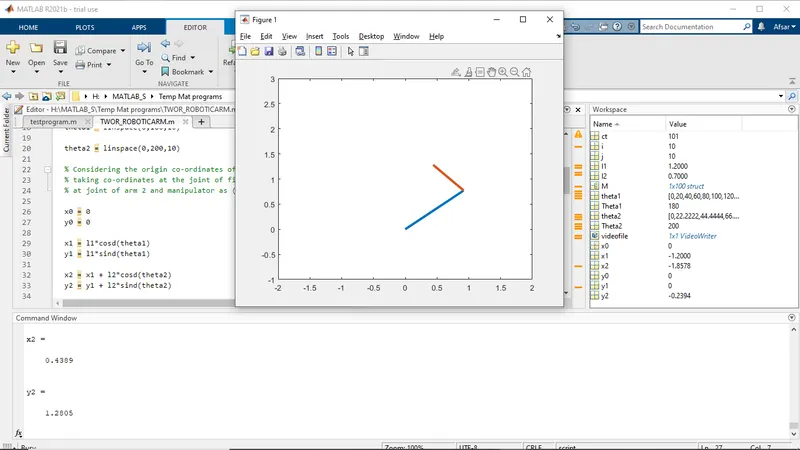
a. The video link for the animation plot is: https://youtu.be/Mc637pesacw
b.
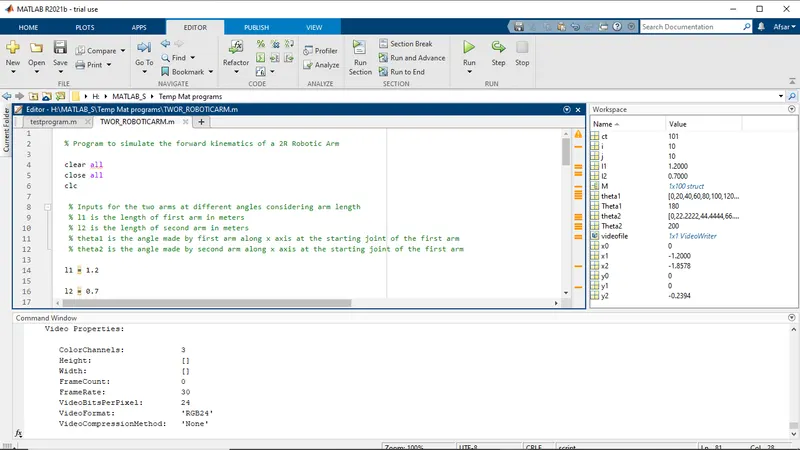
% Program to simulate the forward kinematics of a 2R Robotic Arm

clear all
close all
clc

 % Inputs for the two arms at different angles considering arm length
 % l1 is the length of first arm in meters
 % l2 is the length of second arm in meters
 % theta1 is the angle made by first arm along x axis at the starting joint of the first arm
 % theta2 is the angle made by second arm along x axis at the starting joint of the first arm

l1 = 1.2

l2 = 0.7

theta1 = linspace(0,180,10)

theta2 = linspace(0,200,10)

% Considering the origin co-ordinates of first arm as (x0,y0) where it shared the joint with main body of the robot
% taking co-ordinates at the joint of first and second arm as (x1,y1) and
% at joint of arm 2 and manipulator as (x2,y2) and defining them

x0 = 0
y0 = 0

x1 = l1*cosd(theta1)
y1 = l1*sind(theta1)

x2 = x1 + l2*cosd(theta2)
y2 = y1 + l2*sind(theta2)


% For plotting the movement of arms of the robot the program is as follows
% wherein nested for loop would be required to plot the movement of both
% arms along the main body of the robot and also with respect to eacthother

ct=1;
for i = 1:length(theta1)
    Theta1 = theta1(i)

           x1 = l1*cosd(Theta1)
           y1 = l1*sind(Theta1)

           for j = 1:length(theta2)
         Theta2 = theta2(j)
           x0 = 0
           y0 = 0


            x2 = x1 + l2*cosd(Theta2)
           y2 = y1 + l2*sind(Theta2)

           % Plotting for arm 1 and arm 2 using plot command in a single array because when using line command, program will not execute for the co-ordinates of both arms present in a single array
           % and using plot command separately for both arms separately
           % needs the use of hold on function to represent both arms in a
           % sinle plot


           plot([x0 x1],[y0 y1],[x1 x2],[y1 y2],'linewidth',3)

           % Giving axis command to adjust the axis of the plot so that the
           % both arms can be visible in the plot thus giving us the projection points of the manipulator

           axis([-2 2 -1 3])

          % A variable M is defined to capture the frames of plot of all
          % iterations of the nested forloop
           M(ct) = getframe(gcf)

          ct=ct+1;

       end
end

% End of nested for loop
% Writing program to create a video file in Avi format storing to save the
% animated video of the 2R robotic arms

movie(M)
videofile = VideoWriter("Forward_Kinematics.avi", 'Uncompressed AVI')
open(videofile)
writeVideo(videofile,M)
close(videofile)
c.1. For first step we use, clear all, close all and clc to clear the workspace, command windows and all figures if present.
2. Then we define and give inputs for arm 1 and arm 2 of the robot and also define the angle theta1 and theta 2 the arms will make with respect to horizontal x axis at the two joints .
3. We then define the co-ordinates wherein we give the starting co-ordinates of arm1 as (x0, y0) at origin having value (0,0) and the with respect to this define the ending co-ordinated using sine and cosine functions ( We use sind() and not sin() because sin() will take values in radians and gicing sind() takes the input in degrees ). We give ending co-ordinates of arms 1 as (x1, y1) which will aso serve as the starting co-ordinates of the joint of arm 2 and ending co-ordinates of arm 2 will be at manipulator which can be calculated in respect to length of arm 1 and it's co-ordinates.
4.As we know that both arm 1 and arm 2 will move along it's axis independendent of eachother and will have wide range of movements which will help in projecting the position of the manipulator so instead of manually entering each valoe of theta 1 and theta 2 we can use nested for loop . We define a counter ct with initail value 1 outside the for loop and we give ct= ct+1 before ending the loop so that no of iterations can be calculated and once the possible no of iterations is executed ct will return false value thus ending the for loop operation.
Inside the for loop for every counter the loop runs it's value is stored individually and not in an array hence a counter i, j are defined which is equal to no of arrays in the theta1 beginning from 1 for i counter and for j it is the no of arrays in theta 2 also beginning from 1 .
We then define Theta1 and Theta2 with respect to there for loop counter replacing theta1 and theta2 in the co-ordinates equation for using it in for loop.
5. After defining all the inputs in for loop we proceed to plot the co-ordinates where we can use line() function but both arms needs to be represented separtaely and using plot command separately for both arms results in displaying only one arm in the plot until 'hold on' command is used thus making the code cubersome and less effiecient hence using one plot command inclusive of all the co-ordinates of both the arms.
6. We used pause() command to animate the two arms but since it pauses the code every time it is not very efficient instead we created a variable M storing all the current figures at each counter ct in the for loop using getframe(gcf) command .
7. We then exit the for loop using end function twice as two for loops were used
8. Lastly we write the code for creating a short animation video by catenation of all the frames stores in variable M using movie() command which runs the movie M times and thenwe go ahead create a variable videofile which stores the video created using Videowriter(a,b) command where a is the name of the file and b is the format of the video file and then we use open() fn to open the created videofile and use writeVideo() fn to writes data from an array to the video file associated with videofile and M signifies the figures and this should be used after open(0 fn otherwise it will throw an error and finally we use close() to close the video once played.
Output:-