Week 2- 2R Robotic Arm Challenge
Program to simulate the forward kinematics of a 2R Robotic Arm
- 2R robotic arm is define as a robotic arm with two rotation. as shown in fig. it has two links which rotate over a two- dimensional plane with two different values of Θ.
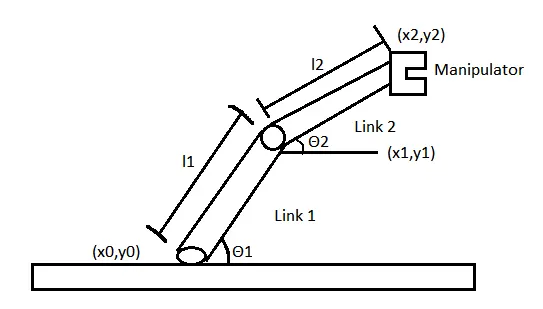
Here, l1 = length of Link 1,
l2 = length of link 2,
Θ1 = angle formed by link 1 with respect to base line,
Θ2 = angle formed by link 2 with respect to base line,
(x0,y0) & (x1,y1) is Starting coordinates & ending co-ordinates of link 1 respectively,
(x1,y1) & (x2,y2) is Starting coordinates & ending co-ordinates of link 2 respectively.
Step-Wise Explanation of Code:-
- starting the program by using comments
- providing input vatiables like length of link 1 (l1) , Link 2(l2) , value of Θ1 & Θ2
- we use linspace commads to provide value to Θ1 & Θ2 where Θ = 0 to 90 degree for 10 values
- Now useing 'for' command for repeting the values of desired variable
- again useing 'for' command for providing movement to the second robotic arm
- now define the co-ordinates of both Robotic arms
- plot all the co-ordinates values and provide axis no.
- now use pause command to make plot look more realistic
- all figure are assigned to a variable 'M'
- Ending 'for' loop twice
- useing Movie command make a movie in .avi formate
Matlab Program:-
close all
clear all
clc

%input
l1=1;
l2=0.5;
theta1 = linspace(0,90,10);
theta2 = linspace(0,90,10);
ct=1;

for i=1:length(theta1)
    THETA1 =theta1(i);
    for j=1:length(theta2)
        THETA2 =theta2(j)
        x0 = 0;
        y0 = 0;

        x1 = l1*cosd(THETA1);
        y1 = l1*sind(THETA2);

        x2 = x1 + l2*cosd(THETA2);
        y2 = y1 + l2*sind(THETA2);

        %Plotting


        plot([x0 x1],[y0 y1],[x1 x2],[y1 y2],'linewidth',3)
        axis ([-0.1 1.5 0 1.5])
        pause(0.05)
        M(ct)= getframe(gcf);
        ct=ct+1;

    end
end

movie(M)
videofile = VideoWriter('Forward Kinamati1.avi','Uncompressed AVI');
open(videofile)
writeVideo(videofile,M)
close(videofile)
No error faced while programming
Youtube Link of an animation :- https://youtu.be/Sv3vlCO8Rko