Week 2- 2R Robotic Arm Challenge
Introduction:
2R linkages mean there are two links and each has a rotational degree of freedom. The base of the first link is used as a pivot point. The other end of the first link is connected to one end of the second link and the other end of this link is attached to the manipulator.
Application:
It is generally used as a pick and place robot in the packaging industry but using different manipulators it can perform various actions.
Working:
Function:
A 2D 2R link will have two rotational motions. One is for the first link and another is for the second link. Let us separate the motions.
Consider the pivot point of the first link as the origin. Since it has only rotational motion, we can determine the coordinates of the other end with the help of the length of the link(radius) and the angle it makes with the horizontal position.
By the trigonometry definitions, the cosine function corresponds to the ratio of the x-axis to the radius and the Sine function represents the ratio of the y-axis length to the radius.
Video creation:
This has been done with the help of Matlab function called “VideoWriter” which creates a blank video. Then we write in that video with the changes in the plot that is stored as an image by using the “getframe(gcf)” function. In this way, video is created.
%Forward kinematics of 2R arm
clear
close all
clc

%Length of first link l_1 (m)
%Length of second link l_2 (m)
%Array of angle of first link with respect to X-axis thetas_1 (deg)
%Array of angle of second link with respect to X-axis thetas_2 (deg)
%Angle of first link with respect to X-axis theta_1 (deg)
%Angle of second link with respect to X-axis theta_2 (deg)
%Frame count fc
%Individual counter ct
%x_0,y_0,x_1,y_1,x_2 and y_2 coordinates points for link1 and link2
%"Videofile" video handler name
%"M" stores individual images

%Input
l_1=1;
l_2=0.5;
fc=20;
x_0=0;
y_0=0;
thetas_1=linspace(0,90,fc);
thetas_2=linspace(0,90,fc);
ct=1;

%Solution
for theta_1 =thetas_1
  for theta_2 = thetas_2
    x_1=x_0+l_1*cosd(theta_1);
    y_1=y_0+l_1*sind(theta_1);

    x_2=x_1+l_2*cosd(theta_2);
    y_2=y_1+l_2*sind(theta_2);

    plot([x_0,x_1],[y_0,y_1],[x_1,x_2],[y_1,y_2]);
    axis([0,3,0,3])
    pause(0.3)

    M(ct)=getframe(gcf);
    ct=ct+1;
  end
end
movie(M)
videofile= VideoWriter(['forward_kinematics.avi','Uncompressed AVI']);
open(videofile)
writeVideo(videofile,M)
close(videofile)
Error faced during the code:
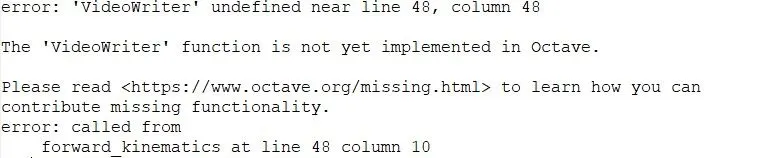 |
I switched over from Octave to Matlab since VideoWriter is not implemented yet in Octave.
The video has been uploaded to YouTube. Please find the link below