Week 2- 2R Robotic Arm Challenge
Aim: To write a program in matlab to simutale the forward kinematics of 2R robotic arm.
introduction: Kinematics is the relation between the position , velocity and accelelation of links without consideration of force cause them.
The forward kinematics is when the kinematics data are know for the joints coordinats. the variables of the end effoctor in a given cartesian space are to be computed.
A robotic joint provides relative motion between two links of the robot. Each joint or axis provides a certain degree of freedom of motion.
position and orientation of an end effoctor in term of the joint angle.
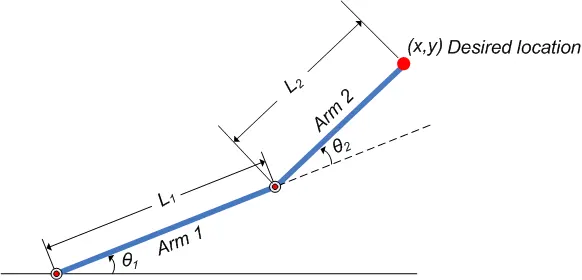
position: x = x2 = a1cos`theta1`+a2cos`(theta1+theta2)`
y = y2 = a1sin`theta1`+a2sin`(theta1+theta2)`
orientation: `[[cos(theta1+theta2), -sin(theta1+theta2)],[sin(theta1+theta2),cos(theta1+theta2)]]`
To calculate the position of x2, x1 has to be calculate .
x1 is defined as = length of the first link arm*cos(angle of the first arm).
y1 is defined as = length of the first link arm*sin(angle of the first arm).
CODE:
% FORWARD KINEMATICS 2R ROBOTIC ARM

clear all
close all
 clc

 l1 = 1
 l2 = .5
 theta1 = linspace(0,90,10);
 theta2 = linspace(0,90,10);
ct = 1
 for i =1:length(theta1);
     THETA1 = theta1(i);
     for j = 1:length(theta2);
         THETA2 = theta2(j);

         x0 = 0;
         y0 = 0;

         x1 = l1*cosd(THETA1);
         y1 = l1*sind(THETA1);

         x2 = x1+l2*cosd(THETA2);
         y2 = y1+l2*sind(THETA2);

         plot([x0 x1],[y0 y1],[x1 x2],[y1 y2],'linewidth',3);
         axis([-0.1 1.5 0 1.5])
         pause(0.03)

         M(ct) = getframe(gcf);
         ct = ct+1;
     end
 end

   movie(M)
   videofile = VideoWriter('forward_kinematics','Uncompressed AVI');
   open(videofile)
   writeVideo(videofile,M)
   close(videofile)
Result: video link - https://youtu.be/N2RZCXMR6Hc
code explanation :- it's better to start with clear all , close all, clc commands.
Next step for code to defind the input and it's valus.
- length of both the arms l1 and l2.
- value of both the thetas with 'linspace' command. the function of linspace command is to linearly space vector.
- Next is set up a counter. A counter is a variable that counts an event in a loop. 'for loop' is used.
- then plotting graph for all the value with pause command is used for time puase of 0.03s . 'M' command is to capture the current frame every time the loop run.
- The final step of the code is to create a movies of the animation of the robitic arm , command used are- movie, videowriter,open , writevideo, finally the close command is used to close the video file.