Week 2- 2R Robotic Arm Challenge
AIM - To simulate forward kinematics of a 2R robotic arm using MATLB
NOMENCLATURE -
L1 - Length of link 1
L2 - Length of link 2
theta 1 = Angle of the first arm (varies from 0 deg to 90 deg) with recpect to X-axis.
theta 2 = Angle of the second arm (varies from deg to 90 deg) with respect to X-axis.
X0 = The base position of robotic arm with respect to x-axis.
X1 = The end position of first link of robotic arm with respect to x-axis.
X2 = The end position of second link of robotic arm with respect to x-axis
Y0 = The base position of robotic arm with respect to Y-axis
Y1 = The end position of first link robotic arm with respect to Y-axis
Y2 = The end position of second link of robotic arm with respect to Y-axis
Equations framed according to find the end positions of maniplator
X1 = X0 + (L1.cos(θ1))
Y1 = Y0 + (L1.sin(θ1))
X2 = X1+(L2.cos(θ2))
Y2= Y1+(L2.sin(θ2))
STEP BY STEP PROCEDURE-
Length of link 1 & 2 and thwta 1 &2 are taken as inputs.x0 and y0 are taken as (0,0) as base point. theta1 and theta2 arrays are intialized.two for loops were used for controlling theta1 and theta2 values. For each value of theta1 the positions of two links are found out using each vakue of theta2. the values of theta1 and theta2 are stored in THETA1 AND THETA2 for every iteration of loops. The graph is plotted using PLOT commnad.The 'getframe(gcf)' command is used inside the second loop for current frame and store the image in array'M'.
The videowriter command creates an empty video file by the name prvided. format is given as
videowriter('forward kinematics of a robotic arm.avi','Uncompressed AVI'). the video is stored in the variable video file.The writevideo command inserts the frames stored in the array 'M' into the videofile.
MATLAB CODE -
clear all
close all
clc

%inputs%
l1 = 1;       %length of the link 1
l2 = 0.5;     %length of link 2

theta1 = linspace(0,90,10);   % link 1 angle with respect to the base
theta2 = linspace(0,90,10);   % link 2 angle with respect to the base

ct = 1;
for i=1:length(theta1)
    THETA1 = theta1(i);

   for j=1:length(theta2)
    THETA2 = theta2(j);

    %coordinates
      x0 = 0;
      y0 = 0;

   x1 = l1*cosd(THETA1);
   y1 = l1*sind(THETA1);

    x2 = x1 + l2*cosd(THETA2);
   y2 = y1 + l2*sind(THETA2);

   %plotting
  plot([x0 x1],[y0 y1],[x1 x2],[y1 y2],'linewidth',3)
  title('Forward Kinematic of Robotic arm ')
  axis([-0.1 1.5 0 1.5])
  pause(0.03)
  M(ct) = getframe(gcf);
  ct = ct+1;


   end

end
movie(M)
videofile = VideoWriter('forward_kinematics_of_a_robotic_arm.avi','Uncompressed AVI');
open(videofile)
writeVideo(videofile,M)
close(videofile)
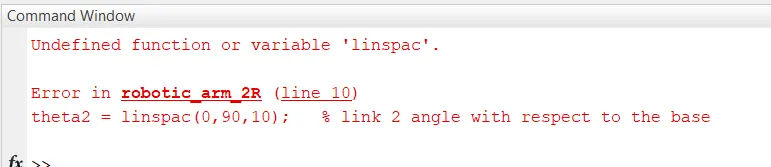
ERRORS FACED WHILE PROGRAMMING -
- Command spelling Typo mistake.
RESULT-
From above code desired output is observed in the link give below.
YOUTUBE LINK -