Week 2- 2R Robotic Arm Challenge
Objective: 1) Write a program to simulate the forward kinematics of a 2R robotic arm.
2) Upload an animation of robotic arm in Youtube.
Theory : The manipulator in robotics is a series of mechanical linkages,arms and joints capable of movement in various directions to control the end effector. Movement of these end effectors determines the workplace. Our aim is to animate the robotic arm and relative motion between the links.
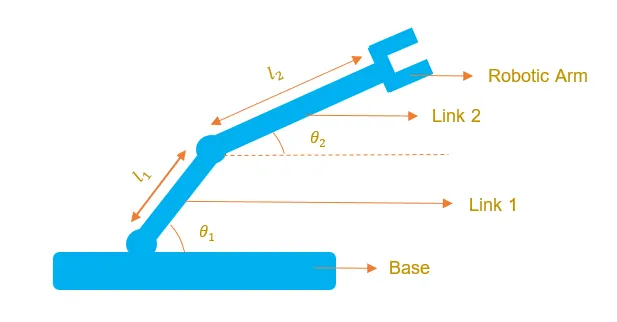
Inputs:
(x0,y0) = starting point of link1
(x1,y1) = end point of link1,starting point of link2
(x2,y2) = end point of link2

   l1 = length of link1
   l2 = length of link2

  theta1 = angle made by link1 with x-axis
  theta2 = angle made by link2 with x-axis


Program codes:

% Forward kinematics of a 2R robotic arm manipulator

clear all
close all
clc

%Inputs
%Length of links
l1 = 1;
l2 = 0.5;

%Value of angles
theta1 = linspace(0,90,10);
theta2 = linspace(0,90,10);
ct=1;
for i = 1:length(theta1)
    THETA1 = theta1(i);
    for j = 1:length(theta2)
        THETA2 = theta2(j);
        %Coordinates of starting point
        x0 = 0;
        y0 = 0;

        %Coordinates of end point of 1st link
        x1 = l1*cosd(THETA1);
        y1 = l1*sind(THETA1);

        %Coordintes of end point of 2nd link
        x2 = x1+l2*cosd(THETA2);
        y2 = y1+l2*sind(THETA2);

        % Plotting

        plot([x0 x1],[y0 y1],[x1 x2],[y1 y2],'linewidth',3)
        %The limits of x and y-axis
        axis([-0.1 1.5 0 1.5])
        %Pause between two figures
        pause(0.03)
        %Command for making an animation or movie
        M(ct)=getframe(gcf);
        ct = ct+1;

    end
end

movie(M)
%Saving the movie in '.avi' format
videofile = VideoWriter('manipulator_for_loop.avi');
open(videofile)
writeVideo(videofile,M)
close(videofile)


Explanation of codes:
1)Initially define the length of links.
2)Values of theta1 and theta2 are assigned using linspace command.
3)Using concept of for loop for iterating the values of desired variable.
4)Defining the coordinates of both links.
5)Plotting all the coordinate values.
6)All figures are assigned to a variable M, one at a time using ct followed by termination of for loop.
7)Finally, movie command is used to combine all the figures saved in M file to make a movie and thereafter saving in .avi format
Animation: Youtube link of the movie has been mentioned below-
Conclusion: This type of simulations are often used by industry.This project is really helpful for beginners.