Week 2- 2R Robotic Arm Challenge
A.I.M:
Write a program in Matlab to simulate the forward kinematics of a 2R Robotic Arm, as shown in the video.
% This is a program for forward kinematics of 2R robotic arm manipulator with animnation video.
clear all % It is used to clear all the workspace.
close all % It is used to close all open pots figure and images.
clc % It is used to clear the command windows.

% Inputs required for calculation of end position of links of a robotic arm.

l1 = 1;                       % l1 is the length of link 1 of a robotic arm.
l2 = 0.5;                     % l2 is the length of link 2 of a robotic arm.

% These are the angles of both the links, where

theta1 = linspace (0,90,15);  % theta1 is the angle made by l1 from the horizontal axis and the linspace command is used to make the angle of link from 0 to 90 with the interval of 15

theta2 = linspace (-20,90,20);% theta2 is the angle made by l2 from the horizontal axis and the linspace command is used to make the angle of link from -20 to 90 with the interval of 20

ct = 1;                       % It is a variable that simply increments (or decrements) by a specific step value in every iteration of a loop.

for i = 1:length(theta1)      % We use for loop to make the function repeats the set of action again & agin.
    THETA1 = theta1(i);       % THETA1 is a variable, where thata1 is a array which contains the 15 values from 0 to 90
    for j = 1:length(theta2)  % We required secound for loop because for each value of theta1 & theta2 changes.
        THETA2 = theta2(j);   % THETA2 is a variable, where thata2 is a array which contains the 20 values from -20 to 90

% The point of a coordinates are required to calculation of values.

% x0 & y0 is the coordinates of link 1 starting points
x0 = 0;
y0 = 0;

% x1 & y1 is the coordinates of link 1 ending points & link 2 starting point both are same, for getting x1 we multiply l1 (lenth of link 1)
% by cosd (we use cosd insted of cos so we get the answer in degree) and the  (THETA1) is the variable for link one.
x1 = l1*cosd(THETA1);
y1 = l1*sind(THETA1);

% x2 & y2 is the coordinates of link 2 ending points for getting x2 we first add the x1 which is the starting point of link 2 + length of 2 link
% multiply by cosd(THETA2) so we get the x2.
x2 = x1 + l2*cosd(THETA2);
y2 = y1 + l2*sind(THETA2);

% The plot command is used to plot the robot arm on x and y coordinates and we use first x0 & x1 , y0 & y1 coordinates for link 1 and for link 2 x1 & x1 , y1 & y2.
plot ([x0 x1],[y0 y1],[x1 x2],[y1 y2], "linewidth", 3);

% The title command is used for givng titel to the figure
title ('Forward Kinematics of 2R Robotic Arm');
axis ([-0.1 1.5 0 1.5]);

% We use pause so THETA 1 & 2 will change at the pause of 0.03s.
pause(0.03);

% Here we store the frames of the different robot arm position
  M(ct) = getframe(gcf);

% It is use to incress the loop in the increment of +1
ct = ct + 1;
    end
end

% The is used to store the all different frames of robot arm at different
% interval and make a video of the frame.
movie(M);
% The VideoWriter command is used to make the video of all frames.
videofile = VideoWriter('forward_kinematics_of_2R_robotic_arm.avi','Uncompressed AVI');
% It is used to open the video file
open(videofile);
writeVideo(videofile, M);
close(videofile);
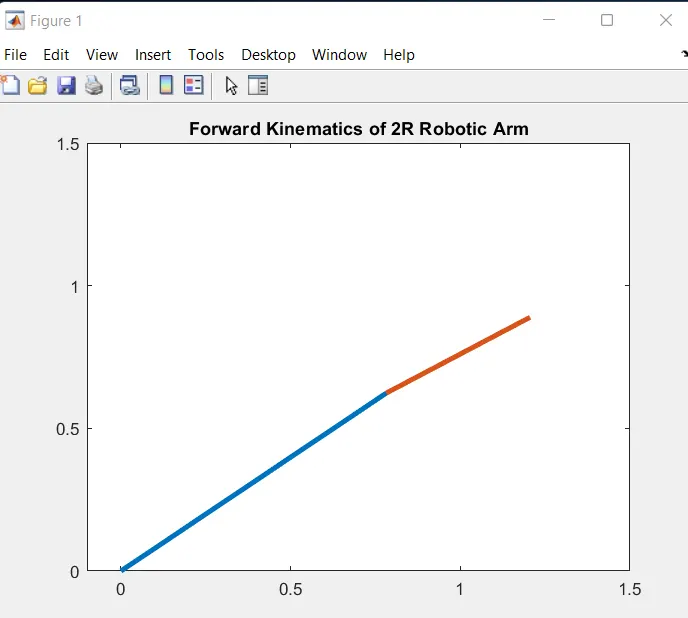
THE LINK FOR THE ANIMATED VIDEO ON YOUTUBE IS: https://youtu.be/4Y0Ot758uek