Week -2
- Make a Simulink model of Doorbell using solenoid block with the following details:
In the above arrangement, when the switch is closed the electromagnet receives electrical power from the battery and pulls the metal arm to hit the bell producing sound.
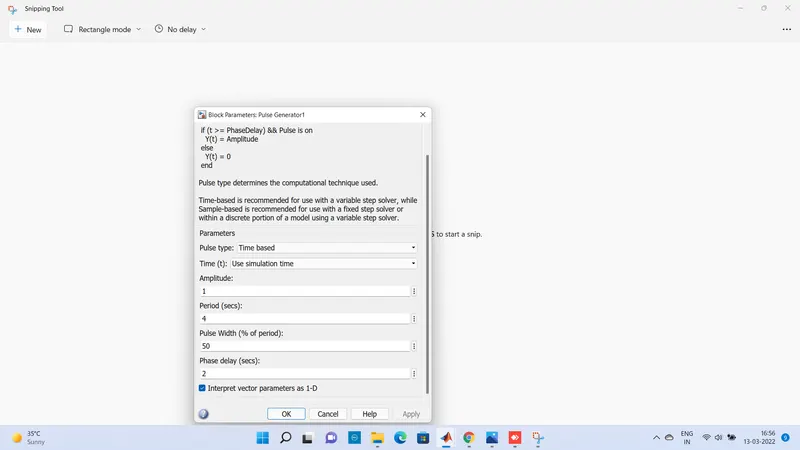
Create a situation where the switch is closed for 2 seconds and then released. Observe the physical movement of the plunger.
SOLUTION
REQUIRED BLOCK:
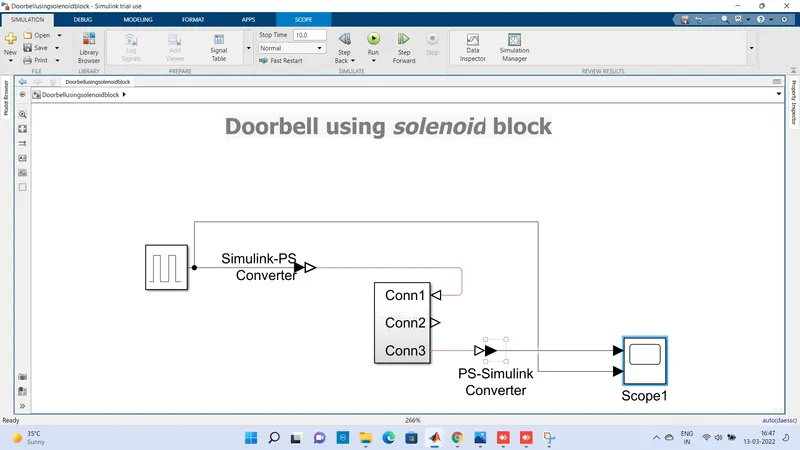
1-BATTERY,2-IDEAL TRANSLATIONAL MOTION SENSOR,3-ELECTRICAL REFERENCE-4-MECHANICAL TRANSLATIONAL REFERENCE,5-SOLENOIDS,6-SOLVER CONFIGURATION,7PULSE GENERATOR, SIMULINK TO PS CONVERTOR(CONN1)SCOPE(CONN3),PS-SIMULINK CONVERTER (C0NN2)
SIMULINK MODEL EXPLANATION
.The pulse generator is used to create square wave pulses at regular interval the block diagaramwave form parameters amplitude,pulse width,period,and phase delay determine the shap of output waveform
-The switch block used is controlled by external physical signal is greater than the thresold parameter then the switch is closed ,otherwises switch is open.
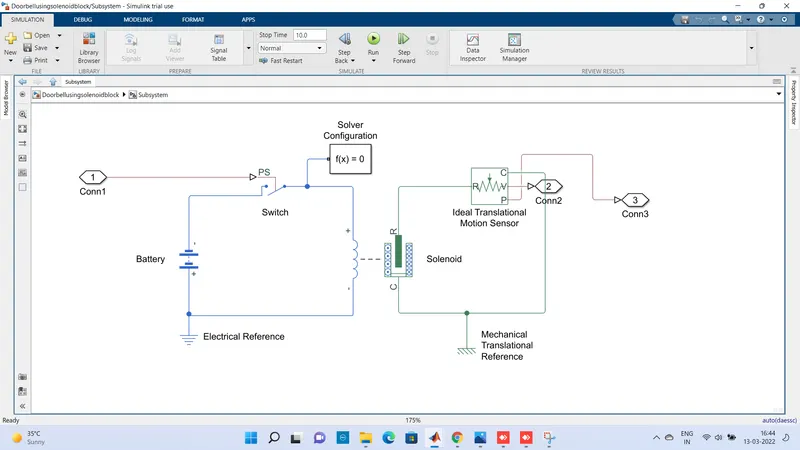
-The positive teriminal of the switch is connected to switch and negative terminal is connected to electrical reference.
-The solenoid block is connected width switch and battery and we will get a complete electrical circuit.The port c is connected width mechanical reference.
-The ideal translational sensor is connected width solenoid block R to observer the movement of plunger
-Scope is connected width the ideal translational sensor to get the output
-PS-Simulink converter is used to convert physical signal to simulink signal
-Solver configuration physical network reprented by a connected simscape blocks requries solver setting information for simulation
RESULT:
OUTPUT AND INPUT WAVEFORMS
RESULT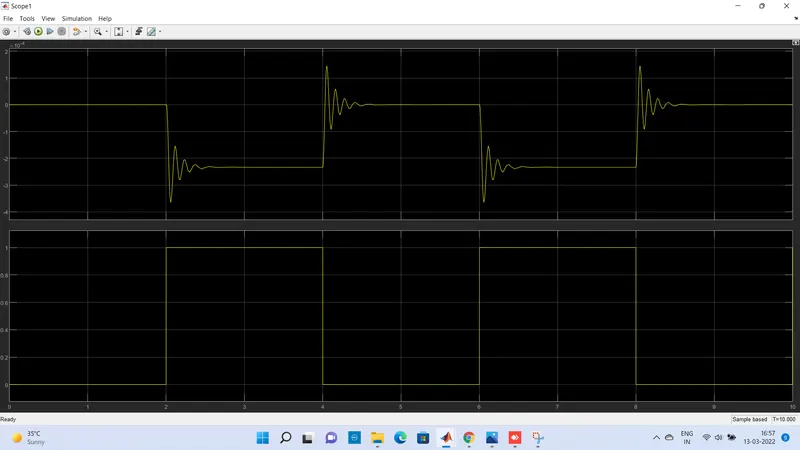
Time period given is 2 seconds to the pulse generator to open and close the switch is closed the solenoid blocks receives electrical power from abattery and the plunger move from port Rand C to hit the bell and produce sound
2.USE A THERMISTOR TO SENSE THE TEMPERATURE OF A HEATER AND TURN OFF OR TURN ON THE FANS AS PER BELOW CONDITIONS
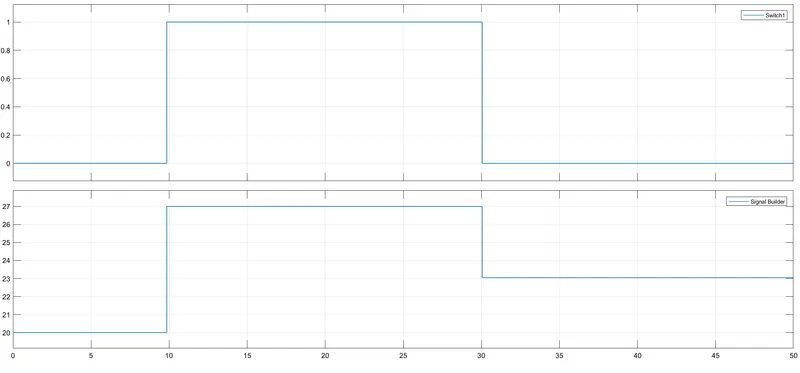
Temperature sources:20 degree celusis from 0 to 10 seconds,27 degree celusis from 10 to 30 seconds,23 degree celusis from 30 to 50 seconds
FAN CONDITIINS:ON if the temperature above 25 degree celusis,OFF otherwise
SOLUTIONS:
SIMULINK DIAGARAM
BLOCK DIAGARAM REQUIRED:SIGNAL BUILDER,THERMISTOR,CONTROLLED TEMPERATURE SOURCE,SWITCH,CONSTANTS,SCOPE,SOLVER CONFIGURATION,CURRENT SENSOR,DC VOLTAGE SOURCE,THERMAL REFERENCE
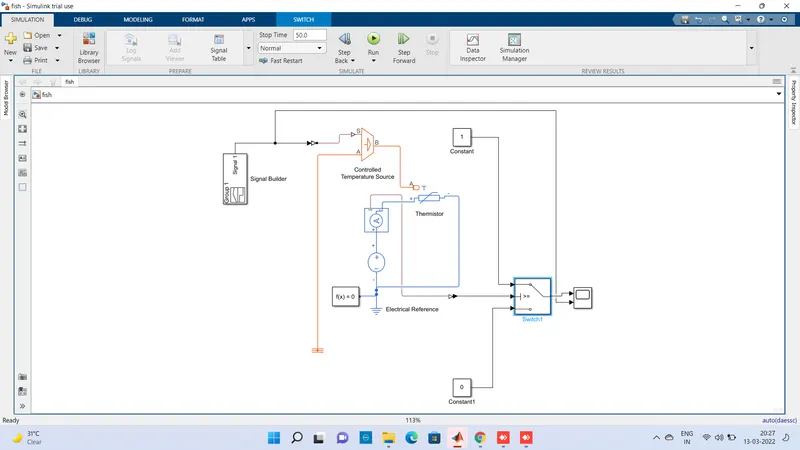
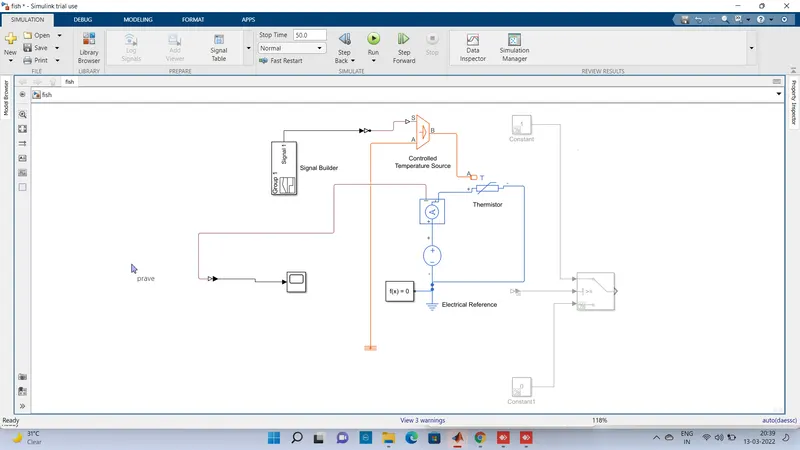
SIMULINK MODEL EXPLANATION
Signal ,bulider block is used to input the values as per given condition
1:At point,time=0 seconds,temperature=20 degree celusis
2:At point,time=10 seconds,temperature=20 degree celusis
3:At point,time=10 seconds,temperature=27 degree celusis
4:At point ,time =30 seconds,temperature=27 degree celusis
5:At point,time=30 seconds,temperature=23 degree celusis
6:At point,time=50 seconds,temperature=23 degree celusis
FIND THRESHOLD VALUES
Fan conditions:on if the temperature above 25 degree celusis,off otherwise
So first set the input 25 degree in signal builder than save and important to connect the output from current sensor-ps to simulink converter-scope to get the threshold value .i will attach the waveform
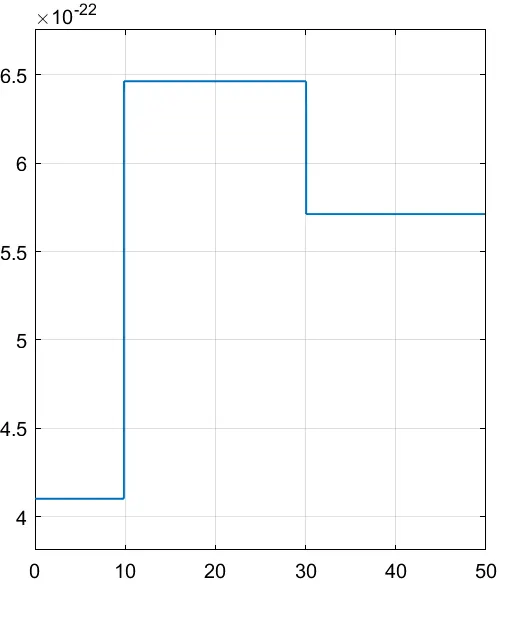
.SO threshold value is 5.72*10^22
.hence this condition when proved 25 degree Cis fan ON otherwise OFF
.Controlled temperature sources represents as ideal source of thermal energy that can maintain a controlled temperature difference regardless of the heat flow rate the temperature difference is set by the physical signal portS.A positive temperature difference causes the temperature at port B to be greater than the temperature at port A
.Thermistor is a type resistor whose resistance is based upon temperature
.The current sensor is used to convert the current measured between two points in a physical signal.
.Voltage sources which reprents 12v dc
.Electrical reference block is given
.Solver configuration,Each physical network reprented by aconnected simscape blocks requires solver setting information for simulation
RESULT
From the above conditions ,all the values are evaluted
FAN conditions ON if the temperature above 25 degree celusis OFF otherwise