Week -2
1. Simulink model of Doorbell using Solenoid Block .
Solenoid- A solenoid is an actuator assembly with a sliding ferromagnetic plunger inside the coil. Without power, the plunger extends for part of its length outside the coil; applying power pulls the plunger into the coil. Electromagnets with fixed cores are not considered solenoids.
Typically, it has a multiturn coil of magnet wire surrounded by a frame, which is also a magnetic flux carrier to enhance its efficiency.
In simple terms, a solenoid converts electrical energy into mechanical work.
Here i use pulse generator, solenoid, battery, switch, scope, ideal translational motion sensor, electrical reference, solver configuration, mechanical translational reference, PS To simulink.
Pulse Generator- The Pulse Generator block generates square wave pulses at regular intervals. The block waveform parameters, Amplitude, Pulse Width, Period, and Phase delay, determine the shape of the output waveform.
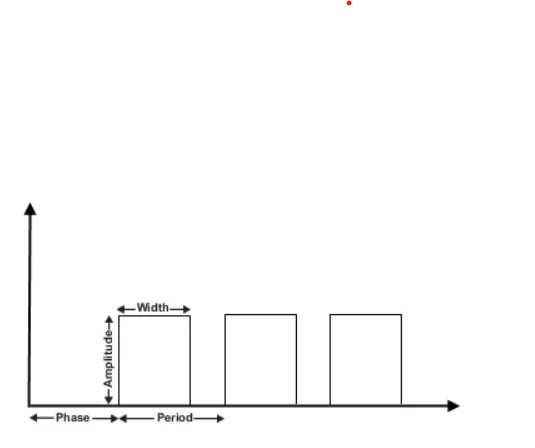
Fig:- Pulse Generator
Ideal Translational Motion Sensor block represents a device that converts an across variable measured between two mechanical translational nodes into a control signal proportional to velocity or position.
Electrical reference - A model must contain at least one electrical reference port (electrical ground).
Solver configuration - Each physical network represented by a connected Simscape™ block diagram requires solver settings information for simulation. The Solver Configuration block specifies the solver parameters that your model needs before you can begin simulation.
Mechanical Translational Reference - This block represents a mechanical translational reference point, that is, a frame or a ground. Use it to connect mechanical translational ports that are rigidly affixed to the frame (ground).
PS To simulink It is used to convert physical signal to simulink signal.
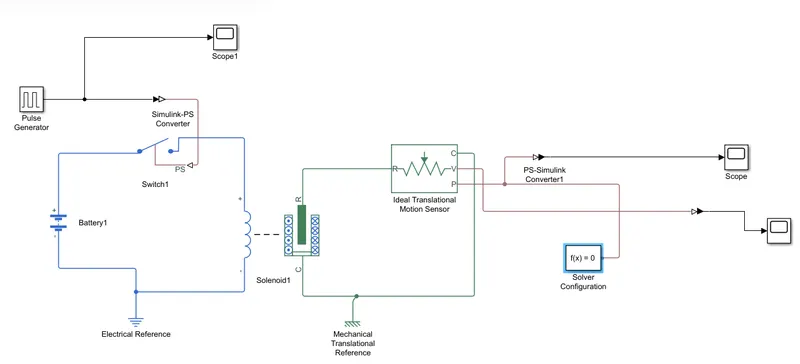
Fig:- Simulink block diagram of Doorbell
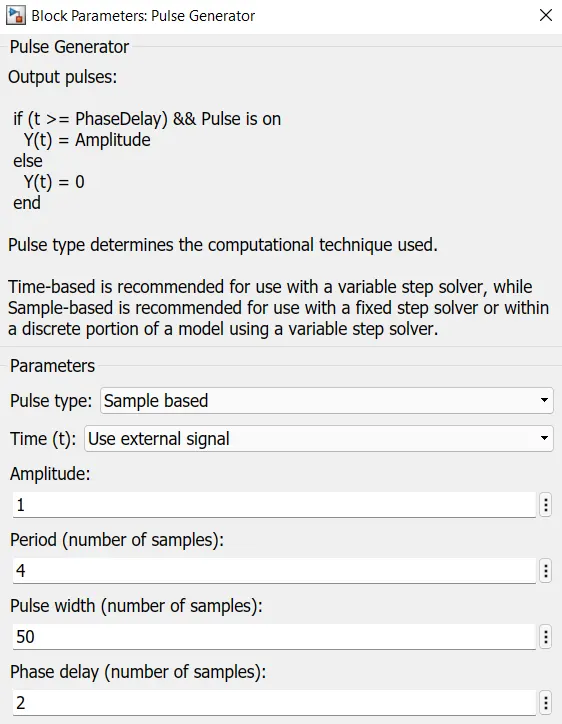
Fig :-Pulse generator parameters
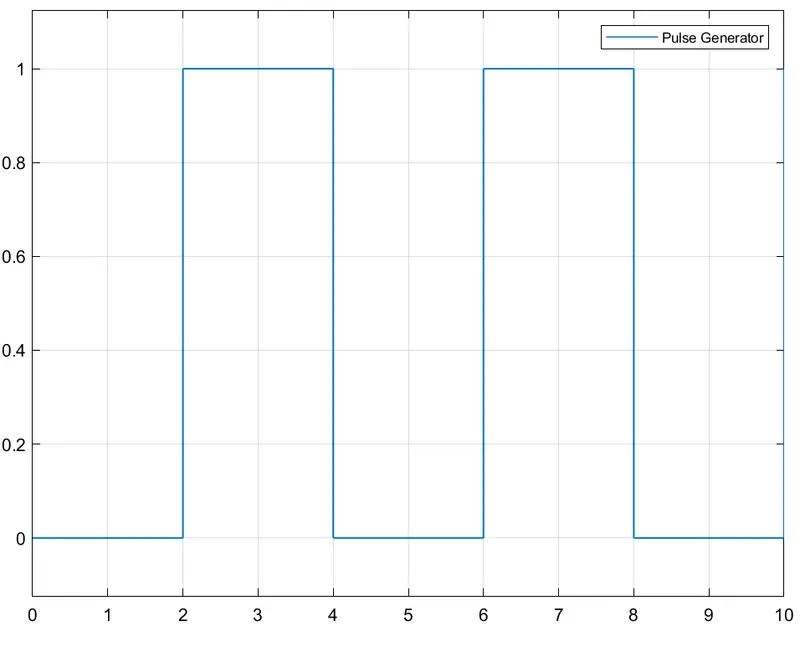
Fig:- Scope view of Pulse Generator
Battery and sloenoid are connected to an electrical reference and switch at one end and on the other end it is connected with ideal translational motion sensor which senses the motion of plunger.We get output form V (velocity)and P(position) of the plunger respectively.
As per reqired delay of 2 seconds we get the following response graphs.
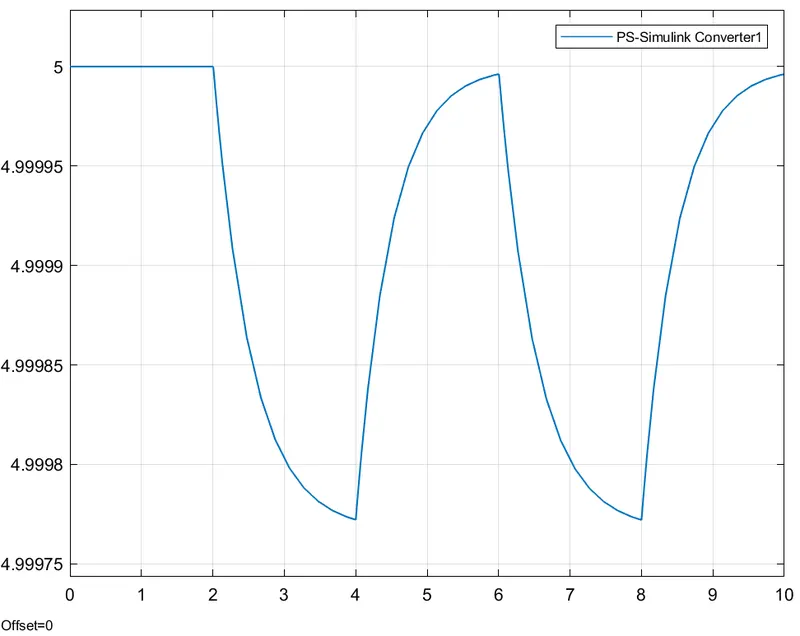
Fig :- position graph
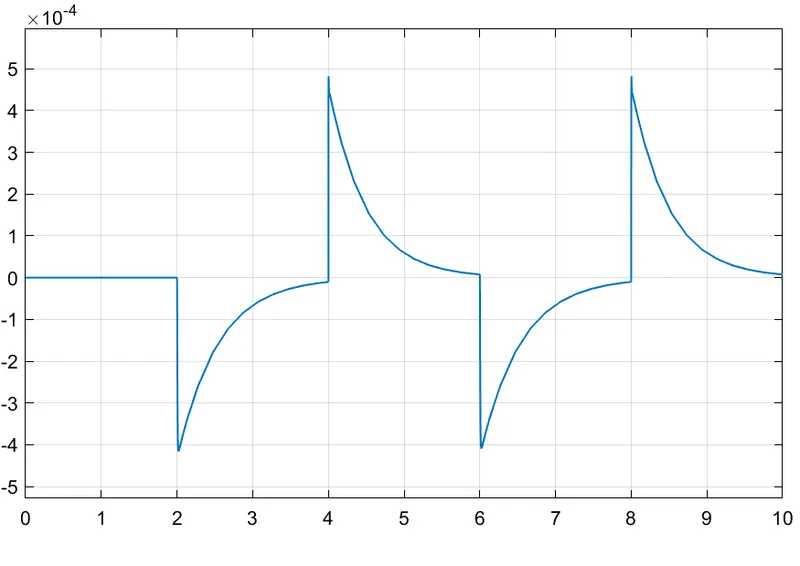
Fig:- Velocity graph
Here in velocity graph we can clearly see the plunger movement when the solenoid is energised.
2. A thermistor to sense the temperature of a heater to operate fan.
To use a thermistor to sense the temperature of a heater & turn on or turn off the fan as per the below conditions:
- Temperature source: 20 °C from 0 to 10 seconds, 27 °C from 10 to 30 seconds, 23 °C from 30 to 50 seconds.
- Fan conditions: ON if the temperature above 25 °C, OFF otherwise.
A thermistor is a type of resistor whose resistance is strongly dependent on temperature, more so than in standard resistors. The word is a combination of thermal and resistor . Thermistors are widely used as inrush current limiters, temperature sensors (negative temperature coefficient or NTC type typically), self resetting over current protectors, and self-regulating heating elements (positive temperature coefficient or PTC type typically). An operational temperature range of a thermistor is dependent on the probe type and is typically in between −100 °C (−148 °F) and 300 °C (572 °F).
- With NTC thermistors, resistance decreases as temperature rises; usually due to an increase in conduction electrons bumped up by thermal agitation from the valence band. An NTC is commonly used as a temperature sensor, or in series with a circuit as an inrush current limiter.
- With PTC thermistors, resistance increases as temperature rises; usually due to increased thermal lattice agitations particularly those of impurities and imperfections. PTC thermistors are commonly installed in series with a circuit, and used to protect against overcurrent conditions, as resettable fuses.
In this we are using NTC type of thermistor.
Here in the block diagram we use signal builder, thermistor, controlled temperature source, battery, resistor , voltage sensor, switch and few previously discussed blocks as well.
Controlled temperature source-This block represents an ideal energy source in a thermal network that can maintain a controlled temperature difference regardless of the heat flow rate. The temperature difference is set by the physical signal port S. A positive temperature difference causes the temperature at port B to be greater than the temperature at port A.
Resistor- This block models a resistor with optional tolerance, operational limits, fault and thermal noise modeling. To model temperature effects, select the thermal variant of this block by right-clicking on the block and selecting Simscape block choices and Show thermal port.
Voltage sensor-The block represents an ideal voltage sensor, that is, a device that converts voltage measured between any electrical connections into a physical signal proportional to the voltage.
For input we will be using signal builder to provide input for 0-10 sec 20'c for 20-30sec 27'c and for 30-50sec 23'c.
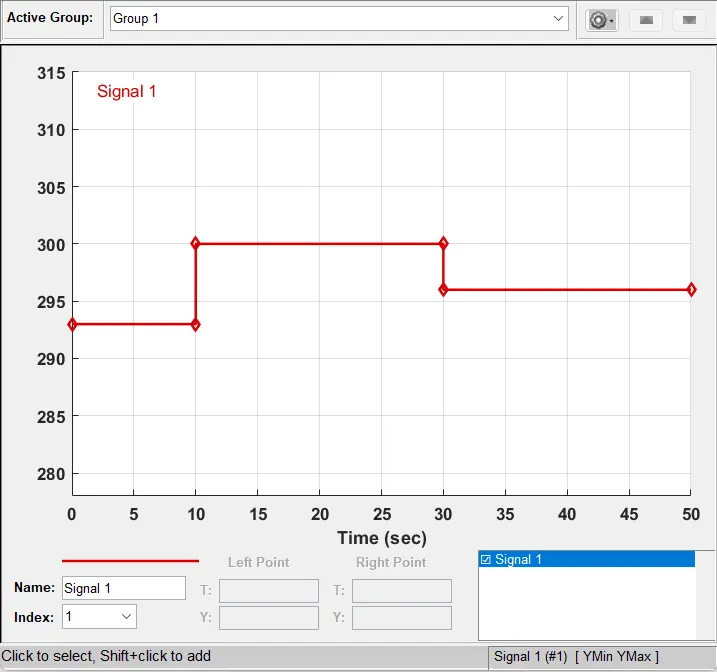
Temperature source is connected to a rersisotr sourced with a 50v supply .A voltage sensor is attached to monitor the fluctuation in voltage when temperature changes.
The output of the voltage is connected to a switch which is used as conditioning to ON or OFF the Fan.
The output is observed on the scope based on the given fixed input. 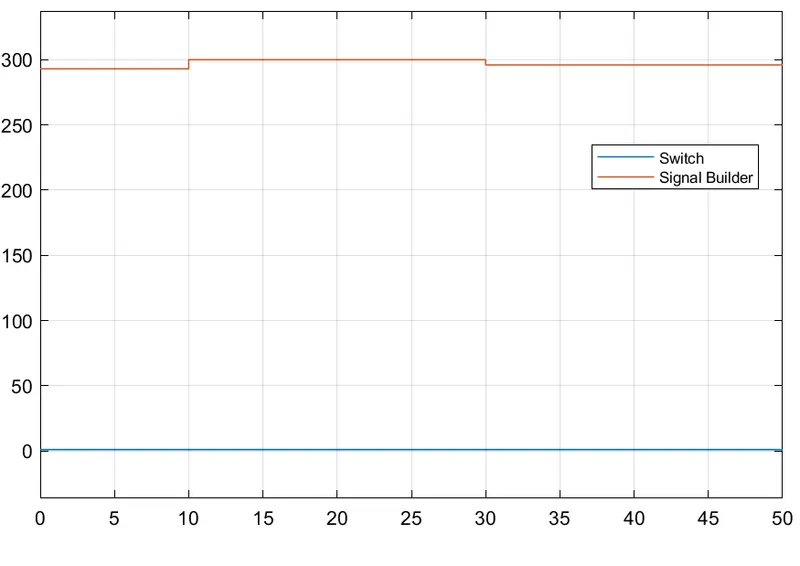
Fig:- Response of the switch.
Below is the link provided for simulink models of Doorbell and thermistor to sense the temperature of a heater & turn on or turn off the fan
https://drive.google.com/drive/u/0/folders/1aPR36XW7gDrqXkpuenk2kJtexNaRvLuk