Week -2
CHALLENGE 1: DOORBELL USING SOLENOID
AIM:
To Create a model of Doorbell using solenoid block and to trace the motion of the plunger in doorbell for every 2 seconds,and simulate it using simulink.
MODEL:
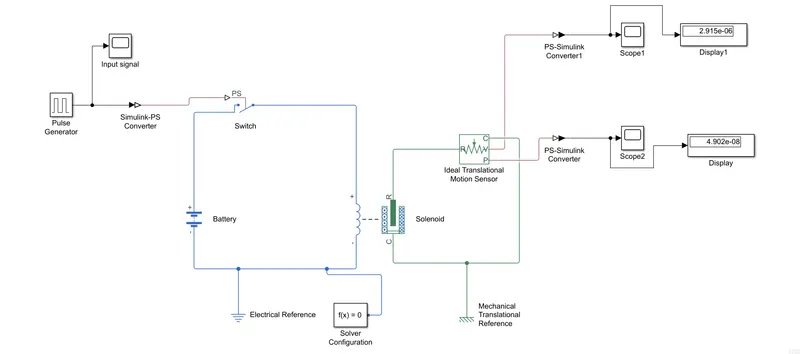
BLOCKS USED:
- Pulse Generator
- Simulink to PS(Physical Signal converter)
- Switch
- Solenoid Block
- Battery(Energy/power source)
- Electrical reference
- Solver Configuration
- Ideal Translational Motion Sensor
- Mechanical reference
- PS to Simulink converter
- Scope
- Display
EXPLANATION OF THE SIMULATION/MODEL:
- First of all create a new model in simulink window and save it.And, Search for PULSE GENERATOR BLOCK which will produce a pulse like signal continously by time-based or sample-based,in that we are choosing time-based with a simulation time of 10 seconds,amplitude and phae-delay for 2 seconds.
- SIMULINK-PS CONVERTER BLOCK which is used to convert the simulink signal in to physical signal,same as PS-SIMULINK CONVERTER BLOCK will convert physical signal in to simulink signal.
- BATTERY BLOCK is the electrical source for the solenoid and we are going to connect it with a switch which will open and close as per the input signal.
- SOLENOID BLOCK,a solenoid is a electro-mechanical device which will produce both electrical and mechanical outputs.It is connected to the switch at one end and another end is connected with the negative port of the Battery.
- So,in solenoid we can actuall trace the position of the plunger which will vibrate due to elctromagnetic field produced in it and the voltage intake to create the electromagnetic field.
- To trace the position of the plunger,we are going to connect an IDEAL TRANSLATIONAL MOTION SENSOR to the mechanical part of the solenoid.
- And,we have to ensure that both the elctrical and mechanical parts or systems are connected with a reference,its very important to ensure that.And,as same as SOLVER CONFIGURATION which is also an important we have to connect it to model,otherwise our model will show an error while simulation.
- By using SCOPE BLOCK we can actually trace the motion or position of the plunger and the voltage.
RESULT/GRAPH:
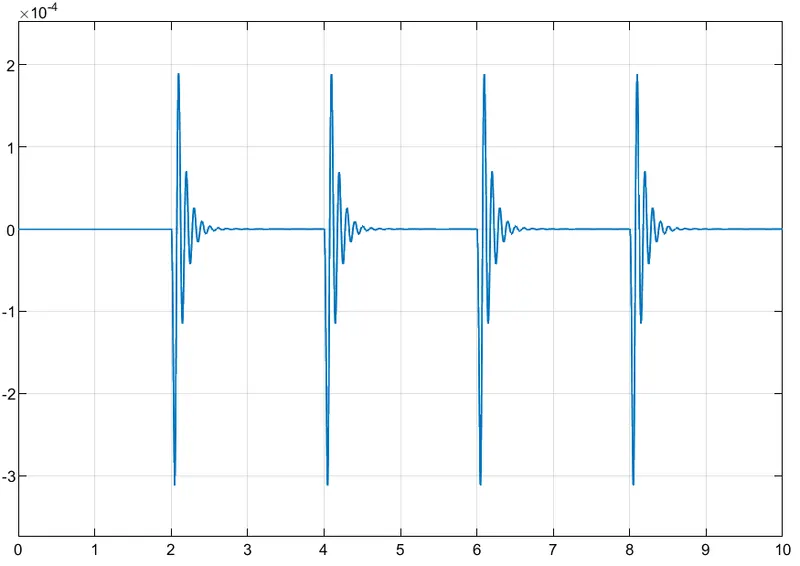
The above graph shows the position of the plunger.
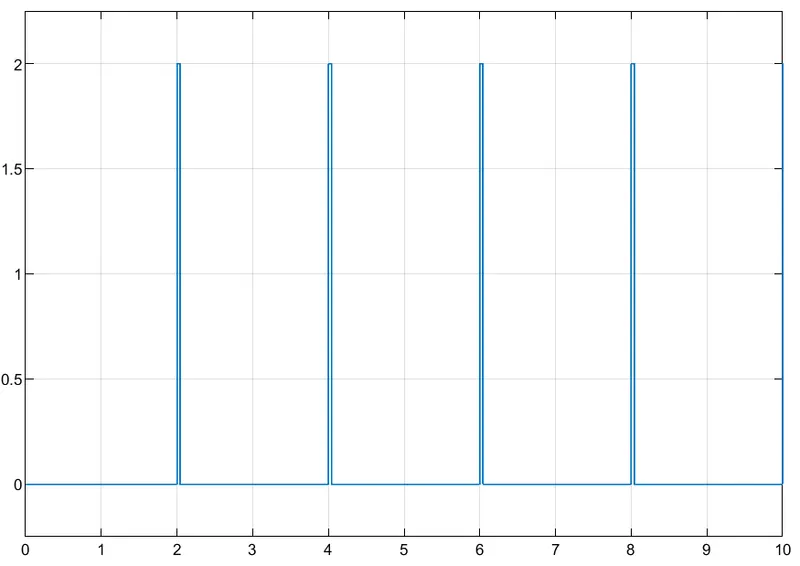
The above graph shows the input signal or input voltage.
-------------------------------------------------------------------------------------------------------------------------------------------
CHALLENGE 2: THERMISTOR AS A TEMPERATURE SENSOR
AIM:
To create a model of Temperature Sensing device with Thermistor and Fan as per the given condition of temperature using Simulink.
MODEL:
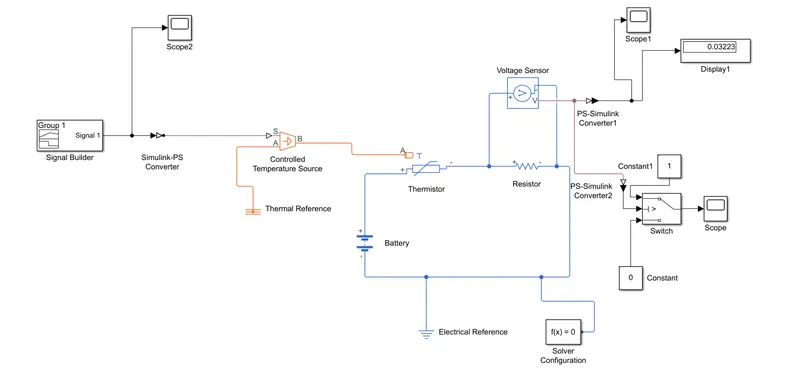
BLOCKS USED:
- Signal Builder
- Simulink-PS converter
- Controlled Temperature Source
- Thermal Reference
- Thermistor
- Battery
- Resistor
- Voltage Sensor
- Electrical Reference
- Switch
- Constant
EXPLANATION:
- First we are using SIGNAL BUILDER block to build our signal as per our given condition as follows,
Temperature:20 degree C from 0 sec to 10 sec Fan Condition: Temperature Above 25 degree C,
27 degree C from 10 sec to 30 sec FAN Switch ON,Otherwise OFF.
23 degree C from 30 sec to 50 sec
- Using CONTROLLED TEMPERATURE SOURCE,we ca pass the signal to the THERMISTOR with the help of Simulink-PS converter.
- THERMISTOR BLOCK:There are two types of thermistor is there,one is PTC THERMISTOR and another is NTC THERMISTOR.Now,we are using NTC THERMISTOR.Thermistor's behaviour will change by the material which it's made off.Here, by seeing the block itself we observe that the thermistor is a device,which will intake temperature as a input and gives voltage or currwent source as a output.
- Battery source is connected to thermistor with the resistor block and to measure the voltage from the termistor some voltage sensor block is also connected with it.
- And,we are using a switch block to control fan by the condition given to it.By giving the thersold temperature conditio we can actually control the fan as per the temperature condition.
- And,we are using the SCOPE block to display results.
RESULT: