Week -2
Objective:
- To make a Simulink model of Doorbell using Solenoid block for the given conditions.
- To make a Simulink model using thermistor to sense the temperature of heater & turn ON or OFF the fan as per given conditions.
Software used: MATLAB R2020a.
Description:
1.Doorbell:
Condition:
The switch should be closed for 2 seconds & then released.
Solenoid:
A solenoid is a long piece of wire which is wound in the shape of a coil. When the electric current passes through the coil it creates a relatively uniform magnetic field inside the coil. The solenoid can create a magnetic field from electric current and this magnetic field can be used to generate a linear motion with the help of a metal core. This simple device can be used as an electromagnet, as an inductor or as a miniature wireless receiving antenna in a circuit.
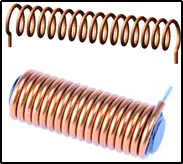
Solenoid
Principle:
The solenoid simply works on the principle of “electromagnetism”. When the current flow through the coil magnetic field is generated in it, if you place a metal core inside the coil the magnetic lines of flux is concentrated on the core which increases the induction of the coil as compared to the air core.
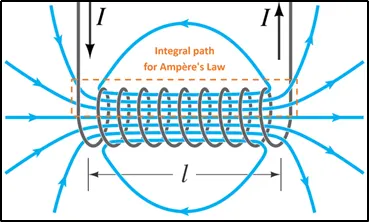
Solenoid working principle
Simulink-Simscape model for the Doorbell using Solenoid:
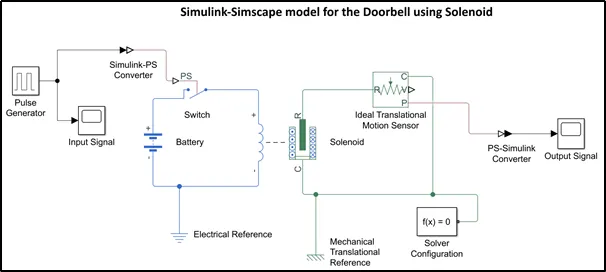
Block used in the model construction:
- Simulink blocks.
- Pulse generator.
- Scope block.
- Simulink-PS converter.
- Switch.
- Battery.
- Electrical and Mechanical translational reference.
- Solenoid.
- Ideal Translational motion sensor.
- PS-Converter.
- Solver configuration.
Model construction:
a. Pulse generator is used to provide input signal for the system. The following snap shows the pulse generator parameters where, Phase delay is of 2 seconds which makes the switch to be closed for 2 sec.
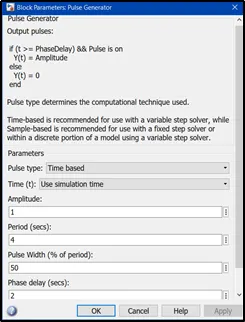
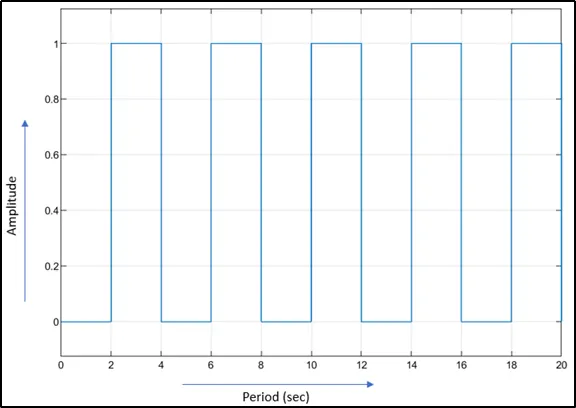
b. The signal generated by the pulse generator is a Simulink signal, but the Simscape blocks need physical signal as the input. For which ‘Simulink-PS converter’ is used to convert the signal as physical signal.
c. Solenoid block (Simscape block) is placed in the Simulink canvas, where blue lines are for the electrical connections and green are for mechanical connections. For the electrical portion a battery of 12V is connected and electrical reference (ground) is given to it.
d. Translational motion sensor is connected on the other side of the solenoid, to detect the deflection. Mechanical translational reference point is used to connect mechanical translational ports that are rigidly affixed to the frame (ground).
e. When a model is build using Simulink & Simscape blocks, a solver configuration block should be connected, so that it specifies the solver parameters that are required for the model before starting the simulation.
f. The position probe ‘P’ from the motion sensor block will provide us the output. Before connecting this to the scope, the physical signal from the motion sensor is converted to Simulink using the ‘PS-Simulink converter’.
g. Once the connections are done, run the simulation (I’ve given 20 sec as the ‘Stop time’ value which is nothing but the simulation time) and check for errors and fix them, if any. Once the simulation is run, we open the scope which is connected to the motion sensor and graphical results can be seen.
Output:
We can observe the deflection of the plunger at 2 second interval, graphically.
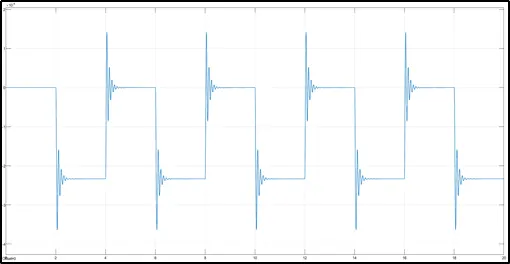
Output of the Doorbell using Solenoid.
2. Thermistor:
Thermistor is a type of resistor whose resistance is dependent on temperature. An operational temperature range of a thermistor is dependent on the probe type and is typically in between −100 °C (173 K) and 300 °C (573 K).
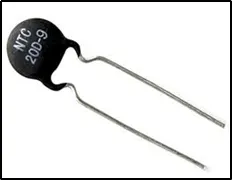
Thermistor
There are two types of thermistors namely,
- NTC (Negative Temperature Coefficient) whose resistance is inversely proportional to temperature.
- PTC (Positive Temperature Coefficient) whose resistance is directly proportional to temperature.
Advantages:
- It has highly sensitivity with a stable response.
- These are rugged and are less costly.
- It has a wide range of resistance values.
- The life of thermistor is long and can withstand electrical and mechanical stresses.
Disadvantages:
- Measurement of wide range of temperature is not suitable.
- Self-heating.
- It exhibits non-linear characteristics.
Condition:
Input: -
- 0 to 10 sec, temperature is 200C (293.15 K)
- 10 to 30 sec, temperature is 270C (300.15 K)
- 30 to 50 sec, temperature is 230C (296.15 K)
Output: -
- Fan should be ON when temperature is > 250C (298.15 K) else OFF.
Simulink-Simscape model.
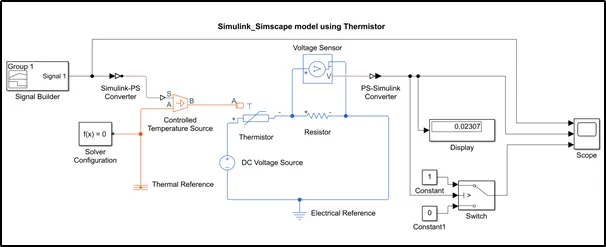
Blocks used in model construction:
- Signal builder.
- Simulink-PS converter.
- Controlled temperature source.
- Thermal reference.
- Thermistor block.
- DC voltage source.
- Resistor.
- Voltage sensor.
- PS-Simulink converter.
- Display block.
- Constant block.
- Switch.
- Scope block.
Model construction:
a. Signal builder block is used to provide the input signal to the model. For which, the given temperature values (degree Celsius) are converted to Kelvin (because all thermal blocks are defined in Kelvin). The below snap shows the signal predefined according to the given conditions.
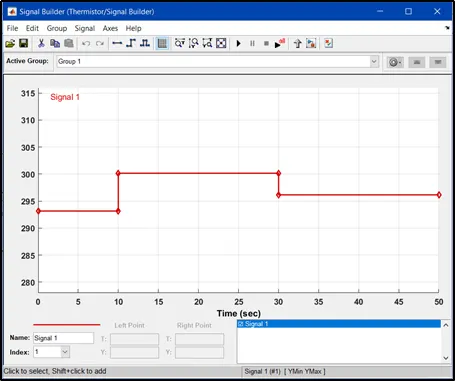
Input temperature conditions.
b. The signal from the signal builder i.e., Simulink signal is converted into Physical signal using the ‘Simulink-PS converter’ then this signal is provided as input to the Simscape block (Controlled temperature source).
c. The ‘Controlled temperature source’ provides physical output based on the conditions given to port S. The port A is connected to the Thermal reference which will be the reference point for the thermal network of the model and port B is connected to the thermal port ‘A’ of the thermistor.
d. The Thermistor block used in the Simulink canvas is a NTC (Negative Temperature Coefficient) thermistor whose resistance increases with decrease in temperature. The physical output from the Controlled temperature source is connected to the thermal port ‘A’. Below snap shows the parameters defined for the thermistor blocks where reference temperature is 250C (298.15 K).
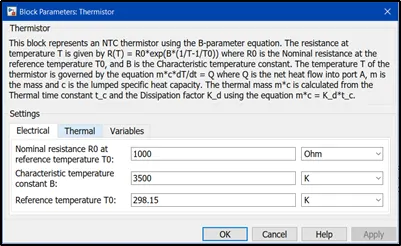
Thermistor block parameters.
e. A DC voltage source of 25V, Resistor of resistance 1 ohm with electrical reference (i.e., ground for electrical network) used to complete the circuit for the thermistor circuit. A voltage sensor is connected across resistor, which converts voltage measured between any electrical connections into a physical signal proportional to the voltage.
f. The physical signal from the Voltage sensor is converted back to Simulink signal using the PS-Simulink converter. This signal is connected to Display block to know the threshold value, which is 0.02307. Now, I’ve used a switch block which has three ports, where port-2 (u2) is the control unit for the other two ports. Port-1 (closes the circuit) is active if the criteria given for u2 is satisfied if not, port-2 (circuit will be open) is activated.
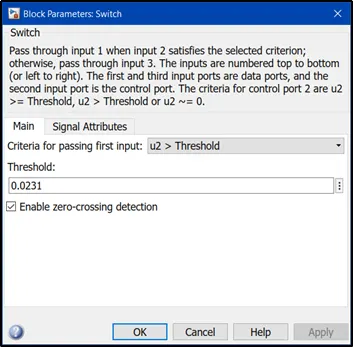
Switch block parameters.
g. Two constant blocks are used with values ‘1’ & ‘0’ where, ‘1’ represents ON & ‘0’ represents OFF. Further, this switch is connected to the fan and the it works according to the status of the switch The below snap shows the parameters defined for switch to operate according to the given condition.
Output:
To check the results graphically Scope block is used.
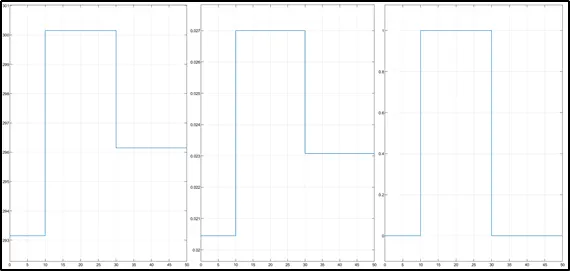
In the above snap there are three graphical results where,
- First graph represents the input signal (Temperature in Kelvin along Y-axis and Stop time along X-axis).
- Second graph represents the solver value (Voltage along Y-axis and Stop time along X-axis).
- Third graph represents the output of the model i.e., the status of the switch (ON or OFF) for the given input condition and it is clear from this graph that the switch is ON when temperature is above 298.15 Kelvin.
Conclusion:
- Simulink model of Doorbell using Solenoid block was done and the switch is made to close for 2 second interval.
- Simulink-Simscape model was built using ‘Thermistor’, and the model satisfies the given condition.