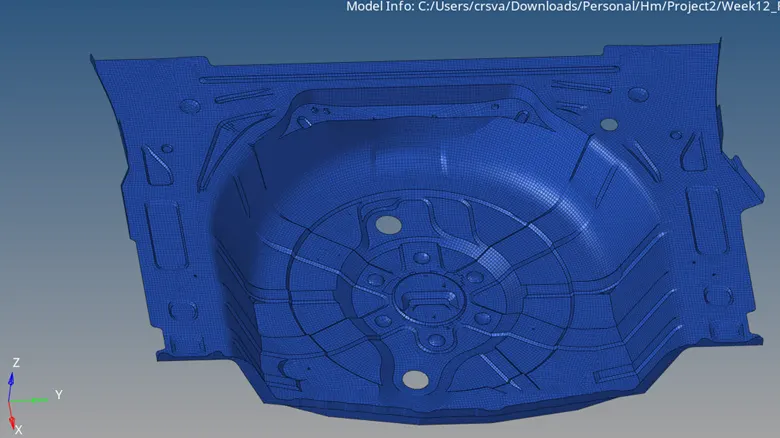
Week 12:Project 2-Meshing of Rear Wheel Holder challenge
Week12 – Project 2
Rear Wheel Holder
Objective: To mesh the given geometry. Model mesh should pass below quality requirements.
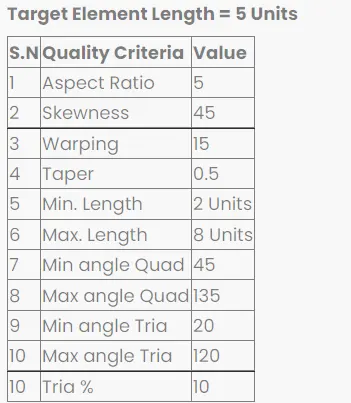
Target Element size= 5 units
CAD model image:
Open the HM file. The imported geoemetry looks as below
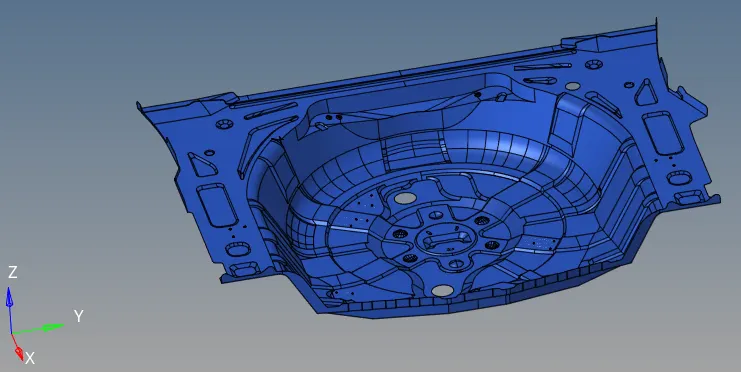
Figure: CAD model
Procedure with required images:
Step-1:
The model geometry is checked for any issues. Toggle by 2D Topo
Since it is sheet metal and uniform thickness of 0.75mm we go for generating the midsurface mesh
mesh->create->midsurface
Toggle by element quality

we check for any free edges, use appropriate tolerance, preview equivalence and equivalence nodes

Step-2:
Preferences-> Criteria file settings->set the below criteria for 2D
Step-4:
Based on any quality issues, we go for 2D->rebuild mesh by selecting few elements in the failing region.
In case of any gaps in the mesh, we go for F3-> replace node option to fill the gap. or we can select ruled mesh option.

We can also choose F6-> create tria or quad incase of any missing elements

F10-> 2D-> check quality. Save failed and F5->retrieve->mask
Find attached. Remesh. Then check quality again same as above.
Check for any duplicate elements in the same window and delete them
2D->quality index-> cleanup tools
2D->elem cleanup
Step-5: Final mesh