Week 11 - Simulation of Flow through a pipe in OpenFoam
Aim:
In this challenge, you will simulate an axi-symmetric flow by applying the wedge boundary condition. The flow is laminar and flows through a constant cross-section pipe at an inlet Reynold's number of 2100. You can do a transient or steady state simulation and you will validate your results with the Hagen- Poiseuille's equations for the fully developed flow.
You will also write code in Matlab to automate the generation of blockMeshDict file. The code should take inputs like pipe length, diameter, wedge angle, etc and output a fully functional blockMeshDict file.
Expected Results
- Validate Hydro-dynamic length with the numerical result
- Validate the fully developed flow velocity profile with its analytical profile
- Validate maximum velocity and pressured drop for fully developed flow
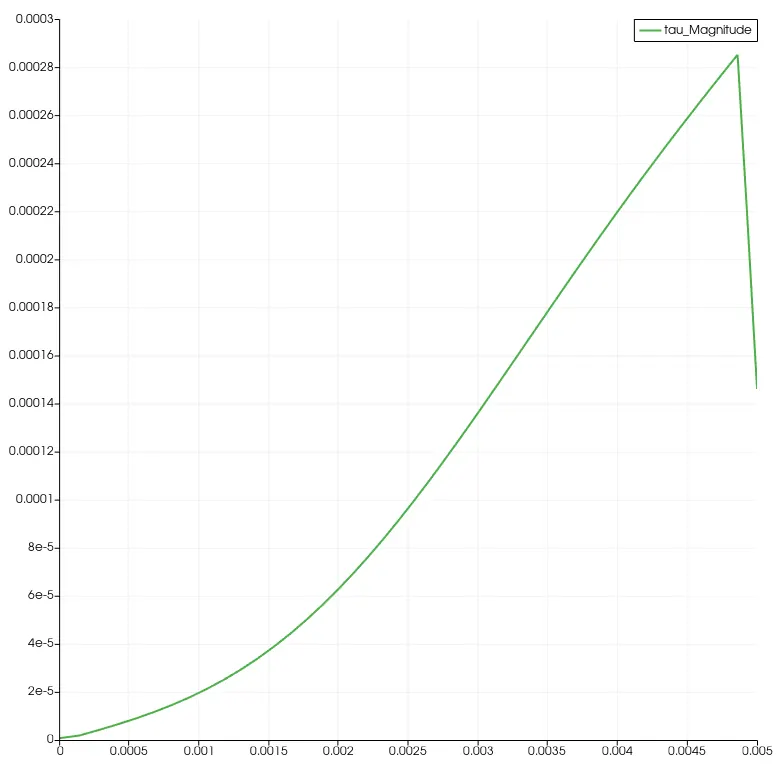
- Post-process Shear stress and validate wall shear stress for fully developed flow
Answer:
This problem of fluid flowing through pipe is based on Hagen - Poiseuille law. This law is applicable to all real world problems which are not in ideal condition. The Hagen - Poiseuille law is law that helps in determining the pressure drop in the incompressible & newtonian fluid flowing in laminar flow through long cylinder pipe with constant cross section.
Following the Hegen - Poiseuille equation to calculate pressure difference between two ends:
`DeltaP = (8pimuLQ)/A^2`
where,
`DeltaP` = Pressure difference between the two ends
`mu` = Dynamic Viscosity
Q = Volumetric Flow Rate
L = Length of pipe
A = Cross Section of pipe
Inputs:
Reynolds Number - 2100
Pipe Dia = 0.01 m
Fluid = Water
Dynamic Viscosity = 8.9e-4 Pa.sec
Density of Water = 1000 kg/m^3 at 20 degree celcius surrounding temperature
Wedge angle = 4 degree
Simulation - 2D incompressible flow simulation through cylindrical pipe
The geometry will be created as per the following image.
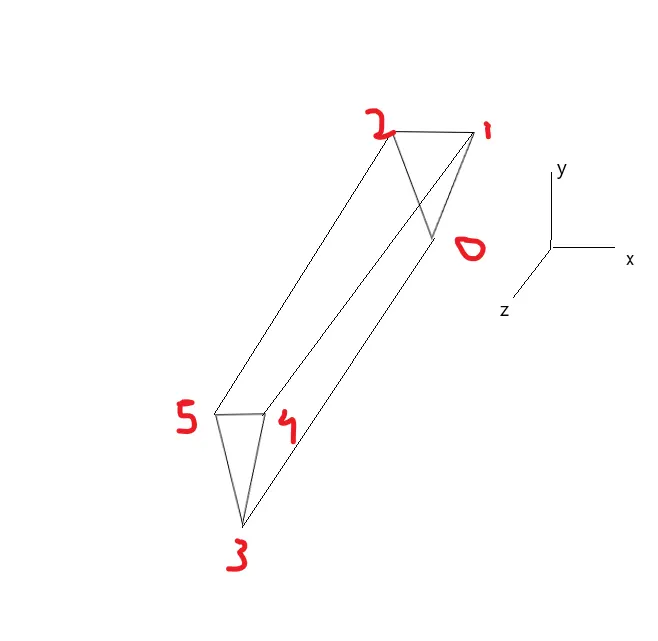
To solve this problem, the blockMeshDict file has been created using Octave which will be utilized in OpenFOAM to solve the simulation. The flow is laminar & incompressible that's why icoFOAM solver will be used from the OpenFOAM solver library.
Based on the inputs of Re, fluid density & dynamic viscosity, the reamining parameters like kinematic viscosity, length of pipe, fluid velocity & kinematic pressure have been determined using the code written in MATLAB language. The same code is also used to generate The code is shown in the below attachment.
Main Code:
% Module - Introduction to CFD using MATLAB & OpenFOAM
% Challenge Week 11 - Simulation of Flow through a pipe in OpenFoam

% Author - Kartik Mehta
% Date - 3/10/2021

% The aim is to simulate laminar & incompressible flow in the circular pipe.
% This code will be used to generate blockMeshDict file in OpenFOAM to perform
% simualtion.
% OpenFOAM Solver - icoFOAM
% Fluid - Water

close all
clear all
clc

% Inputs
Re = 2100; % Reynolds Number

% Fluid properties
rho = 1000; % Density (kg/m^3)
mu = 8.9e-04; % Dynamic Viscosity (Pa.sec)
nu = mu/rho; % Kinematic Viscosity (m^2/s)

% Pipe dimensions
D = 0.01; % Pipe diameter (m)
Radius = D/2; % Radius of pipe (m)
Ac = (pi/4)*D^2; % Cross Section area of the pipe (m^2)
p_w = D*pi; % Wetted Perimeter(m)
Dh = 4*Ac/p_w; % Hydraulic Diameter(m)
rh = Dh/2; % Hydraulic Radius of pipe(m)

% Average Inlet velocity(m/s)
v_avg = (Re * mu)/(rho*Dh);

% Maximum velocity(m/s)
v_max = v_avg*2;

% Maximum shear stress
tau_max = (2*mu*v_max)/rh;

% Entracne Length of the pipe(m)
Le = 0.06*Re*Dh;

% Length of pipe(m)
L = Le + 0.18;

% Calculating Pressure Loss using Haigen Poiseulle's Equation
p_loss = (32*mu*(L-Le)*v_avg)/D^2;
head_loss = p_loss/(rho*9.81); % head loss
p_kinematic = p_loss/(rho*9.81); % Kinematic Pressure (psi)

% Wedge angle
angle = 4; % in degrees

% Printing variables in the command window
fprintf("Kinematic Viscosity = %d m^2/s\n", nu)
fprintf("Length of Pipe = %d m\n", L)
fprintf("Maximum Velocity = %d m/s\n", v_max)
fprintf("Kinematic Pressure = %d psi \n", p_kinematic)

% blockMeshDict header

l1 = '/*--------------------------------*- C++ -*----------------------------------*\';
l2 = '  =========                 |';
l3 = '  \\      /  F ield         | OpenFOAM: The Open Source CFD Toolbox';
l4 = '   \\    /   O peration     | Website:  https://openfoam.org';
l5 = '    \\  /    A nd           | Version:  8';
l6 = '     \\/     M anipulation  |';
l7 = '\*---------------------------------------------------------------------------*/';
l8 = 'FoamFile';
l9 = '{';
l10 = '    version     2.0;';
l11 = '    format      ascii;';
l12 = '    class       dictionary;';
l13 = '    object      blockMeshDict;';
l14 = '}';
l15 = '// * * * * * * * * * * * * * * * * * * * * * * * * * * * * * * * * * * * * * //';

% Creating file to write code
file = fopen('blockMeshDict.txt','wt');

% Writing first l1 tp l15 lines into text file
fprintf(file, '%s\n', l1);
fprintf(file, '%s\n', l2);
fprintf(file, '%s\n', l3);
fprintf(file, '%s\n', l4);
fprintf(file, '%s\n', l5);
fprintf(file, '%s\n', l6);
fprintf(file, '%s\n', l7);
fprintf(file, '%s\n', l8);
fprintf(file, '%s\n', l9);
fprintf(file, '%s\n', l10);
fprintf(file, '%s\n', l11);
fprintf(file, '%s\n', l12);
fprintf(file, '%s\n', l13);
fprintf(file, '%s\n', l14);
fprintf(file, '%s\n', l15);
fprintf(file, '\n');

% Unit Conversion
l16 = 'convertToMeters 1;';

% Vertices Header
l17 = 'vertices';
l18 = '(';

% Vertices
v_0 = [0 0 0];
v_1 = [rh*sind(angle/2) rh*cosd(angle/2) 0];
v_2 = [-rh*sind(angle/2) rh*cosd(angle/2) 0];
v_3 = [0 0 L];
v_4 = [rh*sind(angle/2) rh*cosd(angle/2) L];
v_5 = [-rh*sind(angle/2) rh*cosd(angle/2) L];

% Block definition
b = 'hex (3 5 4 3 0 2 1 0) (50 1 200) simpleGrading (0.5 1 1)';

% For arc edges
eg1 = 'arc 1 2';
eg2 = 'arc 4 5';

% Arc edges vertices
v_6 = [-rh rh 0];
v_7 = [-rh rh L];

% Defining spaces
spaces4 = blanks(4);
spaces8 = blanks(8);
spaces10 = blanks(10);


% Writing l16, l17 & vertices information to file
fprintf(file, '%s\n', l16);
fprintf(file, '\n');
fprintf(file, '%s\n', l17);
fprintf(file, '%s\n', l18);
fprintf(file, '%s(%f %f %f)\n', spaces4, v_0);
fprintf(file, '%s(%f %f %f)\n', spaces4, v_1);
fprintf(file, '%s(%f %f %f)\n', spaces4, v_2);
fprintf(file, '%s(%f %f %f)\n', spaces4, v_3);
fprintf(file, '%s(%f %f %f)\n', spaces4, v_4);
fprintf(file, '%s(%f %f %f)\n', spaces4, v_5);
fprintf(file, ');\n\n');
fprintf(file, 'blocks\n');
fprintf(file, '(\n');
fprintf(file, '%s%s\n', spaces4, b);
fprintf(file, ');\n\n');
fprintf(file, 'edges\n')
fprintf(file, '(\n');
fprintf(file, '%s %s (%f %f %f)\n', spaces4, eg1, v_6);
fprintf(file, '%s %s (%f %f %f)\n', spaces4, eg2, v_7);
fprintf(file, ');\n\n');

% boundary faces information
inlet = '(0 1 2 0)';
outlet = '(3 5 4 3)';
wedge_1 = '(3 4 1 0)';
wedge_2 = '(0 2 5 3)';
wall = '(1 4 5 2)';
axis = '(0 3 3 0)';

% Writing boundary faces information
fprintf(file, 'boundary\n');
fprintf(file, '(\n');
% Inlet
fprintf(file, '%sinletWall\n', spaces4);
fprintf(file, '%s{\n', spaces4);
fprintf(file, '%stype patch;\n', spaces8);
fprintf(file, '%sfaces\n', spaces8);
fprintf(file, '%s(\n', spaces8);
fprintf(file, '%s%s\n', spaces10, inlet);
fprintf(file, '%s);\n', spaces8);
fprintf(file, '%s}\n', spaces4);
% outlet
fprintf(file, '%soutletWall\n', spaces4);
fprintf(file, '%s{\n', spaces4);
fprintf(file, '%stype patch;\n', spaces8);
fprintf(file, '%sfaces\n', spaces8);
fprintf(file, '%s(\n', spaces8);
fprintf(file, '%s%s\n', spaces10, outlet);
fprintf(file, '%s);\n', spaces8);
fprintf(file, '%s}\n', spaces4);
% front face
fprintf(file, '%sfront\n', spaces4);
fprintf(file, '%s{\n', spaces4);
fprintf(file, '%stype wedge;\n', spaces8);
fprintf(file, '%sfaces\n', spaces8);
fprintf(file, '%s(\n', spaces8);
fprintf(file, '%s%s\n', spaces10, wedge_1);
fprintf(file, '%s);\n', spaces8);
fprintf(file, '%s}\n', spaces4);

% back face
fprintf(file, '%sback\n', spaces4);
fprintf(file, '%s{\n', spaces4);
fprintf(file, '%stype wedge;\n', spaces8);
fprintf(file, '%sfaces\n', spaces8);
fprintf(file, '%s(\n', spaces8);
fprintf(file, '%s%s\n', spaces10, wedge_2);
fprintf(file, '%s);\n', spaces8);
fprintf(file, '%s}\n', spaces4);

% wall
fprintf(file, '%swall\n', spaces4);
fprintf(file, '%s{\n', spaces4);
fprintf(file, '%stype wall;\n', spaces8);
fprintf(file, '%sfaces\n', spaces8);
fprintf(file, '%s(\n', spaces8);
fprintf(file, '%s%s\n', spaces10, wall);
fprintf(file, '%s);\n', spaces8);
fprintf(file, '%s}\n', spaces4);
% axis
fprintf(file, '%saxis\n', spaces4);
fprintf(file, '%s{\n', spaces4);
fprintf(file, '%stype empty;\n', spaces8);
fprintf(file, '%sfaces\n', spaces8);
fprintf(file, '%s(\n', spaces8);
fprintf(file, '%s%s\n', spaces10, axis);
fprintf(file, '%s);\n', spaces8);
fprintf(file, '%s}\n', spaces4);
fprintf(file, ');\n\n');

% mergePatchPairs
fprintf(file, 'mergePatchPairs\n');
fprintf(file, '(\n');
fprintf(file, ');\n\n');
fprintf(file, '%s\n', l15);
fclose(file);
The screenshot of the calculated parameters to perform simulation is as below:
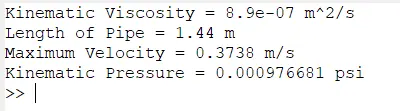
This parameters will be inserted into the dictionaries of OpenFOAM case files to simulate flow through cylinder pipe.
OpenFOAM is the commercial grade open source CFD software which is highly used by academia & industries to oslve the complex fluid flow problems. The software needs to operate though command line prompt either in Linux based operating system or in Windows using WSL. It has number of solvers to address the variety of fluid problems in different applications.
The case file of OpenFOAM contains the number of folders & text files for the initial conditions, boundary conditions & solver settings. The user needs to modify these case files to implement desirable simulatin conditions. The general structure of the case file is shown below. The number files shown in different folder can be vary as per the solver type. For example, for this project, the icoFOAM solver has been used. Two cases have been provided with the solver. From these two, cavity case has been used to simulate the flow through cylinder problem. For this solver the epsilon file, temperature & kinematic energy files are not available in "0" folder.
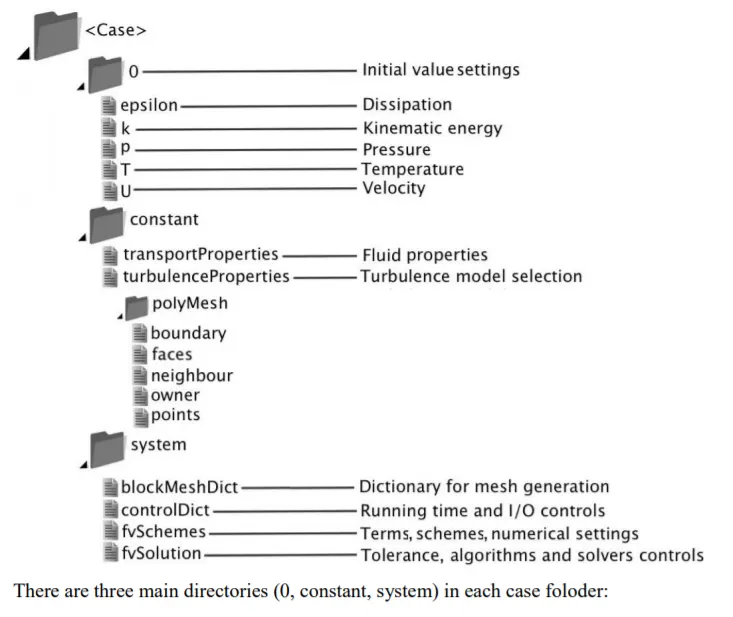
There are normally three folders available in the case file which are 0, system & constant. The 0 folder has files which describes the initial conditions of the simulation. The constant folders has dictionaries which contains the inputs for the parameters which are remain constant through out the simulation. And at last, the system folder contains the dictionaries with details for meshing, to control simulation like time limit, numerical schemes & numerical solutions.
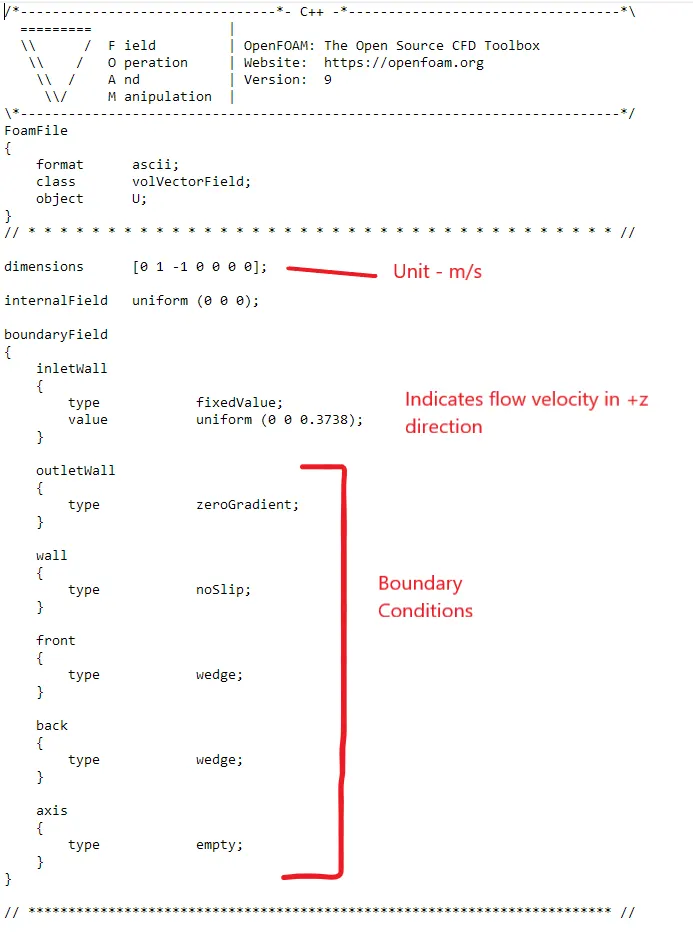
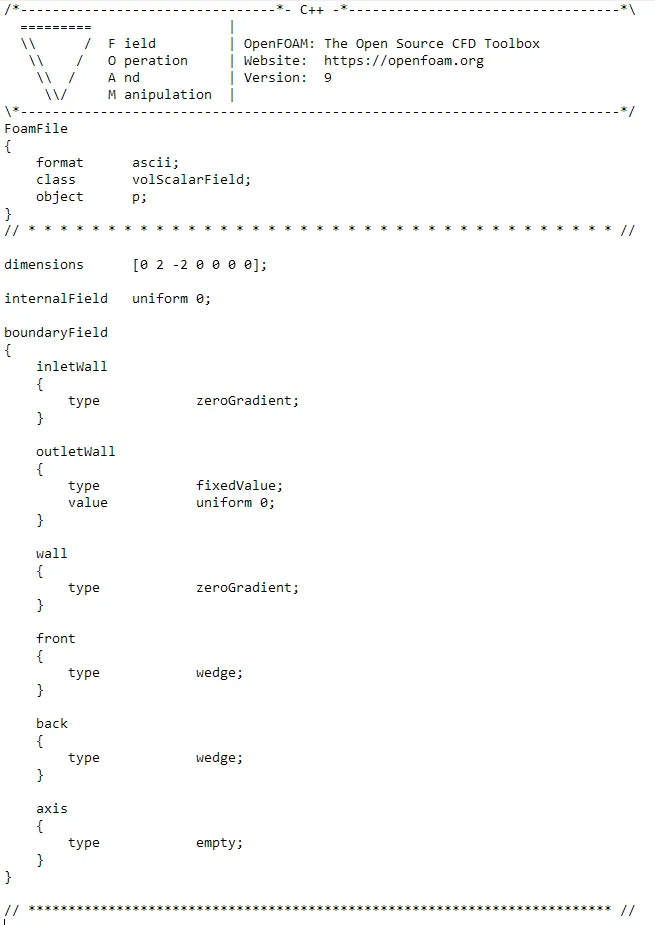
First folder, 0, has two files in this case which are velocity (U) & pressure (p). The details of both files are as follows:
Velocity Dictionary (U):
Pressure Dictionary (p):
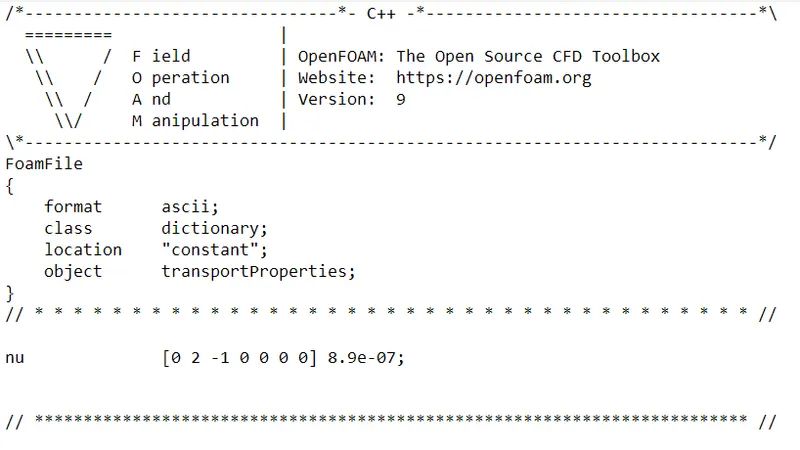
The next folder is for the constants. It has dictionary for the transportProperties which contains the details of kinematic viscosity & one folder that contains the details generated mesh which is called polyMesh.
TransportProperties Dictionary:
The last folder is system folder. It has 4 files for icoFOAM solver.
The mesh will be generated in OpenFOAM using blockMesh command. The text file or dictionary that contains the information to generate mesh on the model is called blockMeshDict.
As per objective, the blockMeshDict file has been produced using Octave software which is open source software based on MATLAB programmming language. The generated blockMeshDict file is shown as below which is inserted as code but it is a text file.
blockMeshDict:
/*--------------------------------*- C++ -*----------------------------------*\
  =========                 |
  \\      /  F ield         | OpenFOAM: The Open Source CFD Toolbox
   \\    /   O peration     | Website:  https://openfoam.org
    \\  /    A nd           | Version:  8
     \\/     M anipulation  |
\*---------------------------------------------------------------------------*/
FoamFile
{
    version     2.0;
    format      ascii;
    class       dictionary;
    object      blockMeshDict;
}
// * * * * * * * * * * * * * * * * * * * * * * * * * * * * * * * * * * * * * //

convertToMeters 1;

vertices
(
    (0.000000 0.000000 0.000000)
    (0.000174 0.004997 0.000000)
    (-0.000174 0.004997 0.000000)
    (0.000000 0.000000 1.440000)
    (0.000174 0.004997 1.440000)
    (-0.000174 0.004997 1.440000)
);

blocks
(
    hex (3 5 4 3 0 2 1 0) (50 1 200) simpleGrading (0.5 1 1)
);

edges
(
     arc 1 2 (-0.005000 0.005000 0.000000)
     arc 4 5 (-0.005000 0.005000 1.440000)
);

boundary
(
    inletWall
    {
        type patch;
        faces
        (
          (0 1 2 0)
        );
    }
    outletWall
    {
        type patch;
        faces
        (
          (3 5 4 3)
        );
    }
    front
    {
        type wedge;
        faces
        (
          (3 4 1 0)
        );
    }
    back
    {
        type wedge;
        faces
        (
          (0 2 5 3)
        );
    }
    wall
    {
        type wall;
        faces
        (
          (1 4 5 2)
        );
    }
    axis
    {
        type empty;
        faces
        (
          (0 3 3 0)
        );
    }
);

mergePatchPairs
(
);

// * * * * * * * * * * * * * * * * * * * * * * * * * * * * * * * * * * * * * //
controlDict:
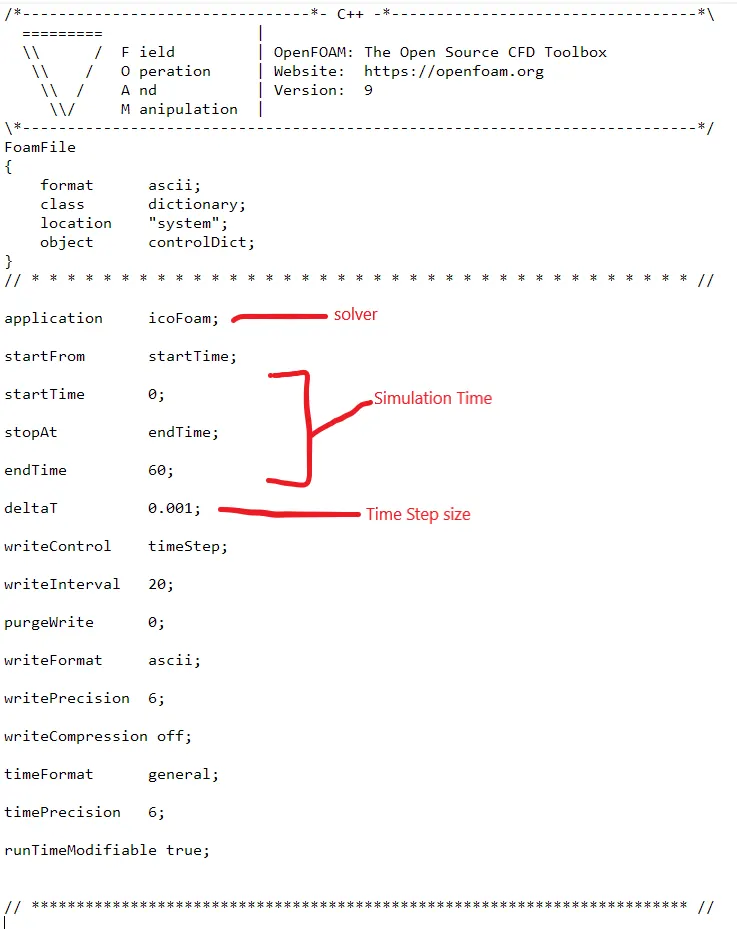
The remaining files in the system folder, fvScheme & fvSolution, has been kept constant.
Meshing:
To generate mesh, blockMesh command is need to be enetered into the command prompt.
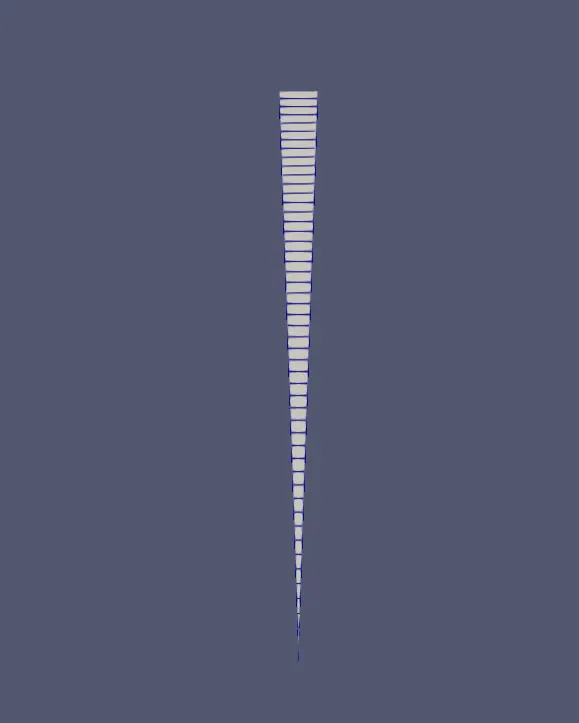
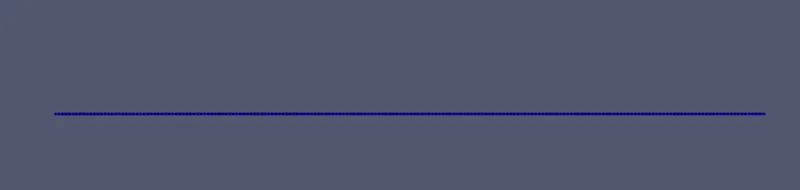
The screenshot of generated mesh has been shown below.
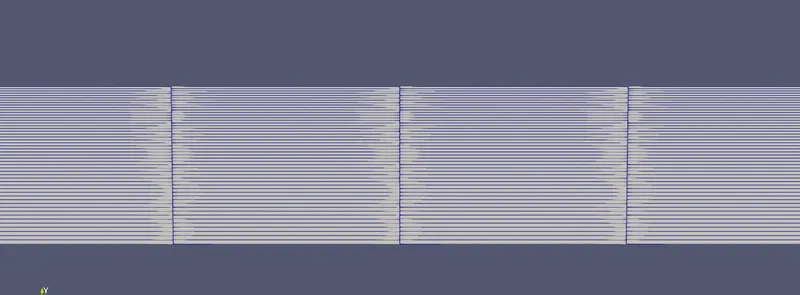
After generating mesh, to simulate the "icoFoam" command has been used to solve the problem. Results are as follows for velocity profile:
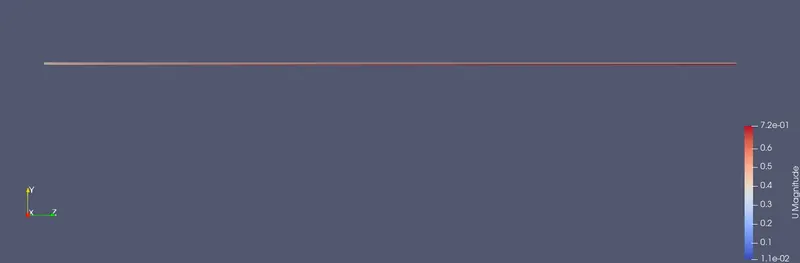
Screenshot of the above results are as follows:
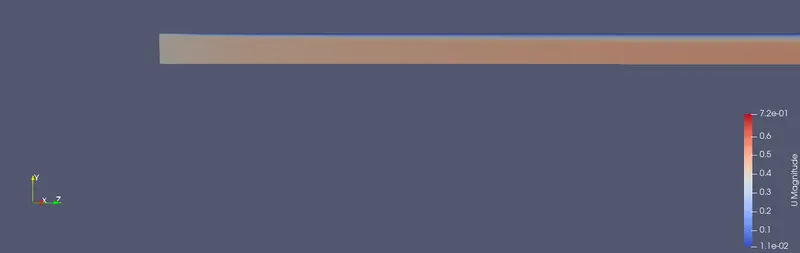
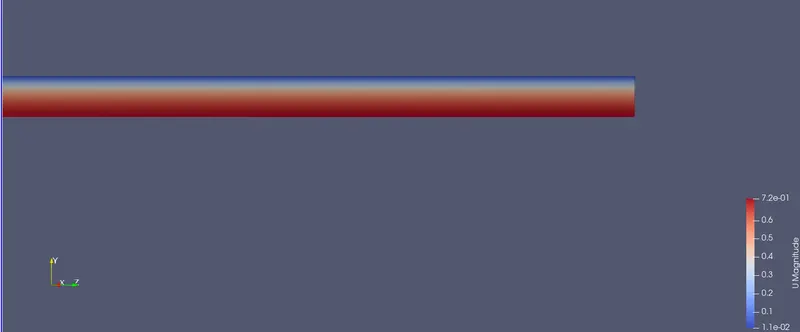
For post-processing, Paraview software has been used.
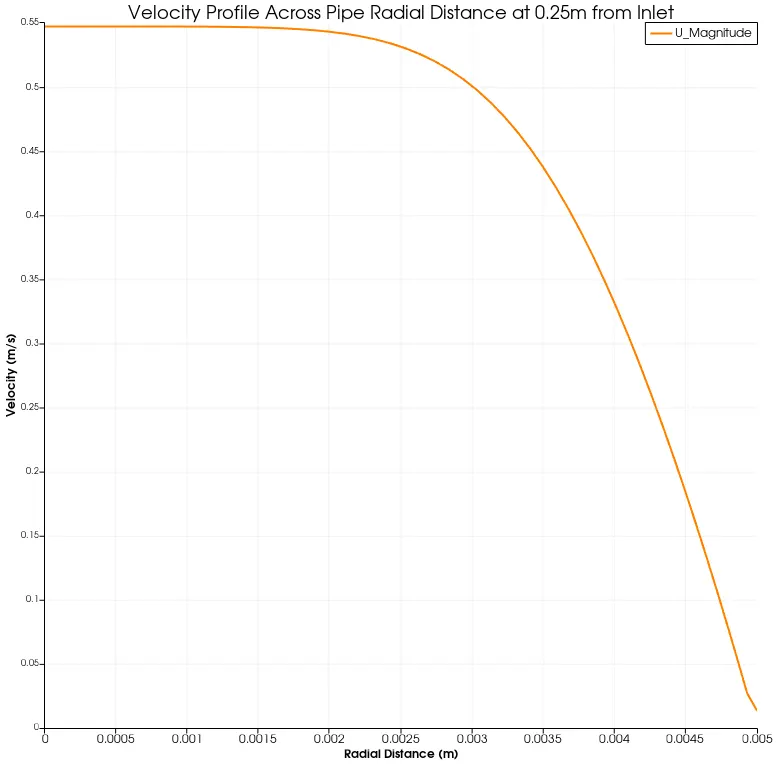
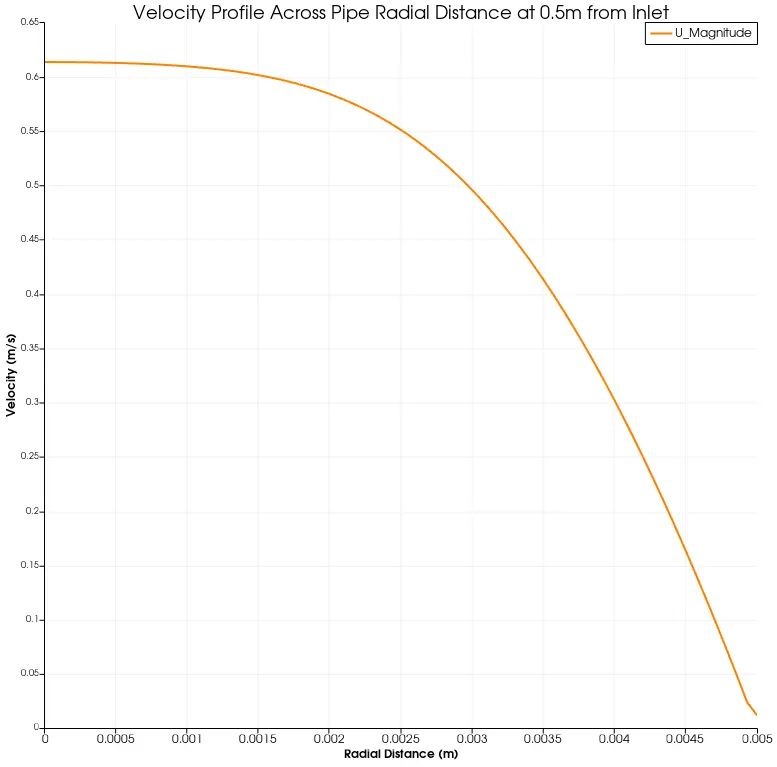
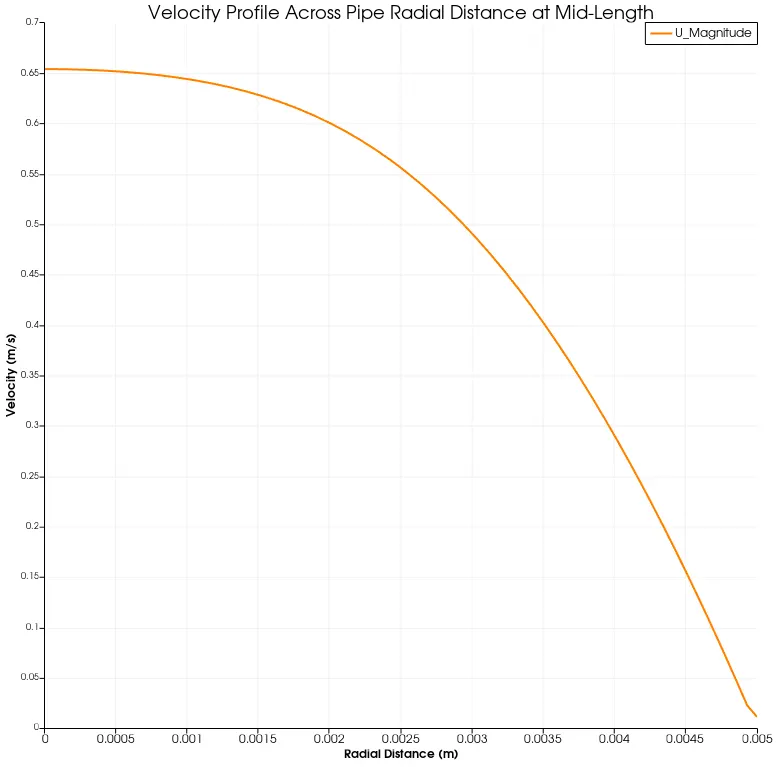
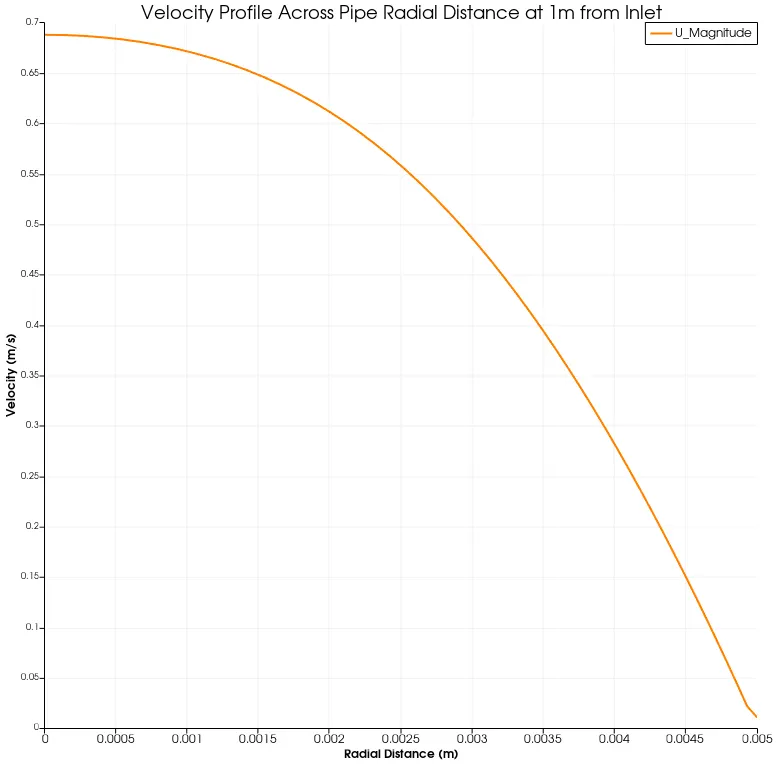
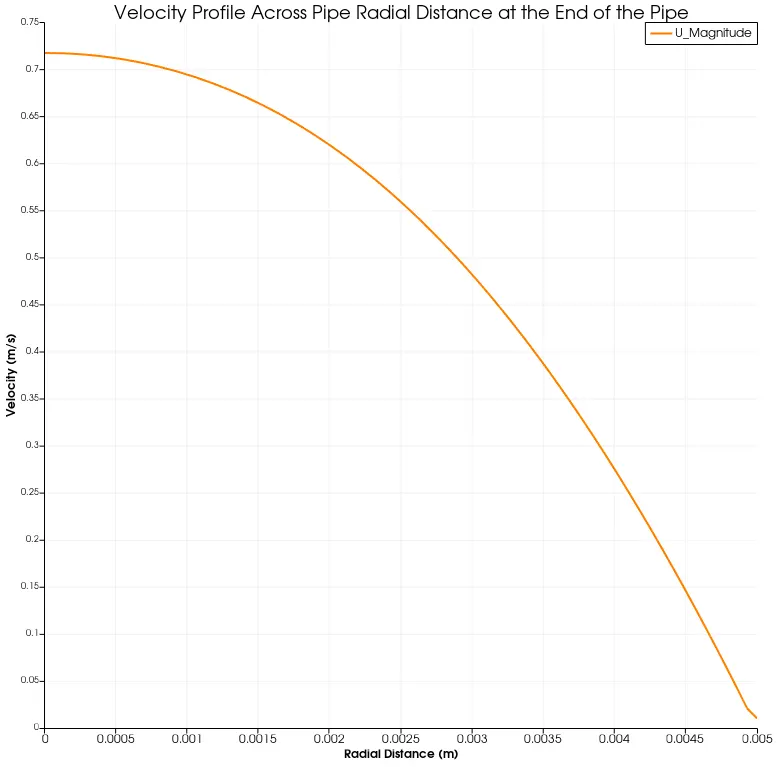
The understand the change in velocity profile in the radial distance of the pipe, the "plot over line" command has been used. The graphs have been created at various locations which are as follows:
Shear Stress Plot: