Week - 11 - Element quality check
AIM: Creating a macro for element quality check using tcl/tk script
OBJECTIVE: The objective of this challenge is to:
1. Create element quality check macro for 2D and 3D elements
2. Create buttons for each criteria
3. On pressing the button the elements should be highlighted using temp nodes
4. Create entry boxes next to the buttons will accept the quality criteria value
PROBLEM STATEMENT: For large models, it is very difficult and time consuming to locate each failed element and then perform quality check on it. So to overcome this difficulty, we develop a macro that helps in highlighting and isolating failed elements with temp nodes. This macro creates a window having separate buttons for each quality and after pressing particular button, the macro highlights failed elements for that quality.
PROCEDURE:
1. To perform the given task, open any code editor ( here we use Notepad++) and type a code as follows:
#Code to create a window of required dimensions
set a .window
catch {destroy $top}
toplevel $a -class TopLevel
wm title $a "Element Quality Check"
wm geometry $top 330x650+20+20; update
wm resizable $a 0 0
wm deiconify $a

This code creates a new window in hypermesh having name as “Element Quality Check” and having geometry of 330x650.
# Code to create buttons for each criteria
label $a.01 -text "2D Element Quality Check" -bg white -font {times 10 bold};
place $a.01 -x 10 -y 10 -width 310 -height 30
button $a.02 -text "Min Length" -command {min_length $min_l} -bg grey -font {times 10 bold};
place $a.02 -x 10 -y 50 -width 145 -height 30
entry $a.03 -textvariable "min_l";
place $a.03 -x 175 -y 50 -width 145 -height 30
button $a.04 -text "Max Length" -command {max_length $max_l} -bg grey -font {times 10 bold};
place $a.04 -x 10 -y 90 -width 145 -height 30
entry $a.05 -textvariable "max_l";
place $a.05 -x 175 -y 90 -width 145 -height 30
button $a.06 -text "Warpage" -command {warpage $w} -bg grey -font {times 10 bold};
place $a.06 -x 10 -y 130 -width 145 -height 30
entry $a.07 -textvariable "w";
place $a.07 -x 175 -y 130 -width 145 -height 30
button $a.08 -text "Aspect Ratio" -command {aspect_ratio $ar} -bg grey -font {times 10 bold};
place $a.08 -x 10 -y 170 -width 145 -height 30
entry $a.09 -textvariable "ar";
place $a.09 -x 175 -y 170 -width 145 -height 30
button $a.010 -text "Skew" -command {skew $s} -bg grey -font {times 10 bold};
place $a.010 -x 10 -y 210 -width 145 -height 30
entry $a.011 -textvariable "s";
place $a.011 -x 175 -y 210 -width 145 -height 30
button $a.012 -text "Jacobian" -command {jacobian $j} -bg grey -font {times 10 bold};
place $a.012 -x 10 -y 250 -width 145 -height 30
entry $a.013 -textvariable "j";
place $a.013 -x 175 -y 250 -width 145 -height 30
button $a.014 -text "Min angle quad" -command {min_angle_quad $min_q} -bg grey -font {times 10 bold};
place $a.014 -x 10 -y 290 -width 145 -height 30
entry $a.015 -textvariable "min_q";
place $a.015 -x 175 -y 290 -width 145 -height 30
button $a.016 -text "Max angle quad" -command {max_angle_quad $max_q} -bg grey -font {times 10 bold};
place $a.016 -x 10 -y 330 -width 145 -height 30
entry $a.017 -textvariable "max_q";
place $a.017 -x 175 -y 330 -width 145 -height 30
button $a.018 -text "Min angle tria" -command {min_angle_tria $min_t} -bg grey -font {times 10 bold};
place $a.018 -x 10 -y 370 -width 145 -height 30
entry $a.019 -textvariable "min_t";
place $a.019 -x 175 -y 370 -width 145 -height 30
button $a.020 -text "Max angle tria" -command {max_angle_tria $max_t} -bg grey -font {times 10 bold};
place $a.020 -x 10 -y 410 -width 145 -height 30
entry $a.021 -textvariable "max_t";
place $a.021 -x 175 -y 410 -width 145 -height 30
label $a.022 -text "3D Element Quality Check" -bg white -font {times 10 bold};
place $a.022 -x 10 -y 450 -width 310 -height 30
button $a.023 -text "Warpage" -command {warpage_3d $w3d} -bg grey -font {times 10 bold};
place $a.023 -x 10 -y 490 -width 145 -height 30
entry $a.024 -textvariable "w3d";
place $a.024 -x 175 -y 490 -width 145 -height 30
button $a.025 -text "Tet collapse" -command {tet_collapse $tet} -bg grey -font {times 10 bold};
place $a.025 -x 10 -y 530 -width 145 -height 30
entry $a.026 -textvariable "tet";
place $a.026 -x 175 -y 530 -width 145 -height 30
button $a.027 -text "Volumetric skew" -command {volumetric_skew $vs} -bg grey -font {times 10 bold};
place $a.027 -x 10 -y 570 -width 145 -height 30
entry $a.028 -textvariable "vs";
place $a.028 -x 175 -y 570 -width 145 -height 30
button $a.029 -text "Clear Nodes" -command {clear} -bg cyan -font {times 10 bold};
place $a.029 -x 115 -y 610 -width 100 -height 30
#Code to highlight and isolate failed elements
proc min_length {min_l} {
*nodecleartempmark;
*createmark elements 1 "displayed"
*elementtestlength elements 1 $min_l 2 1 2 0 "2D Min Length"
*maskentitymark elements 2 0
*maskreverse elements
*createmark nodes 1 "displayed"
*nodemarkaddtempmark 1
*unmaskall2
}
proc max_length {max_l} {
*nodecleartempmark;
*createmark elements 1 "displayed"
*elementtestlength elements 1 $max_l 2 1 2 0 "2D Max Length"
*maskentitymark elements 2 0
*maskreverse elements
*createmark nodes 1 "displayed"
*nodemarkaddtempmark 1
*unmaskall2
}
proc warpage {w} {
*nodecleartempmark;
*createmark elements 1 "displayed"
*elementtestwarpage elements 1 $w 2 2 0 "2D Warpage"
*maskentitymark elements 2 0
*maskreverse elements
*createmark nodes 1 "displayed"
*nodemarkaddtempmark 1
*unmaskall2
}
proc aspect_ratio {ar} {
*nodecleartempmark;
*createmark elements 1 "displayed"
*elementtestaspect elements 1 $ar 2 2 0 "2D Aspect Ratio"
*maskentitymark elements 2 0
*maskreverse elements
*createmark nodes 1 "displayed"
*nodemarkaddtempmark 1
*unmaskall2
}
proc skew {s} {
*nodecleartempmark;
*createmark elements 1 "displayed"
*elementtestskew elements 1 $s 2 2 0 "2D Skew"
*maskentitymark elements 2 0
*maskreverse elements
*createmark nodes 1 "displayed"
*nodemarkaddtempmark 1
*unmaskall2
}
proc jacobian {j} {
*nodecleartempmark;
*createmark elements 1 "displayed"
*elementtestjacobian elements 1 $j 2 2 0 "2D Jacobian"
*maskentitymark elements 2 0
*maskreverse elements
*createmark nodes 1 "displayed"
*nodemarkaddtempmark 1
*unmaskall2
}
proc min_angle_quad {min_q} {
*nodecleartempmark;
*createmark elements 1 "displayed"
*elementtestinterangle elements 1 $min_q 0 2 1 2 0 "2D Quad Min Angle"
*maskentitymark elements 2 0
*maskreverse elements
*createmark nodes 1 "displayed"
*nodemarkaddtempmark 1
*unmaskall2
}
proc max_angle_quad {max_q} {
*nodecleartempmark;
*createmark elements 1 "displayed"
*elementtestinterangle elements 1 $max_q 0 2 0 2 0 "2D Quad Max Angle"
*maskentitymark elements 2 0
*maskreverse elements
*createmark nodes 1 "displayed"
*nodemarkaddtempmark 1
*unmaskall2
}
proc min_angle_tria {min_t} {
*nodecleartempmark;
*createmark elements 1 "displayed"
*elementtestinterangle elements 1 $min_t 1 2 1 2 0 "2D Tria Min Angle"
*maskentitymark elements 2 0
*maskreverse elements
*createmark nodes 1 "displayed"
*nodemarkaddtempmark 1
*unmaskall2
}
proc max_angle_tria {max_t} {
*nodecleartempmark;
*createmark elements 1 "displayed"
*elementtestinterangle elements 1 $max_t 1 2 0 2 0 "2D Tria Max Angle"
*maskentitymark elements 2 0
*maskreverse elements
*createmark nodes 1 "displayed"
*nodemarkaddtempmark 1
*unmaskall2
}
proc warpage_3d {w3d} {
*nodecleartempmark;
*createmark elements 1 "displayed"
*elementtestwarpage elements 1 $w3d 2 4 0 "3D Warpage"
*maskentitymark elements 2 0
*maskreverse elements
*createmark nodes 1 "displayed"
*nodemarkaddtempmark 1
*unmaskall2
}
proc tet_collapse {tet} {
*nodecleartempmark;
*createmark elements 1 "displayed"
*elementtesttetracollapse elements 1 $tet 2 0 "3D Tetra collapse"
*maskentitymark elements 2 0
*maskreverse elements
*createmark nodes 1 "displayed"
*nodemarkaddtempmark 1
*unmaskall2
}
proc volumetric_skew {vs} {
*nodecleartempmark;
*createmark elements 1 "displayed"
*elementtestvolumetricskew elements 1 $vs 2 0 "3D Volumetric Skew"
*maskentitymark elements 2 0
*maskreverse elements
*createmark nodes 1 "displayed"
*nodemarkaddtempmark 1
*unmaskall2
}
proc clear {} {
*nodecleartempmark
}
2. After writing the code save the file.
3. Then open any model in hypermesh and run this file in hypermesh using shortcut key assign to it.
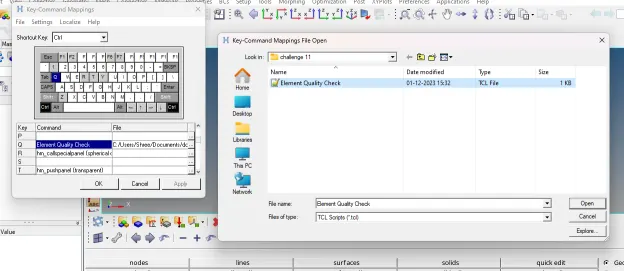
4. After running this code in hypermesh, following result will appear:
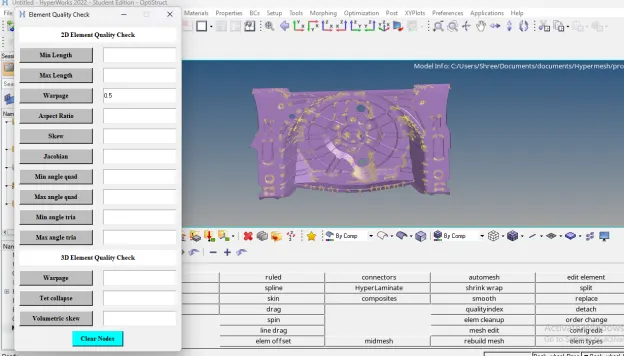
TCL COMMAND EXPLANATION:
1. *nodecleartempmark: Clears all of the nodes from the temporary node mark. If a node is selected at the time this command is run, it will not be removed, but its graphic will be cleared
2. *maskentitymark: This command masks the entities of entity_type that are on mark_id. Valid mark_ids are 1 and 2. Only entities in displayed collectors may be masked. To mask connectors and the realized FE, a flag of 1 must be passed. To mask only connectors (excluding realized FE) and all other entity types, a flag of zero must be passed.
3. *maskreverse: Reverses the masking state of a specific entity type. For collected entities, only entities in displayed collectors are affected.
4. *nodemarkaddtempmark: Places a node on the temporary node mark
5. *unmaskall: Unmasks all supported entities. For collected entities, only entities in displayed collectors are affected
6. *elementtestlength: Tests elements for whether or not they pass the edge length element quality check, and puts those that fail
on the specified outputmark
7. *elementtestwarpage: Tests 2D and 3D elements for whether or not they pass the warpage element quality check, and puts those that fail on the specified outputmark
8. *elementtestaspect: Tests 2D and 3D elements using the aspect element quality check
9. *elementtestskew : Tests 2D and 3D elements for whether or not they pass the skew element quality check, and puts those that fail on the specified outputmark
10. *elementtestjacobian: Tests 2D and 3D elements for whether or not they pass the Jacobian ratio element quality check, and puts those that fail on the specified outputmark
11. *elementtestinterangle: Tests 2 and 3 dimensional elements for whether or not they pass the interior angle element quality check, and puts those that fail on the specified outputmark.
12. *elementtesttetracollapse: Tests tetra elements for whether or not they pass the tetra collapse element quality check, and puts those that fail on the specified outputmark
13. *elementtestvolumetricskew: Tests tetra elements for whether or not they pass the volumetric skew element quality check, and puts those that fail on the specified output mark.
The tetra element volumetric skew corresponds directly to the Abaqus and Fluent CFD tetra element quality checks. It is calculated by fitting a sphere through the four vertex nodes of the element.
In the CFD community, this quantity is traditionally referred to as "skew." To differentiate it from the finite element quantity of the same name, HyperMesh notes this as "volumetric skew."
14. *nodecleartempmark: Clears all of the nodes from the temporary node mark
CONCLUSION: After executing proper tcl/tk code,
1. We are able to perform element quality check macro for 2D and 3D elements
2. We are able to create buttons for each criteria and after pressing that button the elements are highlighted using temp nodes
3. We are able to create entry boxes next to the buttons that accept the quality criteria value