Week - 11 - Element quality check
Objective: To create a code to show the failed elements based on quality criteria
Procedure:
1. create tk gui to get the quality criteria
2. using the criteria get failed elements and add temp node to highlight them
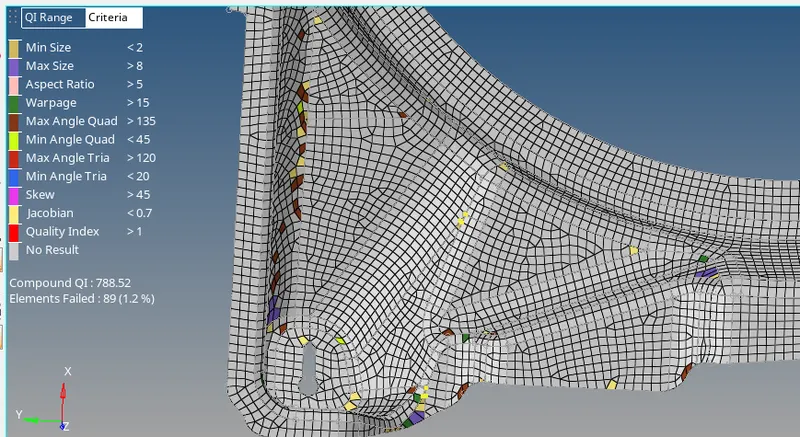
verifying Code:
# need to add a way to display number of failed elements
set a .window
catch {destroy $a}
toplevel $a -class Toplevel
wm title $a "2D Quality check"
wm geometry $a 300x350+200+300
wm resizable $a 0 0
wm deiconify $a
entry $a.01 -textvariable ::min ; place $a.01 -x 130 -y 10 -width 80 -height 25
button $a.02 -text "Min Length" -command {quality $::min 1} -bg grey -font {time 10}; place $a.02 -x 10 -y 10 -width 100 -height 25
entry $a.03 -textvariable ::max ; place $a.03 -x 130 -y 45 -width 80 -height 25
button $a.04 -text "Max Length" -command {quality $::max 2} -bg grey -font {time 10}; place $a.04 -x 10 -y 45 -width 100 -height 25
entry $a.05 -textvariable ::warp ; place $a.05 -x 130 -y 75 -width 80 -height 25
button $a.06 -text "Warpage" -command {quality $::warp 3} -bg grey -font {time 10}; place $a.06 -x 10 -y 75 -width 100 -height 25
entry $a.07 -textvariable ::asp ; place $a.07 -x 130 -y 105 -width 80 -height 25
button $a.08 -text "Aspect" -command {quality $::asp 4} -bg grey -font {time 10}; place $a.08 -x 10 -y 105 -width 100 -height 25
entry $a.09 -textvariable ::skew ; place $a.09 -x 130 -y 135 -width 80 -height 25
button $a.10 -text "Skew" -command {quality $::skew 5} -bg grey -font {time 10}; place $a.10 -x 10 -y 135 -width 100 -height 25
entry $a.11 -textvariable ::jac ; place $a.11 -x 130 -y 165 -width 80 -height 25
button $a.12 -text "Jacobian" -command {quality $::jac 6} -bg grey -font {time 10}; place $a.12 -x 10 -y 165 -width 100 -height 25
entry $a.13 -textvariable ::minq ; place $a.13 -x 130 -y 195 -width 80 -height 25
button $a.14 -text "Min angle Quad" -command {quality $::minq 7} -bg grey -font {time 10}; place $a.14 -x 10 -y 195 -width 100 -height 25
entry $a.15 -textvariable maxq ; place $a.15 -x 130 -y 225 -width 80 -height 25
button $a.16 -text "Max angle Quad" -command {quality $::maxq 8} -bg grey -font {time 10}; place $a.16 -x 10 -y 225 -width 100 -height 25
entry $a.17 -textvariable ::mint ; place $a.17 -x 130 -y 255 -width 80 -height 25
button $a.18 -text "Min angle tria" -command {quality $::mint 9} -bg grey -font {time 10}; place $a.18 -x 10 -y 255 -width 100 -height 25
entry $a.19 -textvariable ::maxt ; place $a.19 -x 130 -y 285 -width 80 -height 25
button $a.20 -text "Max angle tria" -command {quality $::maxt 10} -bg grey -font {time 10}; place $a.20 -x 10 -y 285 -width 100 -height 25
proc quality {a b} {
*nodecleartempmark
*clearmarkall 1; *clearmarkall 2
*createmark elements 1 "displayed"
switch $b {
1 {*elementtestlength elements 1 $a 2 1 2 0 " 2D Length < "}
2 {*elementtestlength elements 1 $a 2 0 2 0 " 2D Length > "}
3 {*elementtestwarpage elements 1 $a 2 2 0 " 2D Warpage "}
4 {*elementtestaspect elements 1 $a 2 2 0 " 2D Aspect Ratio "}
5 {*elementtestskew elements 1 $a 2 2 0 " 2D Skew "}
6 {*elementtestjacobian elements 1 $a 2 2 0 " 2D Jacobian "}
7 {*elementtestinterangle elements 1 $a 0 2 1 2 0 " 2D Quad Min Angle "}
8 {*elementtestinterangle elements 1 $a 0 2 0 2 0 " 2D Quad Max Angle "}
9 {*elementtestinterangle elements 1 $a 1 2 1 2 0 " 2D Tria Min Angle "}
10 {*elementtestinterangle elements 1 $a 1 2 0 2 0 " 2D Tria Max Angle "}
}
*maskentitymark elements 2 0
*maskreverse elements
*createmark nodes 1 "displayed"
*nodemarkaddtempmark 1
*clearmarkall 1
*createmark elements 1 "displayed"
set ele [hm_marklength elements 1]
*unmaskall2
puts $ele
}
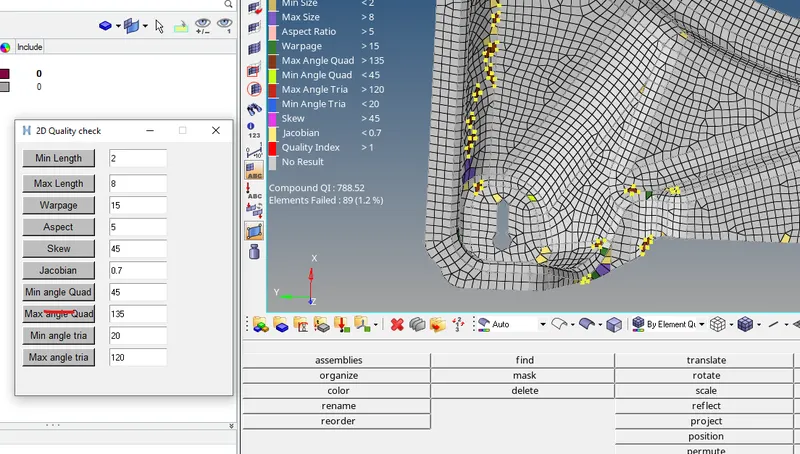
Conclusion: The code is working properly as shown